
Variables in Java: Types, Examples
A variable in Java is a container that holds the value during the execution of a Java program. In other words, a variable is the name of the memory location reserved for storing value.
Each variable in Java has a specific data type that determines the size and type of values it can store in the memory. The size of the memory reserved for a variable depends on its data type.
Since Java is a statically and strongly typed language, the type of every variable is determined at compile time, which helps catch many errors before runtime.
The term “Statically typed” means the type of variable is known and checked by the Java compiler before the execution of program.
The term “Strongly typed” means Java enforces strict type rules, preventing operations between incompatible types unless explicit type conversion is performed.
Types of Data Types in Java
There are two types of data types in Java:
- Primitive Data type
- Non-primitive Data type
Primitive Type Variables
A variable declared with a primitive data type directly holds the actual value of primitive type only. For example, if we write
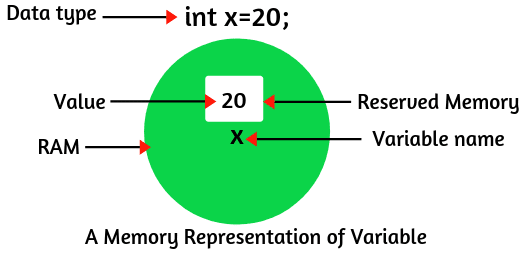
int x = 20;Here,
- int is a primitive data type that represents that this variable can store only integer values such as 10, 20, 50, etc.
- x is the name of the variable that stores the value 20 in the memory location specified with x.
Look at the figure below, which represents the memory location of the variable x initialized with the value 20.
Non-Primitive (Reference Type) Variables
A variable declared with a non-primitive (reference) data type does not hold the actual data. It holds either a null reference or a reference (memory address) to an object of the same type as variable. For example:
String name = "Java";Here,
- String is a non-primitive (reference) data type.
- name is a reference variable that points to a String object containing the text “Java” (actual value) in the memory.
Variable Declaration in Java
In Java, we must declare all the variables before they can be used in the program. We can declare a variable in Java by using either of the following syntaxes:
1. data_type  variable_name;
2. data_type  variable_name = value;
You must end the declaration statement with a semicolon. For example:
int a; // Here, int is a data type and 'a' is a variable.
int b = 20; // Here, int is a data type and 'b' is a variable.
// We can say that b is a variable of type int having value 20.
To declare more than one variable of the same type, we can use a comma-separated list. Following are the valid examples of the variables declaration and initialization in Java:
int x, y, z; // Declare three variables x, y, and z of type int.
int x = 10, y = 20; // Example of initialization.
byte a = 30; // Initializes a byte type variable a.
double pi = 3.14; // Declares and assigns a value to the variable pi.
Variable Initialization in Java
When we define a variable with some initial value, it is called initialization. We should initialize a value to the variable after declaration, but before it using in the expression. We can assign the value of variables in two ways:
- Static initialization
- Dynamic initialization
1. Static Initialization
When the class is loaded into the memory, the memory for static variables is allocated at once. Such variables are known as static variables or class variables in Java.
For example:
static String name = "Kiran";Here,
- name is a static variable having a string value “Kiran”.
- The variable name is declared with the static keyword.
2. Dynamic Initialization
In dynamic initialization, you can declare variables anywhere in the program. When the statement will execute, JVM assigns the memory to them. For example:
char ch = 'B'; // Declaring and initializing a character variable.
int number = 100; // Declaring and initializing an integer variable.
int time = 40, distance =  50; // Declaring and initializing multiple integer variables.
Changing the Value of a Variable
The value stored in a variable can be changed during the execution of program (runtime) unless it is declared final. For example:
int x = 20;
x = 50; // Value changed.
System.out.println(x); // Output: 50
Here, the variable x initially holds 20, but later its value is updated to 50.
Naming Convention to Declare Variables in Java
There are some important points that need to keep in mind during the declaration of Java variables. They are as follows:
- As per Java coding standard, the variable name should start with a lowercase letter.
- If you have lengthy variables such as more than one words, you can declare the first word small and second word with the capital letter.
- The variable name should not contain a blank space.
- The variable name can begin with a special character such as dollar sign ($) and underscore (_).
- The first character must be a letter.
- Names cannot start with a number.
- You cannot use Java keywords like (class, static, int) as a variable name.
- The variable names are case sensitive in Java. For example, count and Count are different variable names.
- Always try to choose meaningful names. For example, variable name totalMarks is better than tm.
Example: Valid and Invalid Variables Names
int age; // Valid variable name.
int smallNumber; // Valid
String collegeName; // Valid
int num ber = 100; // Invalid because there is a blank space between num and ber.
String $name; // Valid
String _nSchool; // Valid
int @num; // Invalid
int 2num; // Invalid because name cannot start with a digit.
Types of Variables in Java
There are three types of variables in Java based on their scope and lifetime. They are as:
- Local variables
- Instance variables
- Class/Static variables
Let’s discuss in details one by one with example programs.
Local Variables in Java
1. A variable that is declared and used inside the body of a method, constructor, or block is called local variable in Java. It is called so because local variable is not available for use from outside that specific block or method.
2. You must assign a local variable with a value at the time of creating. If you try to use a local variable without initializing a value, you will get a compile-time error like “variable x not have been initialized”. For example:
public void mySchool()
{
 // Declaration of a local variable.
    String schoolName;    // Compilation error: variable schoolName might not have been initialized.
    System.out.println("Name of School: " +schoolName);
}
3. You can not use access modifiers (public, private, or protected) with local variables.
4. The local variables are visible only within the declared constructor, method, or block.
5. A local variable is not equivalent to an instance variable. Instance variables are declared at the class level, whereas local variables are declared inside methods or blocks.
6. A local variable cannot be static, since static variables belong to the class, not to an instance or block.
Let’s take some examples based on all the above important points of local variables.
Example 1: Demonstrating Local Variables in Java
package localVariables;
public class Student
{
// Declaration of constructor.
   Student()
   {
  // Declaration and initialization of local variable.
     String nCollege = "PIET";
  // Accessing local variable inside the constructor.
     System.out.println("Name of college: " +nCollege);
   }
// Declaration of instance method.
   void subMarks()
   {
  // Declaration and initialization of local variables.
     int cMarks = 90;
     int pMarks = 85;
     int mMarks = 99;
     int totalMarks = cMarks + pMarks + mMarks;
     System.out.println("Total marks in PCM: " +totalMarks);
   }
   public static void main(String[] args)
   {
  // Create an object of class.
     Student s = new Student();
  // This statement will produce a compile-time error
  // because local variable cannot be accessed from the outside their scope.
  // System.out.println("Name of college: " +nCollege);

     s.subMarks(); // Calling instance method.
  // System.out.println("Total marks in PCM: " + totalMarks); // Compile-time error.
   }
}
Output:
Name of college: PIET
Total marks in PCM: 274
Example 2: Local Variables and Access Modifiers
Let’s take another example program where we will declare access modifiers with local variable and see what we get?
package localVariables;
public class Test
{
 // Instance method.
    void m1()
    {
   // This statement will generate compile-time error
   // because public is an access modifier and you cannot declare access modifiers with local variables.
      public int x = 20;
    }
    public static void main(String[] args)
    {
       Test t = new Test(); // Creating object of class Test.
       t.m1(); // Calling m1 method.
    }
}
Output:
Unresolved compilation problem: Illegal modifier for parameter x; only final is permitted
As shown in the example above, only the final keyword is permitted with local variables in Java. You will learn more about the final keyword in a later tutorial.
Memory Allocation of Local Variables in Java
When a method starts executing, JVM allocate the memory for all the local variables declared in that method. Once the method completes execution, the memory of these variable is released automatically. For example:
void m1() // Memory allocated when the method starts.
{
   // Declaration of local variables.
      int a = 30;
      int b = 40;
   // Logic here.
} // Memory released when the method is completed.
Stored Memory of Local Variables in Java
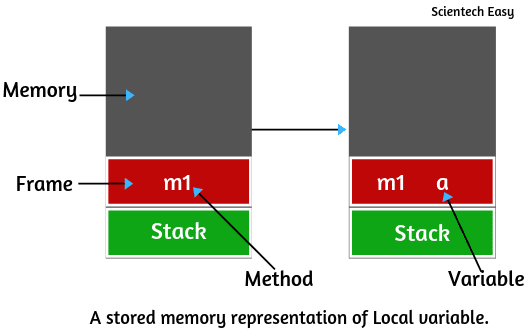
Local variables are stored in stack memory. Consider the preceding example program. When the main() method calls another method (for example, m1()), the JVM creates a new stack frame for that method in the call stack.
After creating a frame for the method m1, the local variable a is created and stored temporarily inside the frame in the stack memory, as shown in the figure below.
When a method completes its execution, the corresponding stack frame is removed from the call stack. All the local variables that were part of that frame are destroyed, and their memory is released automatically. This cleanup process is managed by the Java Virtual Machine (JVM).
Local Variable Type Inference (var) in Java 10
From Java 10 onwards, you can use the var keyword to declare local variables. The keyword var tells the compiler to infer the static type of a local variable based on the value assigned. However, you cannot use the var keyword for uninitialized local variables.
Example: Local Variable Type Inference using var
public class VarExample {
public static void main(String[] args) {

// Using var for local variables
   var name = "Saanvi"; // Inferred as String
   var age = 23; // Inferred as int
   var salary = 45000.75; // Inferred as double

   System.out.println("Name: " + name);
   System.out.println("Age: " + age);
   System.out.println("Salary: " + salary);

// Using var in a for-each loop.
   var cities = java.util.List.of("Dhanbad", "Mumbai", "Chennai");
   for (var city : cities) { // Inferred as String
      System.out.println("City: " + city);
   }
  }
}
Output:
Name: Saanvi
Age: 23
Salary: 45000.75
City: Dhanbad
City: Mumbai
City: Chennai
In this example,
- var name = “John”; → The compiler infers name as a String.
- var age = 25; → Inferred as int.
- var salary = 45000.75; → Inferred as double.
- var city in the loop → Inferred as String based on the type of elements in the list.
Note:
- You must initialize the variable when using var keyword. Otherwise, the compiler cannot infer the type and will show an error.
- The inferred type is the compile-time type. Once inferred, you cannot assign a value of a different incompatible type to that variable later.
Instance Variables in Java
1. A variable that is declared inside the class but outside the body of methods, constructors, or any blocks is called instance variable in Java. It is available for the entire class methods, constructors, and blocks.
2. Instance variables are also called non-static variables because they are not declared as static.
3. Instance variables are created when an object is created using the keyword ‘new’ and destroyed when the object is destroyed.
4. You can use access modifiers with instance variables. If we do not specify any modifiers, the default access modifiers will be used which can be accessed in the same package only.
5. It is not necessary to initialize the instance variables.
Example: Accessing Instance Variables from Static and Non-static Area
Let’s take an example where we will declare instance variables and see how to access instance variables from the static and non-static area.
package instanceVariables;
 public class Test
 {
  // Declare instance variables inside the class.
     int a = 30;
     int b = 40;
  // This is a main method.
     public static void main(String[] args)
     {
    // This area is called static area.
    // So, you can access instance variables by using an object reference variable.
    // Creating an object of the class Test.
       Test t = new Test();
       System.out.println(t.a); // Accessing instance variable using object reference variable 't'.
       System.out.println(t.b);
     }
  // Declaration of instance method.
     void m1() // This method is called user-defined method.
     {
   // This area is called instance Area.
   // So, you can access directly instance variables without creating any object.
      System.out.println(a);
      System.out.println(b);
   }
}
Output:
30
40
Memory Allocation of Instance Variables in Java
1. Instance variables are variables that belong to an object and are commonly known as field or object variables. When an object of a class is created using the new keyword, the memory is allocated for all its instance variables inside the heap memory. This memory is released automatically when the object is destroyed by the Garbage Collector.
2. Each instance (object) of a class has its own copy of every instance variable. In other words, instance variables have their own separate copy of instance variable. They are unique to each object. If one object changes the value of an instance variable, it does not affect the value of the same variable in another object.
Example:
Let’s create a simple program where we will declare an instance variable and create two objects of the class. Here, we will understand that if one object will change the value of an instance variable, does it affect the value of another instance variable?
package instanceVariables;
public class Marks
{
// Declare an instance variable inside the class.
   int phyMarks = 80;

   public static void main(String[] args)
   {
  // Create the two objects of the class 'Marks'.
     Marks m1 = new Marks();
     Marks m2 = new Marks();

  // Call the variables using object m1 and m2.
     int pMarks1 = m1.phyMarks;
     int pMarks2 = m2.phyMarks;

  // Display values before modification.
     System.out.println("Marks of m1: " +pMarks1);
     System.out.println("Marks in m2: " +pMarks2);

  /* If we change the value of instance variable using object reference m2,
     the value of object m1 variable will not change.
     Only the value of instance variable calling by using object m2 will change.
     This shows that they have their own copy of instance variable.*/

     m2.phyMarks=90; // Modifying instance variable using m2.

  // Display values after modification.
     System.out.println("After changing m2.phyMarks:");
     System.out.println("Marks of m1: " +m1.phyMarks);
     System.out.println("Marks of m2: " +m2.phyMarks);
   }
}
Output:
Marks of m1: 80
Marks of m2: 80
After changing m2.phyMarks:
Marks of m1: 80
Marks of m2: 90
In this example,
- Each object (m1, m2) has its own separate copy of phyMarks.
- When we modify m2.phyMarks, it does not affect m1.phyMarks.
- Therefore, instance variables are independent for every object.
Thus, you can change the value of instance variable by using an object if need.
Stored Memory of Instance Variables in Java
When a Java program executes, the JVM creates a memory model known as the Runtime Data Area. This area is divided into several parts, the most important being:
- Heap Memory
- Stack Memory
- Metaspace (introduced in Java 8, replaces PermGen)
- PC Registers
- Method Area (logical part of Metaspace)
- Native Method Stack
Heap Memory
- When you create an object using the new keyword, memory for that object and its instance variables is allocated in the heap. In simple words, objects and their instance variables (fields) are stored in the heap memory.
- Since the heap is a shared memory area, all threads in a Java program can access objects stored there.
- The Garbage Collector (GC) manages the heap memory and automatically removes objects that are no longer referenced.
Stack Memory
- This memory stores method calls, local variables, and references to objects that resides in the heap. Each thread in Java has its own separate stack memory.
- When a method is called, a new frame is created in the stack. This frame holds method-specific data like parameters and local variables.
- When the method execution completes, the frame is automatically destroyed.
Memory Storage for Instance Variables
- When you create an object (for example, Student s = new Student();), the instance variables of that object are stored in the heap memory as part of the object’s data.
- If the instance variable is a primitive type (such as int, float, etc.), its actual value is stored directly inside the object in the heap memory.
- If the instance variable is a reference type (such as another object, an array, or a class, then:
- The reference (or pointer) is stored inside the object in the heap.
- The actual object referenced by a variable is also stored in the heap, but possibly in a different memory area (such as the Young Generation or Old Generation), depending on garbage collection state and object lifetime.
Static Variables in Java
A variable which is declared with a static keyword is called static variable in Java. A static variable is also called class variable because it is associated with the class rather than with any specific object.
Declaration Rules
- Static variables are always declared inside the class, but outside of any methods, constructors, or blocks.
- You can directly access them using the class name (for example, ClassName.variableName).
- You can also access them through an object, but we don’t recommend that because the variable belongs to the class, not to individual objects.
Example: Declaring and Accessing Static Variables
package staticVariables;
public class Test
{
// Declaration of static variables.
   static int a = 400;
   static int b = 500;

// Static method (main method).
   public static void main(String[] args)
   {
  // Static area: Access static variables using the class name.
     System.out.println(Test.a); // Test is the name of class.
     System.out.println(Test.b);

  // Create the object of class Test to call instance method.
     Test t = new Test();
     t.m1;
    }
 // Instance method.
    void m1()
    {
   // Accessing static variables in the instance area.
      System.out.println(Test.a);
      System.out.println(Test.b);
    }
}
Output:
400
500
400
500
In this example,
- Static variables a and b are associated with the class, not with individual objects.
- They can be accessed using the class name (Test.a, Test.b).
- Even inside an instance method, they remain the same for all objects.
- We must call m1() method by creating the object of the class in static region. Otherwise, it will not print output on the console.
Static Variables Share Common Memory
A static variable gets memory only once, when the class is loaded into memory by the ClassLoader. If any object or the class itself changes the value of a static variable, the new value is shared among all objects of that class. Let’s see an example program based on this concept.
Example:
package staticVariables;
class College
{
// Static variable.
   static String collegeName = "PIET";

   public static void main(String[] args)
   {
     System.out.println(College.collegeName);
  // Suppose anyone changes the value of a static variable using the class name.
  // In this case it will display changed value.
     College.collegeName = "RSVM";
     System.out.println(College.collegeName);
    }
}
Output:
PIET
RSVM
In this example,
- The collegeName variable belongs to the class College.
- When we change its value using the class name, the updated value is reflected everywhere.
Memory Allocation of Static Variables
Memory allocation for static variables happens only once when the dot class is loaded into the memory and it is destroyed when dot class unloaded into the memory.
Stored Memory of Static Variables
Up to Java 7:
- All static variables and class metadata were stored in the PermGen (Permanent Generation) space, which was part of the heap memory.
From Java 8 onwards:
- The PermGen space was removed and replaced by Metaspace.
- Static variables and class-level metadata are stored in the Method Area, which is logically part of the Metaspace.
- The Metaspace resides in native memory outside the heap.
- If a static variable is a reference type, its reference is stored in the Metaspace (Method Area), but the actual object it points to is stored in the heap memory.


