
The operator which is used to shift the bit patterns right or left is called shift operator in Java. Shift operators move the bits (0s and 1s) of a number left or right by a specified number of positions.
The general form of a shift expression in Java is:
result = left_operand op n;
Here,
left_operand ➜ Specifies the left operand that can be of integral type, such as byte, short, int, long, and char.
op ➜ Specifies the shift operator that can be left-shift, right-shift, or unsigned right shift.
n ➜ Specifies the number of bit positions to be shifted. It must be an integer value.
For example:
10 << 2
Here, the value 10 is the operand, << is a left shift operator, and 2 is the number of bit positions to be shifted.
Types of Shift Operator in Java
There are three types of shift operators available in Java. They are:
- Left shift operator (<<)
- Right shift operator (>>)
- Unsigned right shift operator (>>>)
Let us understand each shift operator in Java with the help of examples.
Left Shift Operator (<<)
The operator that shifts all bits of a number towards the left by n number of bit positions is called left shift operator in Java. This operator is represented by a symbol “<<“, read as “double less than.”
If we write x << n, it means that the bits of x will be shifted towards the left by n positions. The bits shifted out from the left are discarded, and zeros are added on the right.
Let us take examples to understand the concept of the left shift operator.
Example 1:
If int x = 20, calculate the value of x if x << 3.
int x = 20;

x << 3 = 160
Here, the value of x is 20, whose binary representation is 0 0 0 1 0 1 0 0. Now the expression x << 3 will shift the bits of x towards the left by 3 positions. Due to this, the leftmost 3 bits will be lost.
After shifting, all the bits of x are 1 0 1 0 0 0 0 0, which is 160 in the decimal number system.
20 = 00010100

After shift = 10100000 (160)
The bit pattern after the left shift is shown in the below figure:

Let us write Java code to verify the output of the above example.
public class LeftShiftExample1 {
    public static void main(String[] args) {
        int x = 20;
        int result = x << 3;
        System.out.println("Value of x: " + x);
        System.out.println("After left shift (x << 3): " + result);
    }
}
Output:
Value of x: 20
After left shift (x << 3): 160
Shifting a number left by n positions is equivalent to multiplying it by 2^n (for positive numbers without overflow).
Let us take the above example in which n = 3. So, 20 * 2^3 = 20 * 8 = 160.
Example 2:
If a = 45, calculate the value of a if a << 1.
int a = 45;

a << 1 = 90
The binary representation of the value 45 is 0 0 1 0 1 1 0 1. If this value is shifted towards the left by one position, we will get 0 1 0 1 1 0 1 0. This number in decimal form is nothing but 90, which is twice 45. The 45 * 2^1 = 90.
Let us write Java code to verify the output of this example.
public class LeftShiftExample2 {
    public static void main(String[] args) {
        int a = 45;
        int result = a << 1;
        System.out.println("Value of a: " + a);
        System.out.println("After left shift (a << 1): " + result);
    }
}
Output:
Value of a: 45
After left shift (a << 1): 90
Right Shift Operator
The operator that shifts the bits of a number towards the right by n number of bit positions is called right shift operator in Java. The right shift operator is represented by the symbol >>, read as double greater than.
If we write x >> n, it means that the bits of x will be shifted towards the right by n positions.
Types of Right Shift Operators in Java
There are two types of right shift operators in Java:
1. Signed right shift operator (>>)
2. Unsigned right shift operator (>>>)
Both operators shift bits to the right, but they differ in how they fill the leftmost bits. Let us understand in detail.
Signed Right Shift Operator
The signed right shift operator >> shifts bits of the number towards the right and also preserves the sign bit, which is the leftmost bit.
A sign bit represents the sign of a number. If the sign bit is 0, it represents a positive number. If the sign bit is 1, it represents a negative number.
Filling Rule
- If the number is positive, the leftmost position is filled with 0.
- The leftmost position is filled with 1 if the number is negative.
- The signed shift operator uses the same sign as used in the number before shifting of bits.
Let’s understand the concept of the right shift operator in Java with the help of some examples.
Example 3:
If int x = 10, calculate the value of x >> 3.
The value of x is 10, whose binary representation is 0 0 0 0 1 0 1 0. Since the number is positive, the leftmost bit position will be filled with 0. Now the expression x >> 3 will shift the bits of x towards the right by 3 positions. Bits shifted out from the right are discarded because of shifting.
After shifting, bits of x are 0 0 0 0 0 0 0 1, which is 1 in decimal form. The bit pattern after the right shift is shown in the below figure:
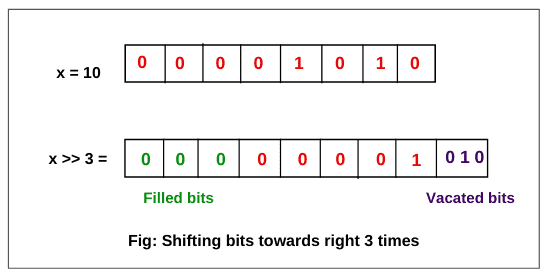
You will notice in this example that after performing the right shift operation on a positive number (10), we get a positive value (1) as a result. Similarly, if we perform the right shift operation on a negative number, again, we will get a negative value only.
- Shifting a value to the right by n positions is equivalent to dividing the number by 2^n for positive numbers only.
- For negative numbers, the result may differ because the signed right shift operator (>>) preserves the sign bit and performs rounding toward negative infinity.
Example 4:
int i = 10;

int result = i >> 3; // result = 1
In this example, 10 / 2^3 = 10 / 8 = 1.
Example 5:
int i = 20;

int result = i >> 2; // result = 5.
In this example, 20 / 2^2 = 5.
Example 6:
int i = -20;

int result = i >> 2; // result = -5.
In this example, -20 / 2^2 = -5. The result is obtained using bit shifting with sign preservation.
Let’s take an example, which is based on right shifting of a negative number.
Example 7:
If int x = -10, calculate the x >> 2 value.
The value of x is -10; that is a negative number. So, we will use 2’s complement system to represent the negative numbers. Follow all the steps given below in the figure.
1. The binary representation of +10 in 8-bit form is 00001010.
2. Obtain the 1’s complement of 00001010.
3. Now, add 1 to get 2’s complement form. After adding 1 in LSB (Least Significant Bit), the result is 11110110. This is in 2’s complement form. In this result, 1 in MSB (Most Significant Bit) represents a negative number. Thus, the 2’s complement form of -10 is 11110110. Since the number is negative, the leftmost position is filled with two 1s.
4. Now the expression x >> 2 will shift the bits of x towards the right by 2 positions. The rightmost 2 bits will be lost due to shifting. Hence, after shifting, bits of x in 2’s complement form are 11111101.
5. We will convert 2’s complement bits into 1’s complement bits. Subtract 1 in LSB to convert 2’s complement form into 1’s complement. The result in 1’s complement form is 11111100.
6. Take the complement of each bit to get the original form of number after shifting. So, the result in original form is 00000011. This is nothing but -3 in decimal form.
Let us write a Java program to verify the above result.
public class SignedRightShiftExample {
    public static void main(String[] args)
    {
       int x = -10,
       c = 0;
       c = x >> 2;
       System.out.println("x >> 2 = " +c);
    }
}
Output:
x >> 2 = -3
Unsigned Right Shift Operator
The unsigned right shift operator in Java performs nearly the same operation as the signed right shift operator. This operator is represented by the symbol “>>>,” read as “triple greater than.”
The unsigned right shift operator always fills the leftmost position with 0s because the value is not signed. Since it always stores 0 in the sign bit, it is also called the “zero-fill right shift” operator in Java.
If you apply the unsigned right shift operator >>> on a positive number, it will give the same result as that of >>. But in the case of negative numbers, the result will be positive because the signed bit is replaced by 0.
Both the signed right shift operator >> and the unsigned right shift operator >>> are used to shift bits towards the right. The only difference between them is that >> preserves the sign bit, whereas >>> does not preserve the sign bit. It always fills 0 in the sign bit whether the number is positive or negative.
Let us take an example program to observe the effect of various shift operators.
Example 8:
public class UnsignedRightShiftExample {
public static void main(String[] args)
{
    int x = 10;
    int y = -10;

    System.out.println("x >> 1 = " + (x >> 1));
    System.out.println("x >>> 1 = " + (x >>> 1));
    System.out.println("y >> 2 = " + (y >> 2));
    System.out.println("y >>> 2 = " + (y >>> 2));
 }
}
Output:
x >> 1 = 5
x >>> 1 = 5
y >> 2 = -3
y >>> 2 = 1073741821
Difference Between Right Shift >> and Unsigned Right Shift >>>
| Feature | >> (Right Shift) | >>> (Unsigned Right Shift) |
|---|---|---|
| Sign Preservation | Yes | No |
| Leftmost Bits | Filled with sign bit | Filled with 0 |
| Negative Numbers | Remain negative | Become positive |
| Use Case | Arithmetic operations | Bit-level operations |


