
Properties in Java
Properties in Java is a class that is a child class (subclass) of Hashtable. It is mainly used to maintain the list of values in which key and value pairs are represented in the form of strings.
In other words, keys and values in Properties objects should be of type String. Properties class was added in JDK 1.0 version. It is present in java.util.Properties package. It provides additional methods to retrieve and store data from the properties file.
Hierarchy of Properties Class in Java
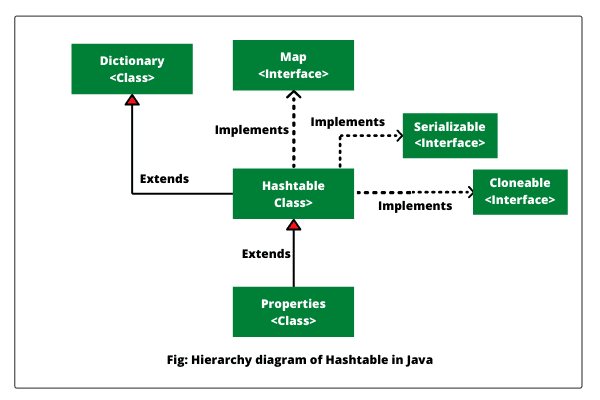
Properties class extends Hashtable class that extends Dictionary class. It implements Map, Serializable, and Cloneable interfaces. The hierarchy diagram of Properties class in Java is shown in the below figure.
Properties Class Declaration
The general declaration of Properties class is declared as given below:
public class Properties
    extends Hashtable<Object,Object>
Variable Defined by Properties class
Java Properties class defines the following instance variable. The general syntax is as follows:
Protected Properties defaults;This instance variable stores a default properties list associated with a Properties object.
Constructors of Properties Class
Java Properties class defines the following constructors that are as follows:
1. Properties(): This form of a constructor is used to create an empty property list (map) with no default values. The general syntax to create Properties object is as follows:
Properties p = new Properties();2. Properties(Properties defaults): This form of constructor creates an empty property list with the specified defaults. The general syntax to create Properties object with the specified defaults is as follow:
Properties p = new Properties(Properties defaults);Methods of Properties Class in Java
In addition to methods that Properties class inherit from Hashtable, Properties class defines some more additional methods that are as:
1. String getProperties(String key): This method returns the value associated with key. If the key is neither in the list nor in the default property list, it will return null object.
2. String getProperty(String key, String defaultValue): This method returns the value associated with key. If the key is neither in the list nor in the default property list, it will return defaultValue.
3. void list(PrintStream streamOut): This method prints the property list streamOut to the specified output stream.
4. void list(PrintWriter streamOut): This method prints this property list streamOut to the specified output stream.
5. void load(InputStream inStream): This method loads (reads) a property list (key and element pairs) from the InputStream.
6. void load(Reader reader): This method loads a property list (key and element pairs) from the input character stream in a simple line-oriented format.
7. void loadFromXML(InputStream in): This method loads all of the properties represented by the XML document on the specified InputStream into the properties table.
8. Enumeration propertyNames(): It returns an enumeration of all the keys in this property list, including distinct keys in the default property list.
9. Object setProperties(String key, String value): It returns value associated with key. It returns null if value associated with key does not exist.
10. void store(OutputStream streamOut, String description): It is used to store a property list to an OutputStream.
How to Get Data from Properties File using Properties Class?
Example 1: Let’s write a Java program to get data from properties file using properties class. First, create a properties file and store data into it. Save it as db.properties.
username = John
password = 12345
Now, creates Java class to read the data from the properties file.
import java.util.*;
import java.io.*;
public class Test {
public static void main(String[] args)throws Exception {
   FileReader reader=new FileReader("db.properties");
   Properties p=new Properties();
   p.load(reader);

   System.out.println(p.getProperty("username"));
   System.out.println(p.getProperty("password"));
  }
}
Output:
John
12345How to Get All System Properties using Properties Class in Java?
By using System.getProperties() method of Properties class, we can get all the properties of the system. Let’s create a Java program where we will get data from the system properties. Look at the example code to understand better.
Example 2:
import java.io.IOException;
import java.util.Iterator;
import java.util.Map;
import java.util.Map.Entry;
import java.util.Properties;
import java.util.Set;

public class Test {
public static void main(String[] args) throws IOException
{
   Properties p = System.getProperties();
   Set<Entry<Object, Object>> set = p.entrySet();

   Iterator<Entry<Object, Object>> itr = set.iterator();
   while(itr.hasNext())
   {
      Map.Entry entry = (Map.Entry)itr.next();
      System.out.println(entry.getKey()+" = "+entry.getValue());
   }
  }
}
Output:
java.runtime.name = Java(TM) SE Runtime Environment
sun.boot.library.path = C:\Program Files (x86)\Java\jre1.8.0_181\bin
java.vm.version = 25.181-b13
java.vm.vendor = Oracle Corporation
java.vendor.url = http://java.oracle.com/
path.separator = ;
java.vm.name = Java HotSpot(TM) Client VM
file.encoding.pkg = sun.io
user.country = IN
user.script =
sun.java.launcher = SUN_STANDARD
sun.os.patch.level =
java.vm.specification.name = Java Virtual Machine Specification
. . . . . . . . . . . . . . . . . .
.. . . . . . . . . . . . . . . . . .How to Create Properties file using Properties Class?
Example 3: Let’s write a Java program where we will create properties file using properties class. Look at the example code.
import java.io.FileWriter;
import java.io.IOException;
import java.util.Properties;

public class Test {
public static void main(String[] args) throws IOException
{
   Properties p = new Properties();
   p.setProperty("Name","John");
   p.setProperty("Email","john@scientecheasy.com");

   FileWriter fw = new FileWriter("info.properties");
   p.store(fw,"Scientech Easy Properties File Example");
 }
}
Now refresh your project folder and see the properties file named “info.properties”. Open info.properties file to see the result.
Output:
       #Scientech Easy Properties File Example
       #Thu Dec 17 09:24:58 IST 2020
       Name=John
       Email=john@scientecheasy.com
Advantage of Properties File
The main advantage of the properties file is that recompilation is not needed if any data is changed from a properties file. If any data is changed from the properties file, we don’t require to recompile the Java class. It is used to store data that is to be changed frequently.
In this tutorial, we have discussed properties class in Java with example programs. Hope that you will have understood this simple topic and practiced all example programs.
Thanks for reading!!!

