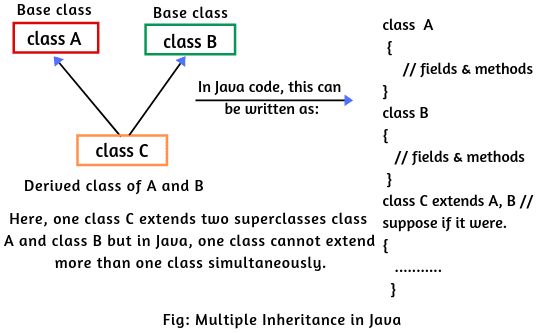
Deriving a subclass from multiple superclasses is known as multiple inheritance in Java. In other words, when a single class inherits properties and behaviors from more than one parent class, it is called multiple inheritance.
Some programming languages, such as C++ and Python, support multiple inheritance of classes. However, Java does not support multiple inheritance of classes directly. In Java, a class can extend only one superclass using the extends keyword, but it can implement multiple interfaces using the implements keyword.
Therefore, Java supports single inheritance through classes and multiple inheritance through interfaces. This approach allows a class to inherit behavior and implement multiple types without extending multiple classes.
Look at the below figure, where a class C extends two superclasses, A and B.
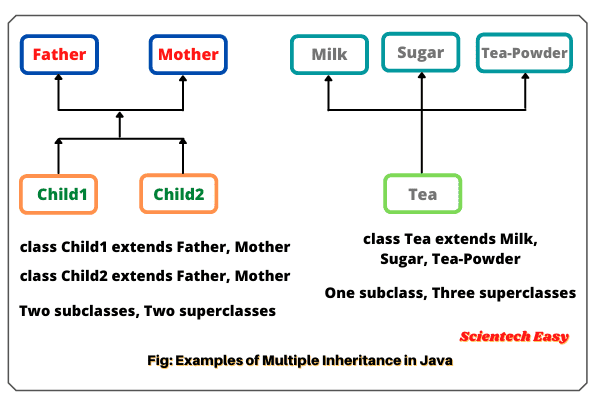
Now, look at some different examples of multiple inheritance in the below figure to understand more clearly.
In programming languages that support multiple inheritance, it can sometimes increase complexity and cause ambiguity when a class inherits methods with the same signature from multiple superclasses. A well-known example of this ambiguity is the diamond problem.
Java avoids this issue with class inheritance by allowing a class to extend only one superclass. However, similar conflicts can arise when a class implements multiple interfaces that provide default methods with the same signature.
Java Does Not Support Multiple Inheritance Through Classes
If a subclass inherits from a superclass, it can inherit the superclass’s accessible fields and methods, subject to Java’s access and member inheritance rules. However, Java does not allow a class to extend more than one class directly.
Let’s consider a simple example to understand why Java does not support multiple inheritance through classes.
Consider a scenario as shown in the below figure. In this scenario, there are three classes: A, B, and C. Class C extends two parent classes, such as class A and class B. Assume that class A and class B both have the same method signature msg() (say) with different implementations.
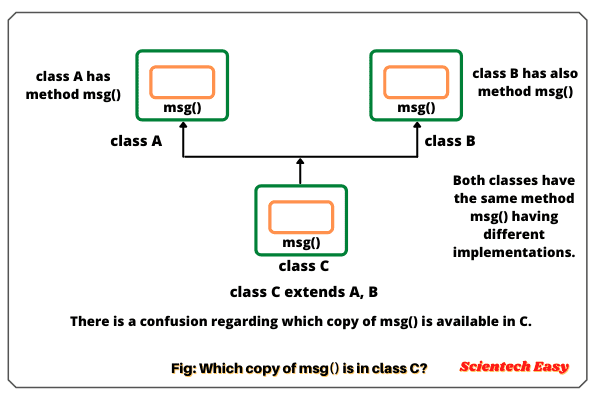
According to inheritance concepts, both methods will inherit to class C. If we construct an object of class C and call the msg() method using the child class object reference, which msg() method will be invoked? (i.e., which copy of the msg() method will be available in class C?)
In this situation, the Java compiler will not be able to determine which of the methods in the parent class is to be called. Hence, it will create ambiguity and confusion in calling the method msg() from the A or B class.
Since the compile-time error is better than a runtime error, Java will give a compile-time error if we extend more than one class. So, whether you have the same or different method signature, you will still get a compile-time error.
Let us understand programmatically how Java does not support multiple inheritance.
Example 1: Java Prevents Multiple Inheritance Through Classes
class A {
    void msg() {
        System.out.println("Hello Java");
    }
}
class B {
    void msg() {
        System.out.println("Welcome you in the world of programming.");
    }
}

// Invalid in Java: a class cannot extend two classes
class C extends A, B {
    public static void main(String[] args) {
        C obj = new C();
        obj.msg(); // Which msg() method would be called?
    }
}
Output:
Compile-time error
As you can see in the above example, multiple inheritance leads to confusion when two superclasses have a method with the same name but different implementations.
Since Java supports single inheritance through classes, which means a class can extend only one superclass at a time. To reduce the ambiguity, complexity, and confusion, Java does not support multiple inheritance directly through classes.
Multiple Inheritance Using Interfaces in Java
We can achieve the functionality of multiple inheritance in Java by using interfaces. A class cannot extend more than one class, but a class can implement multiple interfaces simultaneously.
In Java, an interface can declare abstract methods without implementations. It can also provide implementations through default and static methods. Therefore, a class can inherit behavior from interfaces that define default methods.
If two interfaces provide default methods with the same signature, the implementing class must resolve the conflict by overriding the method, unless a more specific inherited implementation takes precedence under Java’s method-resolution rules.
Thus, Java supports multiple inheritance through interfaces while providing rules to handle potential conflicts between inherited default methods.
Let’s write a simple program to demonstrate multiple inheritance in Java using interfaces.
Example 2: Multiple Inheritance in Java Using Interfaces
// Java program to demonstrate multiple inheritance through interfaces.
interface Printable {
    // Interface methods are public and abstract by default.
    void print();
}
interface Showable {
    void show();
}
public class Test implements Printable, Showable {
    // Implement the abstract methods of both interfaces.
    @Override
    public void print() {
        System.out.println("Hello");
    }
    @Override
    public void show() {
        System.out.println("Java");
    }
    public static void main(String[] args) {
        Test t = new Test();
        t.print();
        t.show();
    }
}
Output:
Hello
Java
In this example:
- We have created two interfaces named Printable and Showable.
- Inside these interfaces, we have declared two abstract methods, print() and show(), without providing their implementations.
- A class named Test implements both interfaces and provides implementations for both methods.
- Inside the main() method, we have created an object of the Test class and called the print() and show() methods using the reference variable t.
Thus, Java allows a class to implement multiple interfaces, demonstrating multiple inheritance of type through interfaces. If you find this program difficult to understand, don’t worry. You will understand it more easily when you learn about interfaces in Java.
Example 3: Implementing Multiple Inheritance Using Interfaces
// Java program to demonstrate multiple inheritance using interfaces.
interface Father {
    void msg1();
}
interface Mother {
    void msg2();
}

class Child1 implements Father, Mother {
    @Override
    public void msg1() {
        System.out.println("Every father loves his child in the world.");
    }
    @Override
    public void msg2() {
        System.out.println("Every mother loves his child in the world.");
    }
}

class Child2 implements Father, Mother {
    @Override
    public void msg1() {
        System.out.println("I love my father very much.");
    }
    @Override
    public void msg2() {
        System.out.println("I love my mother very much.");
    }
}

public class Execution {
    public static void main(String[] args) {
        Child1 ch1 = new Child1();
        ch1.msg1();
        ch1.msg2();

        Child2 ch2 = new Child2();
        ch2.msg1();
        ch2.msg2();
    }
}
Output:
Every father loves his child in the world.
Every mother loves his child in the world.
I love my father very much.
I love my mother very much.
In this example:
- The interfaces Father and Mother declare the abstract methods msg1() and msg2() without implementation, defining distinct functional contracts.
- Both Child1 and Child2 use the implements Father, Mother clause to fulfill multiple type contracts simultaneously without causing multiple-inheritance conflicts.
- Each child class provides its own unique logic for both inherited methods, demonstrating polymorphism and code customization per subclass.
- The Execution class creates independent instances of Child1 and Child2, invoking their respective methods via standard object references.
- Adding the @Override annotation above each method ensures compile-time checks against signature typos or contract mismatches.
Multiple Inheritance Conflict with Default Methods
When two interfaces provide default methods with the identical signature, a class implementing both interfaces faces a method collision known as the diamond problem. The Java compiler refuses to guess which implementation to invoke and forces an explicit resolution.
Example 4: The Diamond Problem with Default Methods
Here is how the Father and Mother interfaces handle a shared default method advice() and how the child classes resolve it:
// Interface 1 with a default implementation
interface Father {
    default void advice() {
        System.out.println("Father's advice: Work hard and stay disciplined.");
    }
}
// Interface 2 with the same default method signature
interface Mother {
    default void advice() {
        System.out.println("Mother's advice: Be kind and stay patient.");
    }
}

// Case 1: Selecting a specific parent interface implementation
class Child1 implements Father, Mother {
    @Override
    public void advice() {
        // Explicitly invokes Father's default implementation
        Father.super.advice();
    }
}

// Case 2: Combining both or providing a custom implementation
class Child2 implements Father, Mother {
    @Override
    public void advice() {
        // Invokes both implementations sequentially
        Father.super.advice();
        Mother.super.advice();
        System.out.println("Child2's takeaway: Balance hard work with kindness.");
    }
}

public class Execution {
    public static void main(String[] args) {
        Child1 ch1 = new Child1();
        System.out.println("--- Child 1 Advice ---");
        ch1.advice();

        Child2 ch2 = new Child2();
        System.out.println("\n--- Child 2 Advice ---");
        ch2.advice();
    }
}
Output:
--- Child 1 Advice ---
Father's advice: Work hard and stay disciplined.

--- Child 2 Advice ---
Father's advice: Work hard and stay disciplined.
Mother's advice: Be kind and stay patient.
Child2's takeaway: Balance hard work with kindness.
Key Technical Rules for Resolution
- You Must Choose: When two parent interfaces offer the exact same default method, Java gets confused and refuses to guess. You are required to write the method inside your child class to settle the conflict, or the code won’t compile.
- Call a Specific Parent: If you want to reuse one parent’s ready-made logic, point directly to it using InterfaceName.super.methodName().
- Write Your Own Rules: You aren’t forced to use either parent’s code. You can ignore both implementations completely and write entirely new code from scratch inside the child class.