Modernizing a JavaScript app used to be simple: you just needed to pick a newer framework. But today, the goal has changed. It is not just about moving from one library to another anymore. You need to make your app fast enough and smart enough to handle a world where AI and global performance are defaults.
Learn how to migrate that legacy code to a modern architecture.
1. Stop Sending JavaScript to Browser
For years, the standard way to build a web app was the Single Page Application (SPA). We sent large JavaScript files to the user, and the browser did all the work. This makes apps feel sluggish, especially on phones.
In 2026, users have no patience for loading spinners. Search engines also rank bad apps that are too slow.
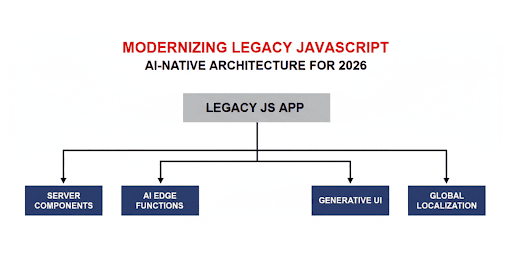
We are moving toward Composable Systems. This means your frontend is no longer one giant block. Instead, it should be a collection of server parts (fast and static) and client parts (interactive). Some parts run only on the server, and some run in the browser. This way, the user only downloads what they actually need to interact with.
2. Move Logic to the Server (RSC)
If you are modernizing a legacy app, moving logic to the server is your highest priority.
Using React Server Components (RSC) (usually through frameworks like Next.js) is the best way to fix performance. In a legacy app, you fetch data from the browser. In a modern app, you fetch it from the server.
Why RSC?
In a legacy React app, you use useEffect to fetch data. This creates a waterfall: browser loads the JS, then it fetches the data, then it renders.
Benefits:
- Zero-Bundle-Size: The libraries you use on the server (like database drivers or markdown parsers) stay on the server. They never reach the user’s phone.
- Security: You can query your database directly inside a component. There is no “API endpoint” for a hacker to find and exploit.
// Modern Server Component (Next.js)
// This runs on the server, not in the browser.
export default async function SalesDashboard() {
 // Direct database access. No API keys leaked!
    const sales = await db.sales.findMany();

    return (
       <section>
       <h1>Your Sales Performance</h1>
       <SalesChart data={sales} />
       </section>
    );
}
3. AI Integration: Moving to the Edge
We are moving past simple chatbots. Modern apps use AI to build the user interface itself. This is called Generative UI.
Vercel AI SDK and LangChain.js
To make AI feel fast, you cannot wait for a slow backend to process a request and send it back. You need to use Edge Functions. These are small pieces of code that run at the “edge” of the network (close to the user).
- Vercel AI SDK: Allows you to stream AI responses directly into your components. Instead of waiting 10 seconds for an answer, the user sees the AI “typing” or building the UI in real-time.
- LangChain.js: If your AI needs to do complex tasks, LangChain helps you chain those steps together in the browser or on the edge.
Use Case
The biggest shift is moving away from Static Routes. In an old app, you write code for /dashboard, /settings, and /profile. In an AI-native app, we build Generative UI.
Instead of building a static page for everything, the UI renders based on user intent.
Example: User says, “Show me my recent sales and help me update the price of the top one.” AI doesn’t just reply with text, it triggers a Sales Chart and a Price Editor form to appear. Code example:
import { streamUI } from 'ai';
import { openai } from '@ai-sdk/openai';

async function handleUserRequest(prompt) {
   const result = await streamUI({
     model: openai('gpt-4o'),
     prompt: prompt,
     tools: {
       showSalesTools: {
         description: 'Show sales chart and price editor',
         parameters: z.object({ salesId: z.string() }),
      // The AI decides to render these specific components
         generate: async ({ salesId }) => (
           <>
            <SalesChart id={salesId} />
            <PriceEditor id={salesId} />
           </>
         )
       }
     }
   });
  return result.value;
}
Rewrite code faster with Cursor
Modernizing a large legacy app takes a long time. This is where tools like Cursor can help.
For example, you can highlight a 500-line spaghetti function and ask Cursor to rewrite this code using TypeScript and React Server Components.
Cursor understands your entire project, not just one file. It can help you find where a legacy API is called and update it to a modern AI-ready stream in seconds. Note: you always need to double check code from Cursor.
4. Build for Internationalization
If you want to scale in the future, you have to think about internationalization from day one. You can’t just hard-code your text. Use the golden rule: keep your content separate from your code.
Your application should work well for a user in Tokyo just as well as one in New York. Instead of hard-coding text or building custom formatters, modern architectures use a standardized JavaScript localization layer that handles dynamic content.
Ensure that dates, currencies, and languages load correctly without making the app heavy for everyone.
5. Use TypeScript and Zod for Safety
AI can be unpredictable. Sometimes it returns data in a weird format. If your app is not prepared, it will crash.
- TypeScript: Helps you catch errors while you are writing the code, not after you have shipped it.
- Zod: This tool checks your data while the app is running. It creates a schema (a set of rules). For example, if the AI is supposed to send a list of prices, Zod makes sure they are actually numbers. If the data is wrong, Zod catches it before it breaks the screen. Check the code example:
import { z } from 'zod';

// Define the "rules" for your sales data
const SalesSchema = z.object({
   total: z.number().positive(),
   productName: z.string(),
   updateDate: z.string()
});

// If the AI sends back the wrong data, Zod catches it here
const safeData = SalesSchema.parse(aiGeneratedData);
6. Migration Strategy
You don’t have to delete your legacy app and start over. Most dev teams use the Strangler Fig Pattern:
- Create a proxy. Set up a Next.js app in front of your old app.
- Migrate page by page. Move one route (like the /dashboard) to the new architecture.
- Keep the rest. Let the old app handle the other pages until you are ready.
Conclusion
Remember, that modernization is not just a one-time rewrite. It is an ongoing move toward smarter, faster, and more global code.
Listed above tips can help you turn a slow legacy application into a fast AI-native tool.