In this tutorial, we will learn how to call a method with parameters in Java. When we call a method, the actual arguments in the method call are passed to the formal parameters defined in the method definition. This process is known as passing parameters or passing arguments in Java.
In Java, the basic mechanism of passing parameters is call-by-value. This means that a copy of the actual argument is passed to the method.
For primitive data types, any modification made to the parameters inside the method does not affect the original values after the method execution is completed.
However, for objects (reference types), a copy of the reference is passed to the method. This allows the method to modify the internal state of the object, and such changes will be reflected in the original object.
When a method requires input, its definition includes formal parameters, and the method call provides the corresponding actual arguments.
How to Call Method with Parameters in Java?
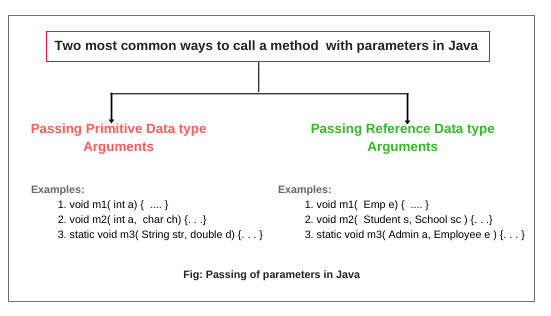
There are two most common ways by which you can call a method with parameters in Java. They are:
- Passing parameters of simple or primitive data type
- Passing parameters of reference data type
Passing Parameters of Primitive Data type in Java
Java passes parameters of primitive data types (like int, char, float, double) and String by passed-by-value. There is no standard limit to specify the number of parameters in a method declaration. But you should limit the number of parameters almost 6 to 7. Any more will have a negative effect on the readability of your code.
Let’s take an example program where we will declare an instance method m1() and static method m2() in a class Simple. In instance method m1(), we will pass primitive values (int and char) and in the static method m2(), String and double argument will pass by value.
Example 1:
public class Simple
{
// Declare instance method with two parameters. Method parameters are always local variables.
// Variables declared inside the method are local variables.
   void m1(int a, char ch)
   {
     System.out.println("m1 method is calling");
     System.out.println(a);
     System.out.println(ch);
   }
// Declare static method with two parameters.
   static void m2(String str, double d)
   {
       System.out.println("m2 method is calling");
       System.out.println(str);
       System.out.println(d);
   }
   public static void main(String[] args)
   {
   // Create an object of the class to call the instance method.
      Simple s = new Simple();

   // Call m1 method using reference variable s and pass two values (int and char).
      s.m1(23, 'D');

   // Call the static method using class name and pass two values (String and double).
      Simple.m2("Shubh", 15.5);
   }
}
Output:
m1 method is calling
23
D
m2 method is calling
Shubh
15.5
Let’s take another example where we will change the value of parameters inside the method, but it will not affect the original value after calling.
Example 2:
public class PassPrimitiveByValue
{
// Declare an instance variable and initialize a value 5.
   int x = 5;
   void m1()
   {
  // Calling passmethod() with x as argument.
     passmethod(x);
     System.out.println("After calling passmethod, x = " +x);
   }
// Changing the parameter in the passmethod.
   static void passmethod(int y)
   {
       y = 10;
   }
   public static void main(String[] args)
   {
      PassPrimitiveByValue pp = new PassPrimitiveByValue();
      pp.m1();
   }
}
Output:
After calling passmethod, x = 5
In the preceding code, when we called m1() method by using the object reference variable pp, it calls passmethod() method by passing a value 5 as an argument. The control of execution is immediately transferred to passmethod(). Within passmethod() method, we changed the value of the parameter.
After the complete execution of passmethod(), the control of execution is transferred back to m1() method. The value of x will be print 5 on the console, not 10. Thus, the changed value did not affect the original value and the original parameter value remains intact.
Passing Parameters of Reference Data type in Java
Passing parameters of reference data type means passing the reference of an object by value. When we call a method with passing the reference of an object by value, Java does not copy the object into the memory.
Actually, it copies the reference of the object into the memory and passes the copy to the parameters of the called method. If we change the reference of the object then the original reference does not get changed because this reference is not original. it’s a copy. For example:
void m1( Emp e );where e is the object reference variable and Emp is the name of a class.
Note:
Java passes the arguments by value for both primitives and objects. Java never passes the object itself.
Let us take an example program based on passing parameters of reference type in Java.
Passing Class Object as Parameters to Method Call in Java
In the previous examples, we passed primitive values such as int, double, String, and char as parameters to methods. However, in real-world applications, developers often pass objects as parameters, especially when working with complex data.
When we pass an object to a method, we are actually passing a copy of the reference to that object. This allows the method to access and modify the internal state of the object.
For example, consider a school management application with modules such as Student, Library, Admin, Employee, and School. We can create a class for each module and pass the objects of these classes as parameters to methods like m1() and m2() in the School class.
This approach helps in organizing code efficiently and enables methods to work with complete objects instead of individual values. So, let’s understand the above scenario by the following example code.
Example 3:
class Student { }
class Library { }
class Admin { }
class Employee { }
public class School
{
// Declare an instance method with two objects of Student and Library classes as parameters.
   void m1(Student s, Library l) // s and l are object reference variables.
   {
      System.out.println("m1 is calling.");
   }
   public static void m2(Admin a, Employee ep)
   {
      System.out.println("m2 is calling");
   }
   public static void main(String[] args)
   {
  //  First create an object of the class school.
      School sc = new School();

   // Create objects of classes Student and Library.
      Student s = new Student(); // (1)
      Library l = new Library(); // (2)

   // Pass the object reference variables as an argument value to the method m1 for calling m1().
      sc.m1(s,l); // (3)

   // Above three lines of code, can be replaced by a single line of code. Both will the same work.
   // sc.m1(new Student(), new Library());

      Admin a = new Admin();
      Employee ep1 = new Employee();
   // You can pass different Employee type reference variable.
   // Reference variable name is not important, but Employee type is important.
   // So, don't confuse between ep and ep1.
      School.m2(a,ep1);
   // Or, we can also write as
   // School.m2(new Admin(), new Employee());
  }
}
Output:
m1 is calling
m2 is calling
Can We have Two Methods with Same Name in Class?
Let’s take an example program where we will declare two methods with the same method name inside a class and check what kind of error comes
Example 4:
public class SameMethodName
{
    void m1()
    {
        System.out.println(" Hello Java ");
    }
    void m1()
    {
        System.out.println(" Welcome to Java world ");
    }
    public static void main(String[] args)
    {
        SameMethodName obj = new SameMethodName();
        obj.m1();
    }
}
The above program will give an error: method m1() is already defined in class SameMethodName. Duplicate methods are not allowed due to the same method signature. If you try to run the above code, you will get the output “Hello Java”.
Can We have Two Methods having Same Name with Different Parameters?
Yes, we can have two methods having the same name with different parameters in a class. This technique is called method overloading in Java. Let’s take a simple example program where we will define two methods having the same name with different parameters.
Example 5:
public class SameMethodName
{
    void m1()
    {
        System.out.println(" Hello Java ");
    }
    void m1( int a )
    {
        System.out.println(" Welcome to Java world ");
    }
    public static void main(String[] args) {
        SameMethodName obj = new SameMethodName();
        obj.m1();
        obj.m1(5);
    }
}
Output:
Hello Java
Welcome to Java world
As you can see in the preceding example program, both m1() method is valid because the method signature is different due to different parameters. Different signature is valid but the same signature is not valid in java.
Can Method be Defined Inside Another Method in Java?
In Java, defining a method inside another method is not allowed. Java does not support the concept of nested or inner methods. If we try to declare a method inside another method, it will result in a compile-time error.
Note:
Java supports the concept of inner classes (a class defined inside another class), but it does not support inner methods.
Let’s take an example program where we will define a method inside another method in a class.
Example 6:
public class InnerMethod
 {
   void m1()
   {
       System.out.println(" Hello Java ");
    // Declaration of Inner method.
       void m2()
       {
          System.out.println(" Hi Java ");
       }
   }
   public static void main(String[] args)
   {
       InnerMethod obj = new InnerMethod();
       obj.m1();
   }
}
The above code will give an error because Java does not support the inner method and it is an invalid program.
How to Call Method in Java from Another Class?
To call a method in Java from another class is very simple. We can call a method from another class by just creating an object of that class inside another class. After creating an object, call methods using the object reference variable. Let’s understand it with an example program.
Example 7:
class SimpleExp
{
  void m1()
  {
     m2();
     System.out.println("Java is developed by Sun Microsystem.");
  }
  void m2()
  {
    m3(5);
    System.out.println("Java is a popular programming language");
  }
  void m3(int x)
  {
     System.out.println("Welcome to online Java tutorial ");
  }
}
Now, create another class SimpleText.
public class SimpleTest
{
  public static void main(String[] args)
  {
  // Create the object of the class SimpleExp.
     SimpleExp se = new SimpleExp();

  // Now, call m1() method using object reference variable se.
     se.m1();
  }
}
Output:
Welcome to online Java tutorial
Java is a popular programming language
Java is developed by Sun MicroSystem.
In the above program, we are calling m1() method from another class SimpleTest but m1() is calling m2(). So, the control of execution is immediately transferred to m2(). Now, m2() is calling m3() with an integer argument.
So, the control of execution is again transferred to m3() and the SOP statement will be executed. After the complete execution of m3() method, the control of execution will go to m2() and executes the SOP statement. Now, the control of execution will go to m1() and execute the statement.
Let’s take important example programs that can be asked in any Java technical test or interview.
Example 8:
public class AddTest
{
// Instance variables.
   int x = 10;
   int y = 20;
  void add(int a, int b) // Here a and b are local variables.
  {
     System.out.println(x + y);
     System.out.println(a + b);
  }

public static void main(String[] args)
{
    AddTest ad = new AddTest();
    ad.add( 50, 50 );
  }
}
Output:
30
100
In this example, both instance variables (x, y) and local variables (a, b) in parameters have different names. So, to find out output is very easy, but if both are the same names, what will be output in this case? Let’s see it.
Example 9:
public class AddTest
{
 // Instance variables.
    int x = 10;
    int y = 20;

   void add(int x, int y) // local variables
   {
      System.out.println(x + y);
      System.out.println(x + y);
   }

public static void main(String[] args)
{
    AddTest ad = new AddTest();
    ad.add(50, 50);
  }
}
Output:
100
100
In this example program, both local and instance variables are having the same names. So in this case, the first priority will go to local variables, not instance variables. Therefore, the output will be 100, 100.
Key Points About Passing Parameters in Java
- A method uses the formal parameters whereas a caller passes the arguments or actual parameters.
- In Java, arguments are passed by value to parameters when a method is called. Passed by value means data stored in an argument is passed.
- There are two ways to call a method with parameters in Java: passing parameters of primitive data type and passing parameters of reference data type.
- In Java, everything is passed by value whether it is reference data type or primitive data type.
- In real-time project, we pass class objects as parameters to method call in Java.
- Java never passes the object itself.