
In this tutorial, we will learn about DataProvider in TestNG in detail with the help of syntax, examples, best practices, and common errors.
We know that there are mainly two ways through which we can directly pass parameter values to test methods. They are:
- through testng.xml file
- through DataProvider
DataProvider is one of the most important feature provided by TestNG, which allows us to run a test method multiple times with different sets of data. It facilitates data-driven testing by providing the ability to pass multiple sets of test data dynamically to test methods.
Here, we will understand the following topics under this tutorial:
- What is DataProvider?
- @DataProvider Annotation in TestNG
- @Test Annotation
- TestNG DataProvider Example with Multiple Parameters
- How to Call DataProvider from another Class?
- Advantages of TestNG Data Provider
The technologies used in this framework are Java and TestNG.
What is DataProvider?
DataProvider feature provided by TestNG is the second way of passing parameters to test methods. It allows the users to write data-driven tests in which we can run multiple times the same test method with different sets of test data.
This feature is useful when you need to test a functionality with various inputs without writing separate test cases for each input. The sets of test data can be any format.
We can pass parameters or complex parameters to the test methods by using data provider as it is not possible to do this from XML. The complex parameters can be complex objects, object read from a property file, or a database, etc. that are created using Java technology.
Key Features of DataProvider in TestNG
There are the following key features of DataProvider in TestNG that you should keep in mind. They are:
- DataProvider supplies multiple sets of data to a single test method.
- It helps in achieving data-driven testing.
- It reduces redundancy and makes test cases more maintainable.
- DataProvider supports integration with external data sources like Excel files (Apache POI), Databases (JDBC), and CSV/JSON/XML files.
DataProvider Method in TestNG
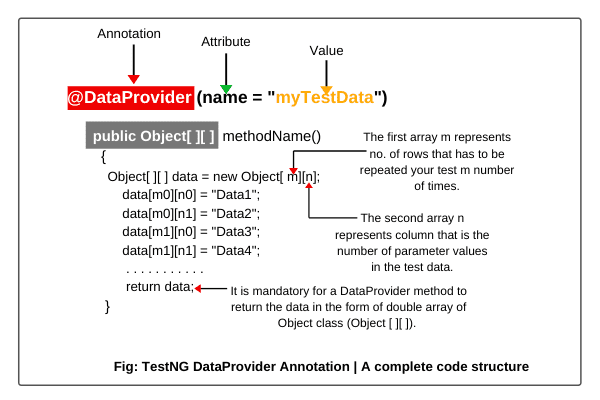
DataProvider is a method in a TestNG class that returns a two-dimensional array of object (Object [ ][ ]) to the test method. The test method will be called m times in m * n type of object array.
Where,
- m ➨ The first array m represents the number of rows that has to be executed your test method m number of times.
- n ➨ The second array n represents the number of columns that is the number of parameters in the test data that test method accepts.
This method is annotated with @DataProvider. We can have data providers with different names which can be defined either on a test class or on other classes.
[blocksy-content-block id=”12371″]
@DataProvider Annotation in TestNG
TestNG provides an annotation called a @DataProvider to use the DataProvider feature in the tests. This annotation is declared with a method in the test class which can then be called on test methods.
@DataProvider annotation can take an attribute “name” called dataProvider in the Test annotation. It has the following general syntax/form to use.
Syntax:
    @DataProvider(name = "myTestData")
This annotation has only one string attribute called name. If the name of the data provider is not provided, the data provider’s name will automatically be set to the method’s name.
“myTestData” is the name of the function which is passing the test data. It can also be any other name. Look at the figure below for a complete Dataprovider annotation code.
@Test Annotation
TestNG uses an attribute called dataProvider in the called @Test to annotate the test methods. The following example is given below for using the annotation.
@Test(dataProvider = "myTestData")
public void methodName(parameters)
{
  . . . . . . . . . . .
}
If you call the DataProvider method from another class, you will have to add one more attribute dataProviderClass in the @Test annotation. It has the following general form to use.
@Test(dataProvider = "myTestData", dataProviderClass = DataProvidingClass.class)
public void methodName(parameters)
{
  . . . . . . . . . . .
}
In the above syntax, DataProvidingClass is the name of class in which DataProvider method has been declared.
TestNG DataProvider Example with Multiple Parameters
Let’s take an example in which we will learn how to use the DataProvider feature in our tests. You follow all the steps below.
1. Open Eclipse and create a Java project named DataProviderProject.
2. Right-click on a java project and go to New option > create a package with name “testDataProvider”.
3. Now create a new java class with the name “DataProviderEx1”.
[blocksy-content-block id=”12121″]
Look out the below example code to understand better.
Example 1:
package testNGDataProvider;
import org.testng.annotations.DataProvider;
import org.testng.annotations.Test;
public class DataProviderTest1
{
// Declare Test annotation with attribute dataProvider and value "getData".
   @Test(dataProvider = "getData")
   public void setData(String name, String rollNo)
   {
      System.out.println("Name: " +name);
      System.out.println("RollNo: " +rollNo);
   }
// Declare DataProvider annotation with attribute name and value "getData".
   @DataProvider(name = "getData")
// Declare a method whose return type is an array of object.
   public Object[ ][ ] dataProviderMethod()
   {
   // Create an object of an array object and declare parameters 3 and 2.
   // 3 represents the number of times your test has to be repeated.
   // 2 represents the number of parameters in test data. Here, we are providing two parameters.
      Object[ ][ ] data = new Object[3][2];

   // 1st row.
      data[0][0] = "John";
      data[0][1] = "23";

   // 2nd row.
      data[1][0] = "Sanjana";
      data[1][1] = "40";

   // 3rd row.
      data[2][0] = "Deep";
      data[2][1] = "01";
      return data;
    }
}Explanation:
1. The test class contains a setData() method which takes two arguments name and rollNo as input and prints it on the console when it will be executed.
2. A DataProvider method called dataProvidermethod has been declared in the same class by using DataProvider annotation of TestNG with attribute “name”.
3. The DataProvider returns a two-dimensional (2D) array of objects with three sets of data such as data one, data two, and data three.
4. The “getData” is the value of name attribute which passes the data to the dataProvider attribute which has the same value getData.
5. The DataProvider provides the values of the parameters to a setData() method which is annotated with @Test annotation, attribute dataProvider, and value getData.
6. Now run the test class as TestNG Suite. You will see the following test result in the console.
Output:
       Name: John
       RollNo: 23
       Name: Sanjana
       RollNo: 40
       Name: Deep
       RollNo: 01
       Default test Tests run: 3, Failures: 0, Skips: 0
As you can see from the above test result, the respective setData() method has been executed three times in the class. The execution of the setData() method is dependent upon the number of sets of data passed by the dataProviderMethod. Since the setData method is executed three times. Therefore, three different sets of data have been returned by the DataProvider.
[blocksy-content-block id=”12153″]
Key Points:
1. It is mandatory for a DataProvider method to return the data in the form of a double array of object class (Object[ ][ ]). The first array represents a set of data whereas the second array contains values of parameters.
2. The “name” attribute of DataProvider is optional. If you don’t declare it, the name of method will use. Let’s take another example based on these key points.
Example 2:
package testNGDataProvider;
import org.testng.annotations.DataProvider;
import org.testng.annotations.Test;
public class DataproviderTest2
{
  @Test(dataProvider = "getData")
  public void setData(String username, String password)
  {
    System.out.println("Username: "+ username);
    System.out.println("Password: " +password);
  }
// Here, we are not declaring attribute "name" for DataProvider. So, it will use the name of method or function.
   @DataProvider public Object[ ][ ] getData()
   {
   // You can also return data in this way. Here, we are using an anonymous concept of Java to return data.
      return new Object[ ][ ] {
           {"DEEPAK"," 1234"},
           {"AMIT","12345"},
           {"RASHMI", " 123456"}
      };
   }
}
Output:
Username: DEEPAK
Password: 1234
Username: AMIT
Password: 12345
Username: RASHMI
Password: 123456Scenario to Automate:
Let’s automate a scenario using data provider feature in the following test. In this scenario, we will take a very simple example of LogIn application of pixabay, where the username and password are required to clear the authentication.
First, make two accounts from two different email ids and passwords on the pixabay website. You can also take another website for your convenience. Now automate the following scenario below.
1. Launch the Firefox browser web browser.
2. Open the login page pixabay.
3. Login with two different sets of usernames and passwords using the DataProvider feature.
4. Logout webpage and close the browser.
Now follow all steps in the below example code.
Example 3:
package parameterbyDataProvider;
import java.util.concurrent.TimeUnit;
import org.openqa.selenium.By;
import org.openqa.selenium.WebDriver;
import org.openqa.selenium.WebElement;
import org.openqa.selenium.firefox.FirefoxDriver;
import org.testng.annotations.AfterTest;
import org.testng.annotations.BeforeTest;
import org.testng.annotations.DataProvider;
import org.testng.annotations.Test;

public class ParameterDataprovider
{
// Create a WebDriver reference.
   WebDriver driver;

   @BeforeTest // It will be executed before any of the execution of the test method only once.
   public void setupDriver()
   {
  // Create an object of FirefoxDriver class.
     driver = new FirefoxDriver();
     driver.manage().timeouts().implicitlyWait(10, TimeUnit.SECONDS);

     driver.manage().window().maximize();
     String URL = "https://pixabay.com/accounts/login/"; driver.get(URL);
   }
   @Test(dataProvider = "myData")
   public void login(String Username, String Password)
   {
     WebElement userN = driver.findElement(By.name("username"));
     userN.sendKeys(Username);

     WebElement passW = driver.findElement(By.name("password"));
     passW.sendKeys(Password);

     WebElement login = driver.findElement(By.xpath("*//input[@value='Log in']"));
     login.click();

     WebElement profileImage = driver.findElement(By.xpath("*//img[@class='profile_image']"));
     profileImage.click();

     WebElement logout = driver.findElement(By.linkText("Log out"));
     logout.click();

     driver.findElement(By.linkText("Log in")).click();
   }
   @DataProvider(name = "myData")
   public Object[ ][ ] loginData()
   {
      Object[ ][ ] data = new Object[2][2];
      data[0][0] = "1st username";
      data[0][1] = "1st password";
      data[1][0] = "2nd username";
      data[1][1] = "2nd password";
      return data;
   }
   @AfterTest
   public void close()
   {
     driver.close();
   }
}
Output:
PASSED: login
PASSED: login
===============================================
Default test Tests run: 2, Failures: 0, Skips: 0
===============================================TestNG Result Window:
Once test execution is finished, the results will look like this in the TestNg Result window.

As we are providing the test data two times. Therefore, the above test will be executed two times completely.
How to Call DataProvider from Another Class?
To put the DataProvider method in another class, we will have to make data provider as static. In addition to this, in the Test method, we will need to add one more attribute dataProviderClass in @Test annotation.
Let’s automate another scenario in which we will only send data into Yandex search by calling the Dataprovider method from another class.
Scenario to Automate:
1. Launch Firefox browser.
2. Open the Yandex search (“https://www.yandex.com”).
3. Send data into search text box.
4. Close browser.
Now follow the below example code to automate the above scenario.
Example 4:
package dataProviderThroughClass;
import java.util.concurrent.TimeUnit;
import org.openqa.selenium.By;
import org.openqa.selenium.WebDriver;
import org.openqa.selenium.firefox.FirefoxDriver;
import org.testng.annotations.AfterTest;
import org.testng.annotations.BeforeTest;
import org.testng.annotations.Test;
public class DataProviderTest
{
  WebDriver driver;
  @BeforeTest
  public void webDriversetUp()
  {
     driver = new FirefoxDriver();
     driver.manage().window().maximize();

     String URL = "https://yandex.com/";
     driver.get(URL);
     driver.manage().timeouts().implicitlyWait(10, TimeUnit.SECONDS);
  }
  @Test(dataProvider = "getData", dataProviderClass = DataProviderClass.class)
  public void loginMethod(String data)
  {
    driver.findElement(By.xpath("*//input[@id='text']")).sendKeys(data);
  }
  @AfterTest
  public void close()
  {
    driver.close();
  }
}
Now, we will create a DataProviderClass.
package dataProviderThroughClass;
import org.testng.annotations.DataProvider;
public class DataProviderClass
{
  @DataProvider(name = "getData")
  public static Object[ ][ ] dataProviderMethod()
  {
    return new Object[ ][ ] {
       {"TestNG"},
       {" DataProvider"},
       {" multiple"},
       {" parameters"}
    };
  }
}
Now, we will execute DataProviderTest and see the below test result on the console.
Output:
       PASSED: loginMethod("TestNG")
       PASSED: loginMethod(" DataProvider")
       PASSED: loginMethod(" multiple")
       PASSED: loginMethod(" parameters")
===============================================
Default test Tests run: 4, Failures: 0, Skips: 0
===============================================
TestNG Result Window:

As we are providing the test data one time. Therefore, the above test will be executed one time only.
Advantages of TestNG Data Provider
The advantages of data provider in TestNG are as follows:
- TestNG Data provider helps to pass parameter values directly to the test method.
- It allows users to write data-driven tests where they can run multiple times the same test method with different sets of test data.
- DataProvider promotes code reusability. You can use the same DataProvider by multiple test classes without duplicating the code.
- This feature makes test classes cleaner and more modular.
- Test classes focus only on test logic, while DataProvider methods handle data separately. Thus, this improves code organization and readability.
- If test data changes, you only need to update the DataProvider class instead of modifying multiple test classes. Hence, data provider enhances maintainability.
DataProvider in TestNG is a powerful mechanism for executing a test case multiple times with different sets of input data. It helps to create robust data-driven tests in TestNG. I hope that you will have understood the basic definition of Data provider annotation and its syntax with the help of examples.


