
What is JVM in Java | JVM Architecture, JIT Compiler
Java Virtual Machine (JVM) in Java is the heart of the entire execution process of the Java program.
It is basically a program that provides the runtime environment necessary for Java programs to execute.
In other words, Java Virtual Machine (JVM) is an abstract computer machine that is responsible for executing Java bytecode (a highly optimized set of instructions) on a particular hardware platform. It is also called Java run-time system.
The specification of JVM is provided by Sun Microsystem whose implementation provides a runtime environment to execute our Java applications. JVM implementation is known as Java Runtime Environment (JRE).
Since JVM is platform-dependent, therefore, it is available for many hardware and software platforms.
The most popular JVM is HotSpot that is produced by Oracle. It is available for many operating systems such as Windows, Linux, Solaris, and Mac OS.
We cannot run the Java program unless JVM is available for the appropriate hardware and operating system platform.
Internal Architecture of Java Virtual Machine (JVM)
Let’s understand the internal architecture of JVM as shown in the below figure.

As you can observe in the above figure, JVM contains the following main components that are as follows:
- Class loader sub system
- Runtime data areas
- Execution engine
- Native method interface
- Java native libraries
- Operating system
Runtime data areas consist of the following sub-components that are as follows:
- Method area
- Heap
- Java stacks
- PC register
- Native method stacks
How JVM works Internally?
Java Virtual Machine performs the following operations for execution of the program. They are as follows:
a) Load the code into memory.
b) Verifies the code.
c) Executes the code
d) Provides runtime environment.
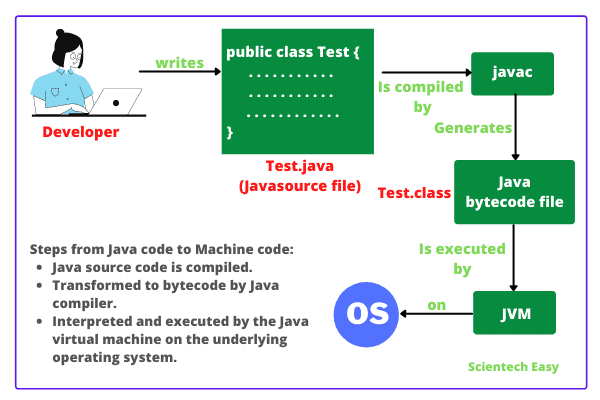
When we make a program in Java, .java program code is converted into a .class file consisting of byte code instructions by the Java compiler. This Java compiler is outside of JVM.
[adinserter block=”5″]
Now, Java Virtual Machine performs the following operations that are as follows:
1. This .class file is transferred to the class loader sub system of JVM as shown in the above figure.
In JVM, class loader sub system is a module or program that performs the following functions:
a) First of all, the class loader sub system loads .class file into the memory.
b) Then bytecode verifier verifies whether all byte code instructions are proper or not. If it finds any instruction suspicious, the further execution process is rejected immediately.
c) If byte code instructions are proper, it allots the necessary memory to execute the program.
This memory is divided into 5 separates parts that is called run-time data areas. It contains the data and results during the execution of the program. These areas are as follows:
1. Class (Method) Area:
Class (Method) area is a block of memory that stores the class code, code of variables, and methods of the Java program. Here methods mean functions declared in the class.
2. Heap:
This is the runtime data area where objects are created. When JVM loads a class, a method and a heap area are immediately built in it.
[adinserter block=”2″]
3. Stacks:
Method code is stored in the Method area. But during the execution of a method, it requires some more memory to store the data and results. This memory is allocated on Java stacks.
Java stacks are those memory areas where Java methods are executed. In Java stacks, a separate frame is created where the method is executed.
Each time a method is called, a new frame is created into the stack. When method invocation is completed, a frame associated with it is destroyed.
JVM always creates a separate thread (or process) to execute each method.
4. PC Register:
PC (Program Counter) registers are those registers (memory areas) that contain the memory address of JVM instructions currently being executed.
5. Native Method Stack:
Methods of Java program are executed on Java stacks. Similarly, native methods used in the program or application are executed on Native method stacks.
Generally, to execute the native methods, Java native method libraries are needed. These header files are located and connected to JVM by a program, known as Native method interface.
Execution Engine
Execution engine consists of two parts: Interpreter and JIT (Just In Time) compiler. They convert the byte code instructions into machine code so that the processor can execute them.
In Java, JVM implementation uses both interpreter and JIT compiler simultaneously to convert byte code into machine code. This technique is called adaptive optimizer.
Generally, any programming language (like C/C++, Fortran, COBOL, etc.) will use either an interpreter or a compiler to convert the source code stream into a machine code.
Now, the two main questions are: Why Interpreter and JIT compiler both are needed and how both work simultaneously?
Before going to understand this, we will know what is JIT compiler in Java language?
What is JIT Compiler in Java?
JIT compiler in Java is the part of JVM that is used to increase the speed of execution of a Java program.
In other words, it is used to improve the performance of the execution of the program. It helps to reduce the amount of time needed for the execution of the program.
How Interpreter and JIT compiler work simultaneously in Java?
To understand this, let us consider some sample codes. Suppose these are byte code instructions:
print x;
print y;
Repeat the following execution 10 times by changing the values of i from 1 to 10:
print z;
Java interpreter starts the execution process from 1st instruction. It converts print x; into machine code and transfers it to the microprocessor.
For this, suppose Java interpreter has taken 2 nanoseconds time to complete it. The microprocessor takes it, executes it, and the value of a is displayed on the screen.
Now, the interpreter comes back into memory, reads the 2nd instruction print y; and takes another 2 nanoseconds to convert it into machine code. Then the machine code is given to the processor and the processor executes it.
Similarly, the interpreter comes back to read the 3rd instruction, which is a looping statement print z; It should be done 10 times.
Suppose, the first time the interpreter takes 2 nanoseconds to convert print z into machine code.
After giving this machine code to the processor, it comes back to memory, reads the print z; instruction the 2nd time, and takes another 2 nanoseconds to convert this instruction into machine code. Then the interpreter gives this machine code to the processor for execution.
Again, the interpreter comes back and reads print z; and converts it for 3rd time taking another 2 nanoseconds. Like this, Java interpreter will convert the print z; instruction into machine code 10 times.
Thus, the interpreter will take a total of 10 x 2 = 20 nanoseconds to complete this loop. This procedure is time-consuming and not efficient.
That is the reason why JVM does not allot this byte code instruction to the interpreter. It allots this code to the JIT compiler.
Here, the term compiler means translator that converts instruction set of Java Virtual Machine to the instruction set of a specific processor.
How does JIT Compiler execute Looping Instructions?
Let us understand how does JIT compiler in Java executes the looping instruction.
First of all, JIT compiler reads the print z instruction and then converts that into machine code. For this, suppose JIT compiler takes 2 nanoseconds to complete this task.
Now, JIT compiler allocates a block of memory and pushes this machine code instruction into that memory. For this, suppose it takes another 2 nanoseconds to complete it. So, the JIT compiler took a total of 4 nanoseconds.
Next, the processor will fetch this machine code instruction from memory and executes it 10 times.
Now you can observe that JIT compiler took only 4 nanoseconds for complete execution, whereas the interpreter needed 20 nanoseconds to execute the same loop.
Thus, JIT compiler increases the speed of the execution process.
Here, a question again arises that why the first two instructions have been allocated to JIT compiler by the JVM.
The reason is clear. JIT compiler will take 4 nanoseconds to convert each instruction, whereas the interpreter actually took only 2 nanoseconds to convert each instruction.
When .class file is loaded in the memory, JVM, first of all, tries to identify which code is to be given to the interpreter and which one to JIT compiler so that the performance is better.
The blocks of code given to the JIT compiler are also called hotspots in Java. This feature in Java language really improves the execution time of the program at runtime, especially when it is to be executed multiple times.
Although it is not recommended, the JIT compiler option can also be turned off.
Thus, both the Java interpreter and JIT compiler works simultaneously to translate the byte code instruction into machine code instruction.
The garbage collector in JVM helps to clean up unused memory to improve the efficiency of the program.
In this tutorial, you have known what is JVM in Java as well as got familiar with the JVM architecture along with components of Java Virtual Machine. By now, you must have got a glimpse of the working of Java Virtual Machine. Hope that you will have understood the basic points of Java virtual machine (JVM). In the next tutorial, we will understand about Java compiler and how it works.
Thanks for reading!!!


