Loops in Java are control structures that repeatedly execute a block of statements until a termination condition is met. In simple terms, a loop allows you to run the same code multiple times until the specified condition becomes false.
In Java (or any other programming language), we use loops to execute the same block of code repeatedly without rewriting the same code. We can execute a block of code (or statements) any number of times, from zero to infinite number, depending on the condition.
Why Do We Need Loops in Java?
Loops help us avoid writing the same code again and again. Suppose we want to print the string “Hello World” 100 times. It would be a tedious and boring task to have to write the same statement a hundred times.
// Writing the same statement 100 times like this would be tedious.
   System.out.println("Hello World");
   System.out.println("Hello World");
   // repeated 100 times ...
So, how will you resolve this problem?
Java programming language provides a powerful feature called loops that controls how many times an operation or a sequence of statements has to be executed. Using a loop in Java, we can execute the same statement multiple times without rewriting the code.
// Using while loop.
int count = 0;
while (count < 100)
{
  System.out.println("Hello World");
  count++;
}
In this example code, the variable count is initially set to 0. The loop checks whether count < 100 is true. If this condition is true, the loop executes, prints the message “Hello World” and increments count by 1.
The loop continues executing until the condition becomes false. When count reaches 100, the condition count < 100 becomes false. The loop terminates, and control moves to the next statement after the loop
Loop Control Structure in Java
A loop executes a block of statements repeatedly until a specified condition for termination is met. Therefore, a loop in a program consists of two main parts:
- Control statement
- Body of the loop
The control statement tests a condition and determines whether the statements inside the loop body should be executed repeatedly.
Loop control structures can be classified into two types depending on the position of control statement in the loop:
- Entry-controlled loop
- Exit-controlled loop
Entry-Controlled Loop
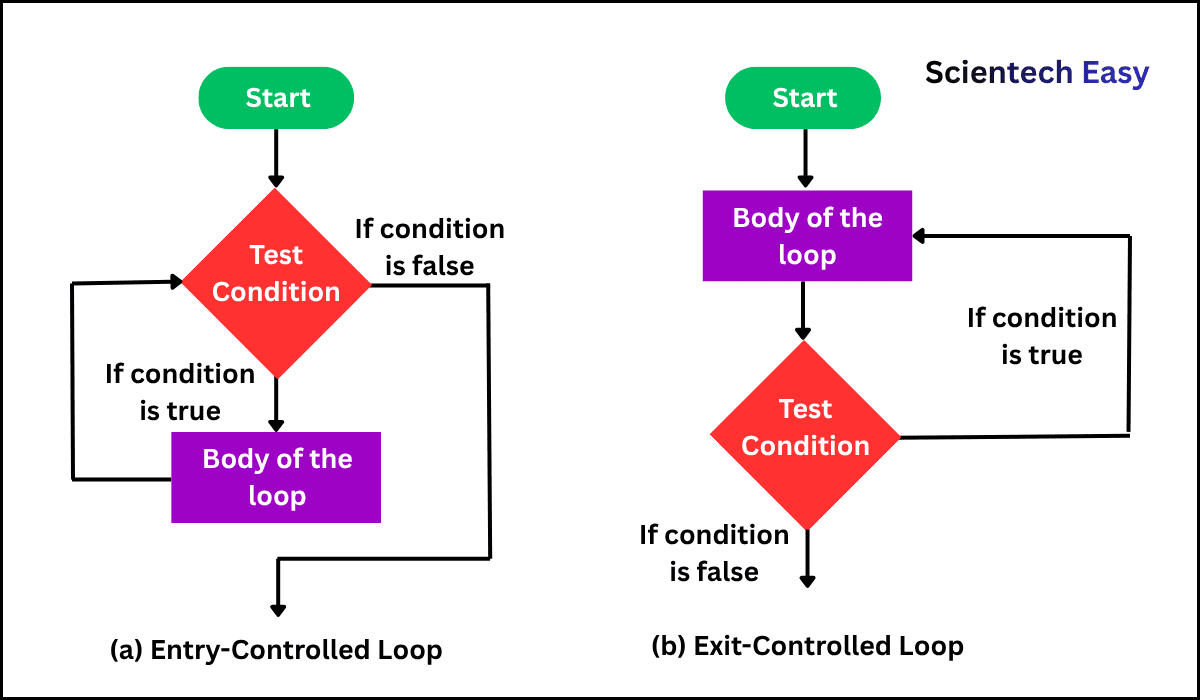
In an entry-controlled loop, the control condition is evaluated before executing the body of the loop.
- If the specified condition is satisfied, the body of loop will execute.
- If not satisfied, the body of loop will not execute.
- The while loop and for loop are the examples of entry-controlled loops in Java.
Exit-Controlled Loop
In an exit-controlled loop, the specified condition is evaluated after executing the body of the loop.
- The body of loop is executed unconditionally at least once, regardless of the specified condition.
- After execution, the condition is checked.
- The do-while loop is an exit-controlled loop in Java.
Note:
The test condition must be carefully defined to ensure that the loop executes the desired number of times in a Java program.
Flowchart Diagram of Entry-Controlled Loop and Exit-Controlled Loop
The flowchart diagram of entry-controlled loop and exit-controlled loop is shown below:
Steps to Process Loops in Java
There are four steps involved in the execution of loops in Java:
- Initialization of the loop control variable (counter)
- Evaluation of the condition
- Execution of the loop body
- Updating of the loop control variable (increment/decrement)
These steps repeat until the condition becomes false.
Types of Loops in Java
There are three main types of loops in Java:
- while loop
- do-while loop
- for loop
In addition, loops can also be categorized as:
- Nested loops
- Infinite loops
Nested Loops in Java
Like conditional statements, a loop structure can be nested one inside the other. Loops placed inside another loop are called nested loops in Java. Nested loops allow us to loop over two variables.
The outside loop is called outer loop, and the inside loop is called inner loop. Each time the outer loop iterates, the inner loop iterates until its condition is satisfied. Let’s understand a simple example program that uses a pair of nested for loops.
Example 1:
public class NestedLoops {
public static void main(String[] args)
{
 for(int x = 1; x <= 10; x++) {
   for(int y = 1; y <= 10; y++) {
      System.out.printf( "%4d", x * y);
   }
  System.out.println();
  }
 }
}
Output:
1   2   3   4   5   6   7   8   9  10
2   4   6   8  10  12  14  16  18  20
3   6   9  12  15  18  21  24  27  30
4   8  12  16  20  24  28  32  36  40
5  10  15  20  25  30  35  40  45  50
6  12  18  24  30  36  42  48  54  60
7  14  21  28  35  42  49  56  63  70
8  16  24  32  40  48  56  64  72  80
9  18  27  36  45  54  63  72  81  90
10  20  30  40  50  60  70  80  90 100
In this example:
- There are two loop variables named x and y. Both loop variables control the execution of a loop.
- There are two for loops.
- The first loop that uses x as its counter variable is called outer loop.
- The second loop that uses y as its counter variable is called inner loop.
- Each loop will execute its corresponding statements 10 times. The outer loop will execute 1 to 10 only once.
- But for each execution of the outer loop, the inner loop iterates 10 times and will display the multiplication of x and y for each value of x and y through the inner loop.
- When the inner loop ends, a call to System.out.println() with no parameters begins a new line. Then, the outer loop starts the next cycle.
- When the above code will be executed, it will display the following output on the console.
Infinite Loops in Java
If a loop repeats forever, it is called infinite loops in Java. It is also known as endless loops because the specified condition always becomes true and the body of loop is executed repeatedly, without end. For example:
int n = 1;
while(n > 0)
{
    System.out.println(n);
  // n never changes.
}
In this example, digit 1 will be displayed an infinite number of times on the console, or at least until you terminate the program. This is because the conditions will never become false. Syntax errors are a common cause of infinite loops in a program. For example:
while(condition); // Semicolon causes infinite loop if the condition is true.This is a common syntax error, so you must avoid putting a semicolon after the condition of while loop. If you try to do this, you will create an empty loop body and could produce an infinite loop.
When to Use Loops in Java Programming?
Loops can be useful in those scenarios where we need to repeat a task multiple times or iterate over a collection of data elements. Although, it is necessary to select the correct type of loop based on the specific requirements of your application or program.
There are the following some common scenarios where you should think about using loops in your Java programs.
- When you have a dataset that needs processing or manipulation, loops can be helpful for you to iterate over the data.
- Loops are convenient when you search for specific elements in an array or a list. You can iterate over the collection by conditional statements to filter out the elements that meet certain criteria.
- If you want to find the sum, average, or any other aggregation of a set of numbers, use loops to calculate sum, or average.
- Loops are useful when you want to display each element of data sequentially in tabular or list form.
- Loops can be useful to produce numerical sequences, such as the Fibonacci series, prime numbers, or any other sequence that follows a specific pattern or logic.
- You can use loops to validate the input until it meets the required conditions, ensuring that you get the correct and expected values.
- We often use loops when working with data structures like arrays, lists, and elements to access, or modify each element in the data structure.
Best Practices for Using Loops
To write clean and maintainable program code in Java using loops, consider the following best practices:
- Use meaningful variable names for loop control.
- Comment your code for better readability.
- Prefer the for loop when the number of iterations is known.
- Prefer the while loop when the number of iterations is unknown.