
For Loop in Java (with Example)
The for loop in Java is an entry-controlled loop structure that executes a set of statements a fixed number of times. It is perfect for those scenarios where we know the exact number of iterations needed to accomplish a task.
The for statement provides a more concise syntax for creating loops. It executes a block of statements as long as the condition is true.
For Loop Syntax in Java
The general syntax to use the for loop in Java program is as follows:
for(initialization; test-condition;  iteration (increment/decrement)) {
   // Loop body
      Statement(s); // statements to be executed.
}
Or,
for (i = initialValue; i < endValue; i++) {
 // Loop body
    Statement(s);
}
The flowchart of the for loop statement with an example is shown in the below figure (a).
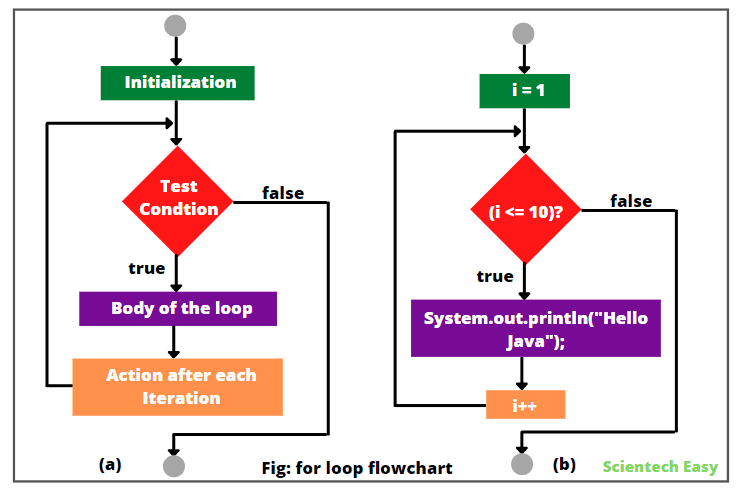
In the above syntax, for loop statement begins with a keyword for, followed by a pair of parentheses enclosing the loop control structure. This structure consists of initialization, test condition, and iteration (increment or decrement). This control structure is followed by the body of loop enclosed inside curly braces.
The initialization, test condition, and iteration are separated by semicolons. There is no semicolon at the end iteration section.
Java For Loop Execution
The execution of for loop statement is as follows:
1. Initialization of control variables: A for loop uses a variable to control how many times the body of loop will be executed and when the body of loop terminates. This variable is called control variable. It is initialized using an assignment operator such as i = 1 and count = 0.
The variables i and count are called loop control variables. It is performed only once when a for loop statement starts to execute.
2. Test-condition: The value of control variable is evaluated using the test condition. The test condition is a Boolean expression, such as i < 10 that determines when the loop will exit. It is evaluated before each loop iteration (execution). When the condition is true the loop body is executed.
When false, the loop is terminated and the execution continues to the next statement after closing a curly brace that immediately follows the loop.
3. Iteration: When the loop body is executed, the control of execution is transferred back to for statement after executing the last statement in the loop.
After each iteration, the loop control variable is updated either incremented or decremented using assignment statements such i++ (i.e. i = i + 1), or i– (i.e. i = i – 1). The new value of loop control variable is again evaluated to see whether it satisfies the loop condition or not.
If the test condition is satisfied, the loop body is again executed. This process continues as long as the value of control variable fails to satisfy to test condition.
Consider the following code of a program.
int i;
for(i = 1; i <= 10; i++ ) {
    System.out.println("Hello Java");
}
How does For Loop Work in Java
Let’s understand how for loop works in the above example. The flowchart of statement is shown in the above figure (b). The for loop is initially set to 1 and the expression i = 1 will be executed only once for the first time.
The test condition is a Boolean expression. The expression (i <= 10) will be tested right after the initialization and at the beginning of each iteration. If this condition is true, the statement inside the loop body is executed and prints “Hello Java”.
The expression (i++) will be executed. Now, the value i becomes 2. Since the value of i is less than 10, the statement will be executed and prints “Hello Java” again.
This process continues until the value of i is greater than 10. If it is greater than 10, the expression (i <= 10) will be false and the loop terminates.
Now, we understood from the above discussion, the expression (i = 1) will be executed only once at the starting of the loop. Then expressions (i <= 10) and (i++) will be executed repeatedly until i is less than or equal to 10. If there is only one statement in the body of loop, as in this example, the curly braces can be omitted.
For Loop Statement Example Program
Let’s take an example program where we will display numbers from 1 to 5 and from 5 to 1 using for loop statement.
Example 1:
package javaProgram;
public class Test {
public static void main(String[] args)
{
   System.out.println("Displaying numbers from 1 to 5:");

// Applying for loop.
   for(int i = 1; i <=5; i++) { // Here, i++ is increment operator.
       System.out.println(i);
   }

   System.out.println("Displaying numbers from 5 to 1:");
   for(int j = 5; j > 0; j--) { // Here, j-- is decrement operator.
       System.out.println(j);
   }
 }
}
Output:
Displaying numbers from 1 to 5:
1
2
3
4
5
Displaying numbers from 5 to 1:
5
4
3
2
1
We can also write the same for loop like this:
int i = 1;
for(; i <= 5;) {
  System.out.println(i);
  i++;
}
Let’s consider another simple example program in which we will generate a sequence of numbers using for loop.
Example 2:
package javaProgram;
public class GenSeqNo {
public static void main(String[] args)
{
// Generating a sequence of numbers from 1 to 10.
   for (int i = 1; i <= 10; i++) {
	 System.out.print(i + " ");
   }
 }
}
Output:
       1 2 3 4 5 6 7 8 9 10
Let’s take an example where we will calculate the sum of squares of integer numbers from 1 to 5 using for loop statement. Look at the following example code to understand better.
Example 3:
package javaProgram;
public class Test {
public static void main(String[] args)
{
// Initialization of loop control variable.
   int i = 1;
   int sum = 0;

// Applying for loop statement.
   for(; i <= 5;) {
      sum = sum + i * i;
      i++; // Incremented by 1 after each iteration.
   }
   System.out.println("Sum: " +sum);
  }
}
Output:
Sum: 55Let’s take an example in which we will calculate the factorial of a number 5.
Example 4:
package javaProgram;
public class FactorialEx {
public static void main(String[] args)
{
  int number = 5;
  int factorial = 1;

  for (int i = 1; i <= number; i++) {
	    factorial *= i;
   }
  System.out.println("Factorial of " + number + " is: " + factorial);
 }
}
Output:
       Factorial of 5 is: 120
Example 5:
Let’s take an example in which we will display the following right-angled triangle pattern on the console.
*
* *
* * *
* * * *
* * * * *
package javaProgram;
public class PatternEx {
public static void main(String[] args)
{
   int rows = 5;
// Applying nested for loops.
   for (int i = 1; i <= rows; i++)
   {
       for (int j = 1; j <= i; j++)
       {
	  System.out.print("* ");
       }
      System.out.println();
   }
 }
}
Output:
       *
       * *
       * * *
       * * * *
       * * * * *
Let’s consider an example program in which we will iterate over elements of an array and calculate the sum.
Example 6:
package javaProgram;
public class IteratingArray {
public static void main(String[] args)
{
// Create an array of five numbers.
   int[] numbers = {1, 2, 3, 4, 5};
   int sum = 0;

// Iterate over an array and calculate the sum
   for (int i = 0; i < numbers.length; i++) {
	  sum += numbers[i];
   }
   System.out.println("Sum of array elements: " + sum);
 }
}
Output:
      Sum of array elements: 15
Infinite For Loop in Java
Consider the following example code of a program.
int x = 1;
for(; ;)
{
  System.out.println(x);
  x++;
 }
In this example, there is no test condition in the for statement that tells where to stop. So, the code will execute without stoppage. This loop is called infinite loop in Java. We should avoid to make an infinite loop.
By mistake, if we make infinite for loop in java program, we can stop it using break statement. It can be used to come out of loop.
Infinite For loop Example Program
Let’s take an example program based on infinite for loop in Java where we will display the sum of cubes of numbers from 1 to 5.
Example 7:
package javaProgram;
public class Test {
public static void main(String[] args)
{
  int i = 1;
  int sum = 0;

// Infinite for loop
   for(; ;) {
      sum = sum + i * i * i;
      i++;
      if(i >= 5) break; // If the i value exceeds 5, then come out of this loop.
   }
   System.out.println("Sum: " +sum);
 }
}
Output:
Sum: 100Let’s create a Java program where we will initialize two variables in for statement and will display numbers from 1 to 5 and 5 to 1 simultaneously.
Example 8:
package javaProgram;
public class Test {
public static void main(String[] args)
{
  int i, j;
  for(i = 1, j = 5; i <=  5; i++, j--)
  {
     System.out.println(i+ "\t" +j);
  }
 }
}
Output:
1 5
2 4
3 3
4 2
5 1In this loop, we have used two initialization expressions (i = 1, and j = 5) and two iteration expressions (i++, and j–). But there is only one test conditional expression (i < = 5). This for loop will print i values from 1 to 5 whereas, the values of j will simultaneously change from 5 to 1.
Note:
1. The for loop can have more than one initialization expression and iteration expression. This feature cannot apply in other loops. Each expression must be separated from the next by a comma. Let’s take one more example program based on this point.
Example 9:
package javaProgram;
public class Test {
public static void main(String[] args)
{
  int x, y;
  for(x = 1, y = 5; x < y; x++, y--)
  {
     System.out.println("x = " + x);
     System.out.println("y = " + y);
  }
 }
}
Output:
x = 1
y = 5
x = 2
y = 4In this example program, the initialization portion consists of two control variables x and y that have been separated by comma. The two comma separated expressions (x++ and y–) in the iteration portion are executed each time the loop repeats.
The test condition in for loop statement can also have compound relation. Let’s understand this statement with the help of an example program.
Example 10:
package javaProgram;
public class Test {
public static void main(String[] args)
{
   int x = 1, sum = 0;
   for(x = 1; x < 20 && sum < 20; x++) {
      sum = sum + x;
   }
  System.out.println("Sum: " +sum);
 }
}
Output:
Sum: 21In this example, the loop will be executed until both conditions x < 20 and sum < 20 are true. The sum is evaluated within the body of loop.
3. It is also possible to use expressions in the initialization and increment portions. For example, this type of statement for(x = (a + b)/5; x > 10; x = x/5) is perfectly valid.
4. When we declare control variable inside a for statement, the scope of that variable is ended after the ending of for loop. It means that the control variable defined inside a for statement is a local variable that cannot be accessed from outside the loop.
Example 11:
public class Test {
public static void main(String[] args)
{
  for(int x = 1; x < 10; x++) {
      System.out.println(x); //  No error.
  }
  System.out.println(x); // Compile time error.
 }
}
Best Practices for Using “for” Loops in Java
“For” loops are a powerful and widely used in Java programming. There are the following key points that you should keep in mind for the best practices:
- Keep the code inside loop body simple. Avoid placing complex logic within the loop, as it can make the code harder to read and debug.
- Choose descriptive and meaningful name of loop control variable to enhance code readability. For example, if you are iterating over a list of employees, use “employee” or “emp” instead of generic names like “i” or “x.”
- Avoid unnecessary computations. Attempt to calculate loop-invariant expressions outside the loop if possible. Unnecessary computations within the loop can slow down execution, especially when the loop iterates a large number of times.
- Correctly set the loop condition and loop control variable initialization to avoid errors, so that unexpected results or infinite loops do not happen.
- Avoid changing loop control variable inside the loop.
- Add comments when necessary, especially when you are using complex logic.
When to Use “for” Loops in Java
“For” loops are a precious concept for iterating over elements and automating repetitive tasks in Java programming. We have mentioned some key points on when to use “for” loops :
- “For” loops are ideal for iterating over arrays, lists, sets, and other collections where you know the number of elements to be iterated.
- When you need to perform a task a fixed number of times, use the for loops that offer a concise and organized way to achieve it.
- For complex scenarios like processing elements in a 2D array, use for loops.
Consider other approaches when, if the number of iterations is not fixed at the beginning, use “while” or “do-while” loops.
Difference between While Loop and For Loop in Java
In Java programming, we can use both “while” and “for” loops for repetitive tasks, but they have distinct differences in their syntax and usage. The key differences between the two loop constructs are as follows:
1. Syntax:
// Syntax of while loop:
   while (condition) {
       // Code to be executed
   }

// Syntax of for loop:
   for (initialization; condition; increment/decrement) {
       // Code to be executed
   }
The “while” loop only needs a conditional expression to be specified. It repeatedly executes the code block as long as the conditional expression tests to true.
The “for” loop needs an initialization, a conditional expression, and an increment or decrement. We typically use it when the number of iterations is known beforehand.
2. Usage:
The “while” loop is suitable when we want to repeat a block of code based on a condition and we do not know the number of iterations in advance.
The “for” loop is ideal when we know the exact number of iterations needed or when iterating over arrays or collections.


