
A motherboard (also called main board or system board) is a basic foundation of a computer that connects all the crucial hardware components or parts of a system. It plays a vital role in ensuring that every part of the computer works together efficiently.
The motherboard performs the following significant functions like:
- Distributing power from the power supply to all hardware components.
- Transferring of data and instructions between various hardware components.
- Providing various sockets and pads for mounting electronic components.
- Offering expansion slots to add additional components, such as graphics card, sound card, network card, etc.
In older desktop computers, there had very few integrated components onto the motherboard. It needs a large number of adapter cards for interfacing videos, hard disk, and floppy disk. In contrast, as the technology advanced, various interfaces have accommodated on the motherboard and fewer adapters are needed.
Nowadays, almost all the electronic components, such as CPU, RAM, expansion slots, heat sink/fan assembly, BIOS chip, etc. have integrated onto the motherboard of all personal computers (PCs). It also holds the expansion bus, Input/Output (I/O) interface, drive controllers, and system memory.
In this tutorial, you will learn about the different components of a computer motherboard, what they do, and where they are located on the motherboard of a computer.
Hardware Components of Computer Motherboard with Functions
A typical modern computer motherboard contains the following electronic components or parts:
- Chipsets
- CPU or processor sockets or slots
- Memory slots
- Expansion slots
- BIOS chip
- CMOS battery
- Power connectors
- Keyboard and mouse connectors
- VRM Modules
- Storage Connectors (SATA, M.2, NVMe)
- USB / USB-C Headers
- Audio & Network Chipsets
- Fan / Cooling Headers
- RGB / LED Headers
- Debug LEDs / POST Display
- Heat Sinks for chipset & VRMs
Let’s understand all the components of motherboard in brief.
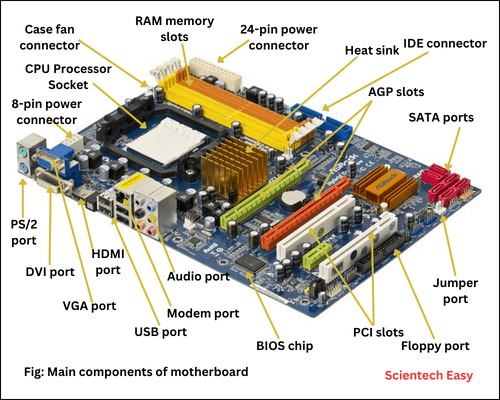
Chipset (PCH – Platform Controller Hub)
A chipset is a set of semiconductor chips (or circuits) on the motherboard that provides interfaces for memory, expansion cards, storage devices, and other peripheral components. It acts as a “traffic controller” of the motherboard and is made up of one or several integrated circuit chips.
The chipset works closely with the CPU processor to collectively control the memory, buses on the motherboard, and some onboard peripheral devices. Therefore, a chipset on the motherboard must be compatible with the processor that it serves.
Together, a chipset and CPU socket determines what type of processor a motherboard can support, how fast it will run, how fast buses will run, and speed, type, and maximum amount of memory we can have. The original manufacturers such as Intel and AMD usually give the name and model number to the chipsets.
We can divide the functions of a chipset into main categories – Northbridge and Southbridge. Let’s take a brief look at both.
Northbridge
A Northbridge is a part of the motherboard chipset that establishes the communication among high-speed peripherals, such as memory, PCI (Peripheral Component Interconnect) bus, AGP (Accelerated Graphics Port) bus, and the Level 2 processor cache (L2 Cache memory).
It communicates with processor and memory using FSB (Front Side Bus) that is a just set of signal pathways between the CPU and main memory. On the other hand, the backside bus is a set of signal pathways between the CPU and Level 2 cache memory, if present.
The overall performance of a motherboard depends on the performance of Northbridge chipset. It controls the data flow between the CPU, memory, and graphics. It also manages the communication between the Southbridge and the rest of computer.
However, the functions of the Northbridge in modern motherboards have been integrated directly into the CPU. This integration improves speed, reduces latency, and lowers power consumption.
Southbridge
Southbridge is a single semiconductor chipset that is responsible for controlling all onboard Input/Output functions of a computer such as USB, BIOS (FireWire), PS/2, Parallel, Series, wire-less LAN ports, IDE, audio, and so on.
It also manages the communications with the other expansion buses, such as PCI, USB, and legacy buses. The below diagram shows an example of a typical computer motherboard chipset (including both Northbridge and Southbridge) and components they interface with.
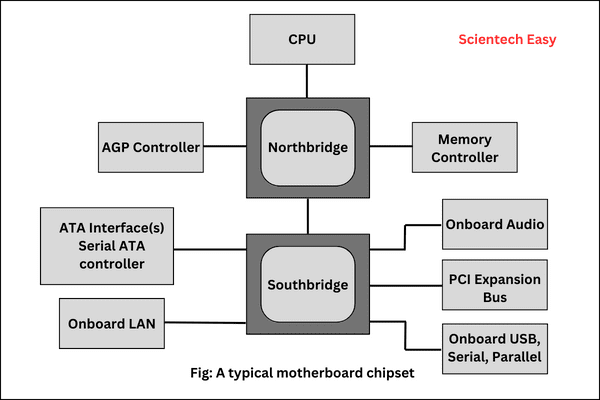
In modern computers, the Southbridge has been replaced by the Platform Controller Hub (PCH) in Intel-based systems and the I/O Hub (Chipset) in AMD-based systems. The PCH connects to the CPU using a Direct Media Interface (DMI) in Intel systems or Infinity Fabric in AMD systems, enabling high-speed communication without the need for separate Northbridge and Southbridge chips.
CPU Processor Sockets
The central processing unit (CPU), or simply a processor, is the brain of the computer. This electrical component performs all the mathematical calculations and 90 percent of all the functions of a computer.
There are various types of processors available for computers in the market. In today’s modern computers, the processor is the easiest component that we can identify on the motherboard. It is installed in either a socket or slot, depending on the type of chip.
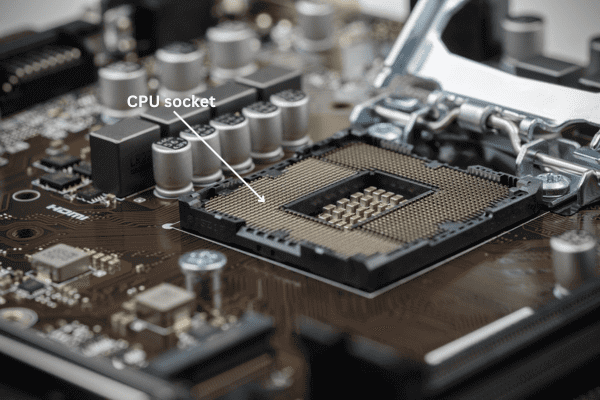
The CPU socket on the motherboard is a flat connector in shape that provides both mechanical support and electrical interface between the processor and the motherboard.. It has several rows and columns of holes (pins) arranged in the square, as shown in the below figure.
Most of the modern CPU sockets use the Pin Grid Array (PGA) or Land Grid Array (LGA) design.
- In PGA sockets, the pins are located on the underside of the processor and fit into the socket holes. AMD processors mainly uses this design.
- In LGA sockets, the pins are on the motherboard socket, and the processor has flat contact pads. Intel processors use this design.
The CPU sockets has feature a ZIF (Zero Insertion Force) that refers to the amount of force required to install a CPU into the socket mounted on the motherboard. It makes easy to insert and remove the processor so that the processor pins are not damaged during the insertion.
Most of the processors installed on the CPU socket are attached along with a heat sink or colling fan because they produce a lot of heat during the normal operations.
Historical and Modern CPU Sockets
The Intel company had designed the first standard CPU socket named Socket 1, originally called “OverDrive” socket. It is usually 17 * 17 pin grid array (PGA) socket that contains 169 pins and needs 5 volt voltage. It supports the processors like 486 SX/SX2, DX/DX2, and DX4 OD (OverDrive). Its successor socket is Socket 2, Socket 3 and so on.
LGA1200 socket is the latest socket created by Intel to install 10th generation and 11th generation Intel® Desktop Processors. However, 9th, 8th, 7th, 6th Generation Intel® Desktop Processors use LGA1151 socket. While AMD use AM5 (LGA 1718) socket type to support
Ryzen 7000 and 8000 Series.
Memory Slots and External Cache
The main memory of a computer is random access memory (RAM), which temporarily stores data during the normal operation of the computer. A memory slot is a physical connector on a motherboard of the computer that holds the main memory chip. It is very easy to identify on the computer motherboard.
Memory slots are long and located very close to each other on the motherboard. The number of slots of memory on the motherboard specifies the maximum amount of RAM that we can install on a computer. However, it may vary from motherboard to motherboard, but the appearance of different slots is the same.
DIMM (Dual In-line Memory Module)
Today, most of the computer’s motherboard come with DIMM (Dual In-line Memory Module) slots. They contain a series of dynamic random access memory (DRAM) chips mounted on a printed circuit board. They are designed in order to use in personal computers, workstations, printers, and servers.
Today, DIMMs come in a variety of sizes and speeds. They generally come in two lengths – for PC, it is 133.35 mm (5.25 in) and SO-DIMM for laptop is about half the size at 67.60 mm (2.66 in).
Variance of DIMMs support DDR, DDR2, DDR3, DDR4 and DDR5 RAM. DIMMs come in different pin configuration that are as follows:
- 100-pin, used for printer SDRAM
- 168-pin, used for SDRAM, FPM, EDO
- 184-pin, used for DDR SDRAM
- 200-pin, used for DRAM in some Sun workstations and servers.
- 240-pin, used for DDR2 SDRAM, and DDR3 SDRAM
- 240-pin, used for FB-DIMM
- 278-pin, used for HP high density SDRAM.
- 288-pin, used for DDR4 SDRAM and DDR5 SDRAM
SO-DIMM or small outline DIMM
- 144-pin, used for SDR SDRAM
- 200-pin, used for DDR SDRAM and DDR2 SDRAM
- 204-pin, used for DDR3 SDRAM
- 260-pin, used for DDR4 SDRAM
- 260-pin, with different notch position, used for either DDR3 or DDR4 SDRAM
- 262-pin, used for DDR5 SDRAM
MiniDIMM
- 244-pin, used for DDR2 SDRAM
MicroDIMM
- 172-pin, used for DDR SDRAM
- 214-pin, used for DDR2 SDRAM
Note: Modern motherboards support DDR5 or DDR4 memory. The full form of DDR is double data rate. The full form of SDRAM is synchronous dynamic random-access memory (synchronous dynamic RAM).
External Cache (Optional)
Some older CPUs had external cache memory on the motherboard, typically Level 2 (L2) cache. Today, most of the modern CPUs have L2 and L3 cache integrated directly on the processor. So, motherboards no longer include external cache.
Expansion Slots
Expansion slots are the most visible components of any motherboard. We can easily identify them on the motherboard, as they are generally located close to each other and near the rare end of the case. Expansion slots are usually 3 to 11 inches long and approximately 1/2 inch wide.
These slots are especially used to install various devices to expand its capabilities. We can install sound card, graphics cards, network card, etc. on these slots. Each type of expansion slot differs in appearance and functions. The most common types of expansion slots on a typical motherboard of today’s computer are as:
- PCI
- AGP
- PCIe
PCI Expansion Slots
Peripheral Component Interconnect (PCI) slots are found on the motherboard of a computer. They are used to connecting various compatible expansion cards or peripheral devices to the computer system.
These expansion slots allow us to add functionality and improve the performance of your computer. Most computers made today contain PCI slots. They can be easily identified because they are usually white and are about 3 inches long.
Types of Expansion Cards and Peripherals
PCI slots can accommodate various types of expansion cards and peripherals. Here are some common devices that we can connect to PCI slots:
- Graphics cards
- Sound cards
- Network Interface Cards (NIC)
- Storage controllers
- TV tuner cards
- Wireless cards
- Modems
- USB expansion cards
Note: PCI slots (legacy) are still included on some motherboards for backward compatibility, but PCI Express (PCIe) has become the standard expansion slot in modern computers.
AGP Expansion Slots
AGP stands for Accelerated Graphics Port or Advanced Graphics Port. It is a high-speed point-to-point channel for adding a 3D graphics card or video card to a computer’s motherboard. It allows the video card to communicate directly with the CPU processor and memory.
AGP slots can be easily recognizable because they are usually brown, located right next to the PCI slots on the motherboard. They are usually shorter than PCI slots.
Note: Modern motherboards no longer use AGP slots. PCIe has completely replaced AGP for graphics and most expansion cards.
PCIe Expansion Slots (Modern Motherboards)
Peripheral Component Interconnect Express (PCIe) is a high-speed serial bus interface that we use to add various expansion cards to a motherboard of the computer system. It is available on new computer motherboards. This slot is designed to replace AGP and PCI slots, but most computer motherboards have still PCI aw well as AGP slots.
A PCIe slot establishes a direct and faster connection between the motherboard and peripherals, resulting in improved data transfer rates and reduced latency compared to their predecessors. We can use these slots to install:
- Graphics cards
- Network adapters
- Storage expansion cards (NVMe adapters, RAID cards)
- Sound cards
- Video capture cards, etc.
Key Points About PCIe Slots
- PCIe slots come in different sizes, such as x1, x4, x8, and x16. These sizes depend on the bandwidth required by the device.
- Modern motherboards support PCIe 3.0, 4.0, and 5.0, with faster versions providing higher data transfer rates.
- PCIe is backward compatible, so older PCIe cards can work in newer slots at lower speeds.
BIOS / UEFI Chip
The Basic Input/Output System (BIOS) or firmware is the most important semiconductor chip on the computer motherboard, aside from the processor. It is a non-volatile memory chip containing BIOS software that stores firmware instructions and data essential for the initial startup of a computer.
Modern computer systems typically use UEFI (Unified Extensible Firmware Interface) instead of the traditional BIOS. The UEFI/BIOS basically tells the CPU processor how to interact with the rest of the hardware components of the computer. UEFI memory chip is activated as soon as the computer is powered on. When we turn on our computer, the BIOS/UEFI chip executes a series of firmware instructions stored in its memory.
These instructions perform several essential tasks, such as:
- Testing hardware components (POST – Power-On Self-Test)
- Initializing system settings (clock, memory, devices)
- Detecting storage drives and peripherals
- Loading the operating system into memory
This process is known as booting up. Modern motherboards with UEFI firmware also support advanced features such as secure boot, faster boot times, graphical user interfaces, and large storage drives.
CMOS Chip
Complementary metal-oxide semiconductor (CMOS) is a type of memory chip that stores certain computer settings, such as date and time, even when the computer is powered off. It gets its power from the small cylindrical battery, called CMOS battery, installed on the computer motherboard.
This battery comes in different shape and size, but they all perform similar functions. CMOS technology is widely used in analog circuits, such as image sensors, data conversion, and highly integrated transceivers for the various types of communication.
Cooling Systems
We know that electronic components produce heat. It is caused by the flow of electric current within the components. The components of a computer works better when kept cool. If heat is not removed, then it may run slower. The computer components may damage if too much heat generated.
When air will flow inside the computer case, it will remove heat. More air will flow, more will heat remove. To overcome this problem, a case fan is installed in the computer case to make the cooling process more efficient.
Besides to this case fan, a heat sink exhausts the heat away from the core of the processor. A case fan on the top of the heat sink does to remove the heat from the CPU.
Note: Modern computer systems may also use liquid cooling or hybrid cooling solutions. These types of cooling are especially used in high-performance or gaming PCs to maintain optimal temperatures for the processor and other critical components.
Power Supply Connectors
Power connectors play a significant role in distributing the necessary electrical power to various components within a computer system. There is only one main power supply connector (usually 24-pin ATX) on the computer motherboard. It also contains a small 4-pin connector for CPU fan.
Power supply connectors can be easily recognizable because it is rectangular in shape and white in color. ATX (Advanced Technology eXtended ) power connector is widely used on the desktop computer and provides the electric power to the motherboard.
The main function of power supply is to convert 110-volt or 220-volt AC voltage into DC voltage for different components of the computer. These DC voltages supply 3.3 volts, +5 volts, and -5 volts, +12 volts and -12 volts. The rating of power supply unit is watts, that is a measure of power.
Types of Power Supply Connectors
There are many different types of power supply connectors used on the computer motherboard and peripherals. Some of the common types of types are as:
- 24-pin ATX power connector: Main power supply to the motherboard
- 4/8-pin CPU power connector: Power to CPU
- PCIe power connector: Power for graphics cards
- SATA power connector: Power for SSDs, HDDs, and optical drives
- Molex power connector: Legacy devices like older HDDs, optical drives, or fans
- Fan power connector: Power for case and CPU fans
Note: Molex connectors are mostly used in older systems, while SATA and PCIe power connectors are standard in modern computers.
The power supply rating is measured in watts (W), which indicates the maximum power it can deliver to the system. Choosing a power supply with adequate wattage is important for system stability, especially for gaming PCs or high-performance workstations.
VRM Modules
The Voltage Regulator Module (VRM) is an important component or part on a computer motherboard. It controls and stabilizes the power supply from the PSU (Power Supply Unit) to the CPU, GPU, and RAM.
Modern processors and memory modules require precise and stable voltage to function properly. The PSU delivers power in +12V, +5V, or +3.3V DC rails. The VRM converts these voltages into a stable, lower voltage (usually between 0.7V to 1.5V) required by the CPU or other components. It continuously monitors and adjusts the voltage to maintain stability.
Storage Connectors (SATA, M.2, NVMe)
Storage connectors on a motherboard of computer allow communication between storage devices (like SSDs and HDDs) and the rest of the computer system. Modern motherboards include several types of storage interfaces, each offering different speeds and form factors. The three most common connectors are SATA, M.2, and NVMe.
1. SATA (Serial ATA)
The Serial Advanced Technology Attachment (SATA) is one of the oldest and most common storage interfaces. It connects storage drives, such as HDDs, SSDs, and optical drives to the motherboard. It replaced the older PATA (Parallel ATA) interface. SATA III (the latest version) supports up to 6 Gbps (around 600 MB/s).
2. M.2 Slot
The Next Generation Form Factor (NGFF), commonly called M.2 is a small, compact connector used for high-speed SSDs. It looks like a small stick similar to RAM but thinner. M.2 slot can connect through SATA or PCIe, depending on the drive and motherboard.
3. NVMe
The Non-Volatile Memory Express (NVMe) is a protocol, not a physical connector. It uses the PCIe interface to communicate directly with the CPU, drastically reducing latency and increasing data transfer speeds. NVMe has extremely fast read/write speeds. It lower latency and higher efficiency.
In this tutorial, you have known about the components of computer motherboard and their functions in easy words. I hope that you will have understood the basic points of motherboard components with figure and enjoyed this tutorial. In the next, we will understand what is CPU (central processing unit) and how does it works in a computer system.
FAQs on Motherboard Components
1. What is a motherboard in a computer?
A motherboard is the main circuit board in a computer that connects all of the crucial components such as the CPU, RAM, storage devices and other hardware. It is also known as the system board or mainboard.
2. What are the main functions of computer motherboard?
The main functions of computer motherboard are:
- It provides sockets, ports, and expansion slots to connect internal hardware components and external peripheral devices.
- It facilitates the flow of data and instructions between various hardware components.
- It distributes power from the power supply unit (PSU) to all connected hardware components.
- It houses essential firmware (BIOS/UEFI) and chipsets that manage system operations and control the system booting process.
3. What are the main components of a motherboard in a computer?
The main components of a motherboard in a computer system include:
- Chipsets
- CPU sockets
- Memory slots
- Expansion slots
- BIOS chip
- CMOS battery
- Power connectors
- Storage connectors
- I/O ports
4. What is a chipset on the motherboard?
The chipset is a group of integrated circuits that manages data flow between the CPU, RAM, storage, and peripherals. It plays a crucial role in determining features and performance of a computer motherboard.
5. What is a CPU socket on a motherboard?
A CPU socket is the physical slot on the motherboard where the processor (CPU) is installed. Different CPUs require specific socket types, such as LGA or AM series sockets.


