
A constructor that is used to copy the data of one object into another object of the same class type is called copy constructor in Java.
In simple words, a copy constructor creates a new object by copying the values of an existing object. It provides an easy and convenient way to create an exact copy of an object from an object sent as an argument to the constructor.
A copy constructor takes a reference to an object of the same class as an argument and returns a new copy with the same values as the argument.
Unlike C++, Java does not provide a built-in copy constructor automatically. You must explicitly define it in the class. Like other constructors, a copy constructor has the following characteristics:
- A copy constructor has the same name as the class.
- It does not have a return type.
- It is invoked when an object is created.
How Does a Copy Constructor Copy Object Data?
Let’s understand how a copy constructor copies data of an object. There are two statements given below where we have created two objects of the same class with reference variables s1 and s2.
Student s1 = new Student();
Student s2 = new Student(s1);
In the second statement, the constructor Student(Student s2) is called. This constructor copies the contents of object s1 into the newly created object s2.
If we write:
Student s2 = s1;
then no new object is created. Both s1 and s2 refer to the same object in memory. Only the reference is copied, not the object contents.
But when we write:
Student s2 = new Student(s1);
A completely new object is created. The copy constructor copies the data from object s1 into the new object referenced by s2.
Example 1: Copy Constructor for Class Student
class Student {
    int id;
    String name;

    // Normal constructor.
    Student(int id, String name) {
        this.id = id;
        this.name = name;
    }

    // Copy constructor.
    Student(Student s) {
        this.id = s.id;
        this.name = s.name;
    }
}
The copy constructor simply takes a single argument whose type is class containing constructor. In other words, it simply takes one parameter, which is a reference to an object of the same class.
Need of Copy Constructor in Java
Sometimes, we need to create an exact copy of an existing object of the same class. Also, if any changes are made to the copied object, they should not affect the original object and vice versa.
To handle such situations, you can use a copy constructor in Java, which creates a new object by copying the values of an existing object. This creates a separate object in memory instead of copying only the reference.
Basic Algorithm to Implement Copy Constructor
The basic algorithm for implementing a copy constructor in Java is as follows:
- Define a class that represents an object you want to copy.
- Within the class, declare instance variables that represent the data members you want to copy.
- Declare a constructor for the same class that takes a reference to an object of the same class as its parameter. This constructor is used to create a new object by copying the values of an existing object.
- Within the copy constructor, initialize the instance variables using the values from the argument object with the help of this keyword.
- Check whether the specified object reference is null. If it is null, initialize the instance variables with default values or handle the situation appropriately.
- The copy constructor performs a shallow copy because it copies object references directly instead of creating separate copies of the referenced objects.
- If the instance variables are objects, construct new instances of those objects inside the constructor and initialize them with values from the argument object. It is called deep copying or cloning. This cloning ensures that changes to the copied object do not affect the original object.
Java Copy Constructor Example Programs
Let’s take a simple example program step by step to understand the concept of copy constructor in Java.
Example 1:
package copyConstructor;
// Step 1: Create a class Number.
public class Number
{
 // Step 2: Declare instance variables a and b with data type int.
    int a = 10;
    int b = 20;

 // Step 3: Declare a default constructor.
    public Number()
    {

    }
 // Step 8: Declare a copy constructor.
    public Number(Number n)
    {
      a = n.a;
      b = n.b;
    }
public static void main(String[] args)
 {
 // Step 4: Create an object of the class Number and print the value by calling variable a and b using reference variable.
 // We cannot directly call non-static member in the static region.
    Number n = new Number();

    System.out.println("Value of a: " +n.a);
    System.out.println("Value of b: " +n.b);

 // Step 5: Now we are updating values of a and b in the existing object i.e existing memory location.
    n.a = 50;
    n.b = 40;
    System.out.println("Updating values of a and b in the existing object");
    System.out.println("Value of a: " +n.a); // 30
    System.out.println("Value of b: " +n.b); // 40

 // Step 6: But when we create a new object, we will not get updated values of a and b in the new object.
 // Take a look.
    Number n2 = new Number();
    System.out.println("Not getting updated values of a and b in the new object");
    System.out.println("Value of a: " +n2.a); // 10 // Getting initial data.
    System.out.println("Value of b: " +n2.b); // 20 // Getting initial data.

 // Step 7: To get the updated values of a and b, create another new object and pass the reference variable n of an existing object.
    Number n3 = new Number(n); // It will call a copy constructor defined in the class.
    System.out.println("Getting updated values of a and b in the new object");
    System.out.println("Value of a: " +n3.a); // 50. Now we are getting updated values of a and b.
    System.out.println("Value of b: " +n3.b); // 40
  }
}
Output:
Value of a: 10
Value of b: 20
Updating values of a and b through reference variable n
Value of a: 50
Value of b: 40
Not getting updated values of a and b in the new object
Value of a: 10
Value of b: 20
Getting updated values of a and b in the new object
Value of a: 50
Value of b: 40Memory Allocation of Copy Constructor
Look at the below figure and understand step by step explanation.
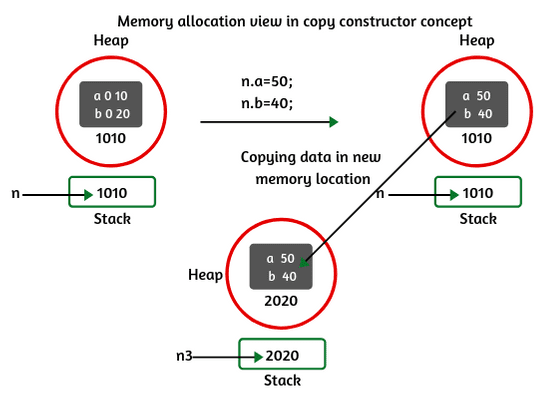
Consider the above program to understand memory allocation of copy constructor concept.
1. In the main method, when we create an object of the class, internally, JVM allocates memory for it and initialized the data 10 and 20 inside the memory after replacing 0 in the loading phase. We called variables a and b using reference variable n and we got the output 10 and 20.
2. In step 5, we have updated values of a and b by using the reference variable n. In the existing memory, the values of a and b are replaced with 50 and 40 respectively as shown in the memory.
3. In step 6, when we created a new object of the class, a new memory is allocated by JVM but we did not get updated values in the new memory as shown in the above figure because JVM did not copy the updated data into the new memory.
So, what will we do to copy the data from one memory to another memory when we create a new object?
4. To copy the data from one memory to another memory, we will use a copy constructor concept. In step 7 of the program, we have created another new object with a reference variable n3 and passed n as an argument to call copy constructor defined in the class.
Now, you will get updated data inside the new memory location with the help of a copy constructor. Thus, copy constructor in Java works.
Key Points:
1. So, we can say that a copy constructor is a constructor which is used for copying the data from one memory location (object) to another memory location (new object) meanwhile object creation.
2. Java always passes objects as the reference, but the references are passed by value.
Let’s take one more example program based on copy constructor. Look at the following example code to understand better.
Example 2:
package copyConstructor;
public class Mango
{
   boolean sweet;
   Mango(boolean b)
   {
      sweet = b;
   }
   Mango(Mango m)
   {
      sweet = m.sweet;
   }
   public void flavor()
   {
      if(sweet)
      System.out.println("Mango is sweet");
   else
      System.out.println("Mango is not sweet");
   }
}
public class FlavorTest {
public static void main(String[] args)
{
   Mango m1 = new Mango(true);
   Mango m2 = new Mango(m1);
   m1.flavor();
   m1.sweet = false;
   m2.flavor();
   m1.flavor();
  }
}
Output:
Mango is sweet
Mango is sweet
Mango is not sweet1.Explanation:
1. In the main, when we created the first object of the class and passed true as an argument, the sweet boolean data members get the signed value of m1. When we called the flavor() method for m1, the result displays “Mango is sweet”.
2. When we created the second object with reference variable m2 and passed m1 as an argument, the copy constructor is called. As sweet was having true value for m1, m2’s sweet will be having true value too. If we call flavor for m2, the result shows “Mango is sweet”.
3. Next, when we have changed the value of sweet for object m1 from true to false and called flavor() method for m1, it shows the result as “Mango is not sweet”. Thus, our copy constructor has worked.
Uses of Copy Constructor in Java
There are mainly two uses of copy constructor in Java program that are as follows:
- A copy constructor is used to declare and initialize an object from another object.
- It can be used to copy data from one memory location to another memory location in Java.
- We can construct a copy of an object that has several fields
- A copy constructor allows us to create a deep copy of heavy objects in Java.
- It helps to replace the usage of the Object.clone() method.
Copy constructor in Java provides an easy and attractive mechanism to make a copy (cloning) of one object from another object of the same class type. Since it is called with a single argument, therefore it is also called one-argument constructor.
Advantages of Copy Constructor
There are the following advantages of using a copy constructor in Java programming. They are:
- A copy constructor can change it if we define a field as final.
- It removes the need for type casting.
- If an object has many fields in the class, copy constructor would help for a great extant.
- Copy constructor make easy for us if we add extra fields because we need to change only in the copy constructor.
- We can achieve complete control over the creation of an object.
Copy Constructor Vs clone() Method
Both copy constructor and Object.clone() method works the same as to create a copy of an existing object of the class. However, the use of copy constructor is easier and well than compared to the Object.clone() method because of the following reasons:
(1) If we use the clone() method of Object class, we will have to import the Cloneable interface. This method may throw the exception named CloneNotSupportException. Handling an exception in a program is a complex job. On the other hand, there are no such complexities when we use copy constructor mechanism.
(2) If the fields are final, then we cannot assign values to them. On the other hand, in the case of copy constructor, we can assign values to the final fields.
(3) The object returned by the clone() method of Object class must be typecast. In copy constructor, on the other hand, there is no such requisite.


