A project can look perfectly manageable on a task board and still be difficult to staff. A developer may be working on three projects at once, a designer may only be available for a few hours a day, and a specialist in another time zone may already have a full schedule.
When everyone works from the same office, some of these conflicts are easier to spot. Distributed teams don’t have that advantage, which makes having a clear view of people’s time and workload much more important.
When a Task List Doesn’t Show the Whole Picture
Task management tools are good at answering basic questions. What needs to be done? Who owns it? When is it due? They become less helpful when the question changes to “How much work can this person actually take on?”
Consider a developer who has five tasks assigned to them. Looking at the task list alone, there is no obvious indication that two of those tasks are scheduled for the same week, one requires collaboration with a team in another time zone, and another depends on a colleague who is on vacation. The developer may appear fully available in one view and overloaded in another.
This is one reason resource planning deserves a view of its own. Once assignments are placed against a timeline, it becomes easier to spot overlapping work and periods when particular people are already heavily committed.
Putting People and Time on the Same Schedule
Resource scheduling connects the work that needs to be done with the people who are expected to do it. Instead of treating an employee as simply the name attached to a task, the schedule can show when that person is working, what else they have been assigned, and where their availability is limited.
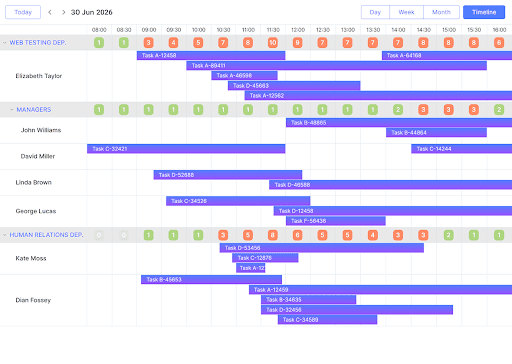
This kind of interface is often part of a larger application rather than a standalone scheduling product. A team building a workforce management system, for example, might use a JS scheduler to provide the interactive timeline and then connect it to employee records, project data, availability rules, and its own backend.
The implementation can go well beyond displaying appointments. A scheduler can provide resource-based views, drag-and-drop assignment, different time scales, and ways to highlight overlapping activities.
Developers can then build the application’s own rules around that functionality instead of having to create every piece of scheduling interaction themselves. That distinction matters. The schedule is only useful if it reflects how the organization actually works.
Distributed Teams Make Scheduling Less Predictable
Different working arrangements can make resource planning harder. Some people work fixed hours, others have more flexible schedules, and some divide their time between several projects or teams. The same person might be available for one assignment in the morning and committed to another for the rest of the day.
Then there are regional holidays, part-time schedules, contractors with limited availability, and employees who split their time between several initiatives. A resource schedule doesn’t need to eliminate all of these complications. It needs to give the team a clear view of them.
Suppose a company is preparing a product release and one engineer is responsible for a particularly specialized part of the work. That person is also supporting another team during the same period.
Moving one deadline may now affect two projects rather than one. Seeing both assignments on the same timeline gives a manager a much better starting point for deciding what should move, what can be reassigned, and what needs to stay as it is.
Workload Balancing Is An Ongoing Process
Resource planning is sometimes treated as something that happens at the beginning of a project. In practice, schedules rarely stay unchanged for long.
A customer request comes in. Someone takes unexpected leave. A task that was supposed to take two days takes five. Suddenly, the carefully balanced plan from last Monday no longer reflects the situation. This is where an interactive schedule becomes more useful than a static resource plan.
A manager can move an assignment, check the resulting overlaps, and look for another person with available capacity. The plan becomes something the team can adjust as work changes rather than a document that describes what was supposed to happen.
There is also a human side to this. Constantly assigning more work to the people who are easiest to reach can create an uneven workload that isn’t obvious from project-level progress reports. Seeing everyone’s assignments together makes those patterns harder to miss.
What Developers Need to Consider
Adding resource scheduling to an internal application raises some practical implementation questions. Where does availability data come from? Who is allowed to change another person’s schedule? How are changes saved?
What happens when two users edit the same assignment? Should an employee’s working hours come from an HR system, the project itself, or both? These decisions affect the architecture around the scheduler.
A reusable scheduling component can handle much of the interaction with the timeline, but it still needs to be connected to the application’s data and business logic.
One organization might need to schedule employees by project, another might organize them by department, and a consulting company may need to track assignments against individual clients. The interface can be similar in all three cases. The rules behind it won’t be.
Better Visibility Makes Changing Plans Easier
No scheduling system can tell a distributed team exactly what will happen next month. Projects change too often for that. What it can do is give people a shared view of the information they need when making those changes.
Instead of checking several task lists, calendars, and messages to work out who is available, a team can start with a schedule that puts assignments and capacity in the same place.
For distributed organizations, that visibility can make resource planning considerably less frustrating. The goal isn’t to create a perfect schedule and keep it untouched. It’s to give teams enough context to make sensible decisions when the schedule inevitably changes.