The MySQL SELECT statement is a Data Query Language (DQL) command used to retrieve data from one or more tables or views in a database. It is the most commonly used SQL statement because it allows you to view and analyze stored data without modifying it.
- Retrieve all rows from a table.
- Retrieve specific columns.
- Filter rows using the WHERE clause.
- Sort data in ascending or descending order with the ORDER BY clause.
- Return unique values using the DISTINCT keyword.
- Perform calculations using expressions and aggregate functions such as COUNT(), SUM(), AVG(), MIN(), and MAX().
- Retrieve data from multiple tables using joins.
- Group and summarize data using the GROUP BY and HAVING clauses.
Unlike INSERT, UPDATE, DELETE, and REPLACE, the SELECT statement is a read-only command. It retrieves data without changing the original records stored in the database.
Basic Syntax of MySQL SELECT Statement
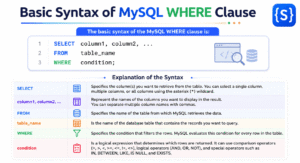
The basic syntax of the MySQL SELECT statement is:
SELECT column1, column2, ...
FROM table_name;
In the above syntax:
- SELECT specifies the column or columns that you want to retrieve from the table.
- FROM specifies the table from which MySQL retrieves the data.
- column1, column2, … represent the names of the columns that you want to display in the result set. You can specify one column, multiple columns, or use the asterisk (*) to retrieve all columns.
- table_name represents the name of the table that stores the data you want to retrieve.
How Does the Syntax Work?
When you execute a SELECT statement, MySQL reads the specified columns from the specified table in the FROM clause and returns the matching records as a result set. Since the SELECT statement is a read-only command, it does not modify, update, or delete any data stored in the table.
Example:
SELECT first_name, last_name
FROM employees;
This query retrieves the first_name and last_name columns from the employees table and displays them in the result set.
How to Retrieve Specific Columns?
You do not always need to retrieve every column from a table. In many situations, you only need specific columns. The SELECT statement in MySQL allows you to retrieve only the columns that you specify. This makes your query more efficient and displays only the required data.
For example, suppose you have a table named students.
| student_id | name | age | city |
|---|---|---|---|
| 101 | John | 20 | New York |
| 102 | Tripti | 19 | Dhanbad |
| 103 | Saanvi | 21 | Kolkata |
To retrieve only the name and age columns, execute the following query:
SELECT name, age
FROM students;
Output:
| name | age |
|---|---|
| Rahul | 20 |
| Neha | 19 |
| Amit | 21 |
In this SQL query:
- The SELECT clause specifies the name and age columns that you want to retrieve.
- The FROM clause tells MySQL to retrieve the data from the students table.
- MySQL reads each row in the table and returns values only from the specified columns.
- It does not include the student_id and city columns in the result because you did not request them.
- The original data stored in the students table remains unchanged because the SELECT statement only retrieves data.
How to Retrieve All Columns from a Table?
Sometimes, you need to view all data stored in a table. Instead of listing each column name individually, you can use the asterisk (*) wildcard to retrieve all columns from the specified table. The * symbol represents all columns in the specified table. The general syntax to retrieve all columns from the table is:
SELECT *
FROM table_name;
Example:
SELECT *
FROM students;
When MySQL executes this query:
- It reads the students table.
- The * wildcard instructs MySQL to retrieve every column in the table.
- MySQL returns all rows along with the values in the student_id, name, age, and city columns.
- The columns appear in the same order in which they are defined in the table.
Output:
| student_id | name | age | city |
|---|---|---|---|
| 101 | John | 20 | New York |
| 102 | Tripti | 19 | Dhanbad |
| 103 | Saanvi | 21 | Kolkata |
Perform Calculations Using the MySQL SELECT Statement
In addition to retrieving data from a table, the MySQL SELECT statement can also evaluate expressions and perform calculations. In this case, MySQL calculates the result and returns it as a result set.
You can use arithmetic operators with the SELECT statement to perform calculations such as addition, subtraction, multiplication, division, and finding the remainder. Let’s take examples based on it.
Example 1: Addition
The following query adds two numbers and returns the result.
SELECT 25 + 15;Output:
40
In this query:
- MySQL evaluates the expression 25 + 15 and calculates the sum of the two numbers.
- After calculation, MySQL returns the result 40 as a single value.
- Since the query does not retrieve data from a table, you do not need to use the FROM clause.
Example 2: Multiplication
The following query multiplies two numbers and returns the result.
SELECT 100 * 5;
Output:
500
In this query:
- MySQL evaluates the expression 100 * 5 and multiplies 100 by 5.
- After multiplying, MySQL returns the result 500 as a single value.
Common Arithmetic Operators in MySQL
You can use the following arithmetic operators with the SELECT statement:
| Operator | Description | Example | Result |
|---|---|---|---|
+ | Addition | SELECT 20 + 10; | 30 |
- | Subtraction | SELECT 20 - 10; | 10 |
* | Multiplication | SELECT 20 * 10; | 200 |
/ | Division | SELECT 20 / 10; | 2 |
% | Modulus (Remainder) | SELECT 20 % 3; | 2 |
Using Calculations with Table Data
You can also perform calculations on column values stored in a table. For example, suppose you have a products table and you want to calculate a 10% tax on the price column. You can do the math directly in the SELECT statement and use the AS keyword to name the new column:
SELECT
    product_name,
    price,
    price * 0.10 AS tax_amount,
    price + (price * 0.10) AS total_price
FROM products;
Output:
| product_name | price | tax_amount | total_price |
|---|---|---|---|
| Laptop | 1000.00 | 100.0000 | 1100.0000 |
| Monitor | 200.00 | 20.0000 | 220.0000 |