The MySQL WHERE clause filters records based on one or more conditions. It returns only the rows that satisfy the specified condition. Rows that do not meet the condition are excluded from the result set.
The WHERE clause is one of the most commonly used SQL clauses because database tables often contain thousands or even millions of records.
Instead of retrieving every row from a table, you can use the WHERE clause to fetch only the data you need. This improves query accuracy and reduces unnecessary data processing.
For example, you can use the WHERE clause to:
- Find a student by their ID.
- Display employees whose salary is greater than ₹50,000.
- Show customers who live in a specific city.
- Retrieve products within a particular price range.
- Update only the records that match a condition.
- Delete only the records that satisfy a specified condition.
Basic Syntax of MySQL WHERE Clause
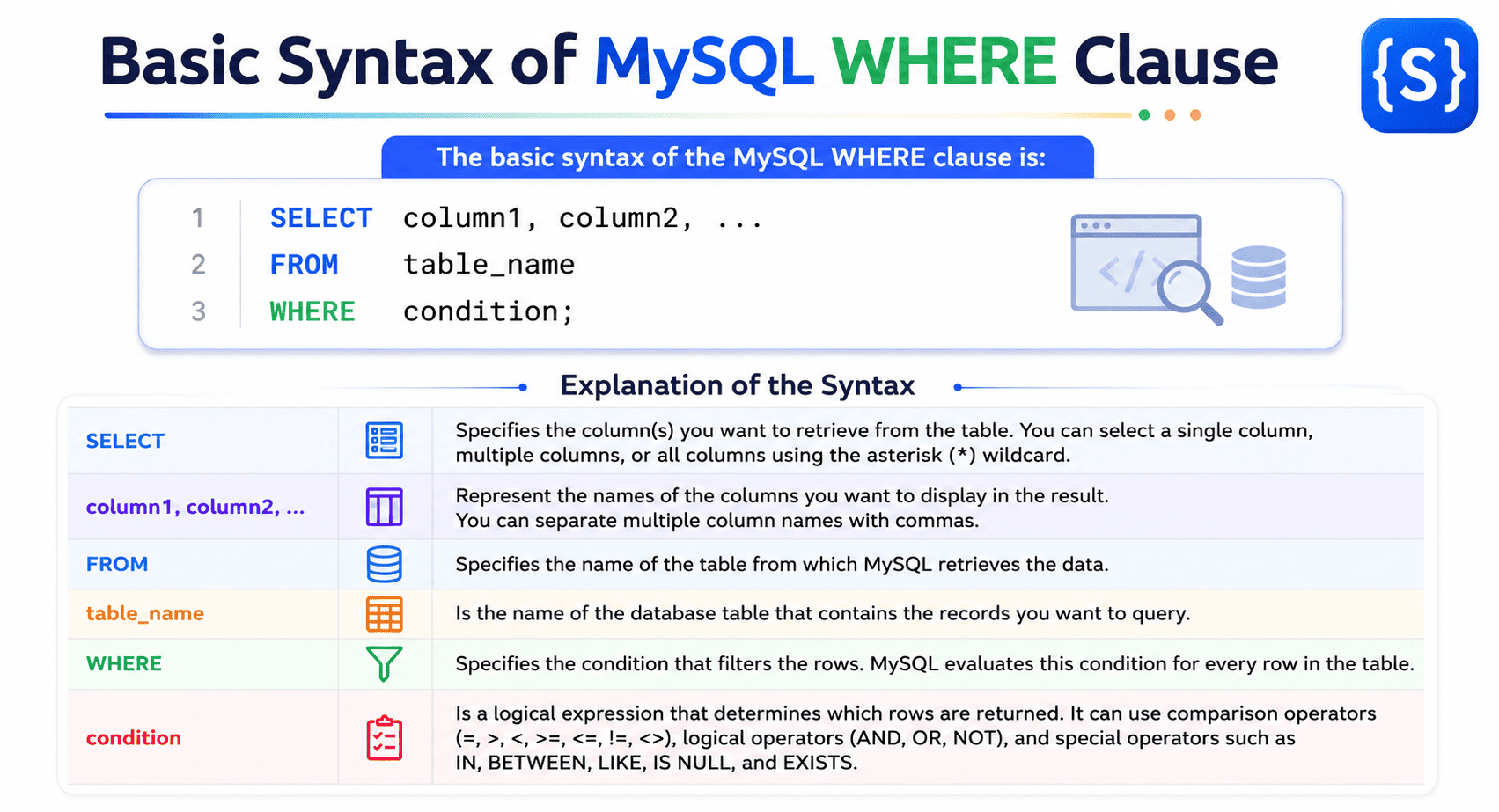
The basic syntax of the MySQL WHERE clause is:
SELECT column1, column2, ...
FROM table_name
WHERE condition;
In this syntax:
- SELECT specifies the column(s) you want to retrieve from the table. You can select a single column, multiple columns, or all columns using the asterisk (*) wildcard.
- column1, column2, … represent the names of the columns you want to display in the result. You can separate multiple column names with commas.
- FROM specifies the name of the table from which MySQL retrieves the data.
- table_name is the name of the database table that contains the records you want to query.
- WHERE specifies the condition that filters the rows. MySQL evaluates this condition for every row in the table.
- condition is a logical expression that determines which rows are returned. It can use comparison operators (=, >, <, >=, <=, !=, <>), logical operators (AND, OR, NOT), and special operators such as IN, BETWEEN, LIKE, IS NULL, and EXISTS.
How the WHERE Clause Works
When MySQL executes a SQL query that contains a WHERE clause, it examines each row in the specified table one by one. For every row, MySQL evaluates the condition specified in the WHERE clause.
- If the condition evaluates to TRUE, MySQL includes the row in the result set.
- If the condition evaluates to FALSE or NULL, MySQL excludes the row from the result set.
This filtering process allows you to retrieve only the records that match the specified condition instead of returning every row in the table.
Example:
Suppose you have a table named students and want to display only the students whose age is 20 years. To extract this data from the table, execute the following SQL query:
SELECT student_id, student_name, age
FROM students
WHERE age = 20;
In this query:
- SELECT student_id, student_name, age retrieves the student_id, student_name, and age columns from the table named students.
- FROM students tells MySQL to retrieve data from the students table.
- WHERE age = 20 filters the rows and returns only those students whose age is exactly 20.
Output:
Only the records of the students table whose age is 20 will be displayed. All other records are ignored.
SQL Statements That Can Use the WHERE Clause
The WHERE clause can be used with several SQL statements to filter rows based on one or more conditions. It is commonly used with the following statements:
- SELECT – Retrieves only the rows that satisfy the specified condition.
- UPDATE – Updates only the rows that match the specified condition.
- DELETE – Deletes only the rows that satisfy the specified condition.
By using the WHERE clause, you can perform operations on specific rows instead of affecting every row in a table. If you omit the WHERE clause in an UPDATE or DELETE statement, all rows in the table are updated or deleted, respectively.
Sample Database Table
To understand how the MySQL WHERE clause works, let’s use the below table named students. Throughout this tutorial, all examples will be based on the data shown below.
| student_id | name | age | city | marks |
|---|---|---|---|---|
| 101 | Tripti | 20 | Dhanbad | 88 |
| 102 | Saanvi | 19 | Ranchi | 92 |
| 103 | Deepak | 21 | Dhanbad | 75 |
| 104 | Priya | 20 | Bokaro | 85 |
| 105 | Rohan | 22 | Jamshedpur | 68 |
| 106 | Anita | 19 | Dhanbad | 95 |
We will use this students table in all the examples throughout this tutorial to demonstrate how the WHERE clause filters records based on different conditions.
Retrieve All Records Without the MySQL WHERE Clause
The following query retrieves every record from the students table because it does not contain a WHERE clause.
SELECT *
FROM students;
Output:
| student_id | name | age | city | marks |
|---|---|---|---|---|
| 101 | Tripti | 20 | Dhanbad | 88 |
| 102 | Saanvi | 19 | Ranchi | 92 |
| 103 | Deepak | 21 | Dhanbad | 75 |
| 104 | Priya | 20 | Bokaro | 85 |
| 105 | Rohan | 22 | Jamshedpur | 68 |
| 106 | Anita | 19 | Dhanbad | 95 |
This query uses the SELECT * statement, where the asterisk (*) represents all columns in the table.
Since the query does not include a WHERE clause, MySQL does not apply any filtering condition. As a result, it retrieves and displays every row from the students table.
When to Use This:
Use a query without a WHERE clause when you want to view all the records stored in a table.
Retrieve a Record Using the MySQL WHERE Clause
Suppose you want to display only the student whose student ID is 103. The following SQL query retrieves the record from the students table.
SELECT *
FROM students
WHERE student_id = 103;
Output:
| student_id | name | age | city | marks |
|---|---|---|---|---|
| 103 | Deepak | 21 | Dhanbad | 75 |
In this SQL query:
- We use the WHERE clause to filter the records in the students table. The filtering condition is student_id = 103.
- When MySQL executes the query, it examines each row in the students table one by one.
- It compares the value of the student_id column in each row with 103.
- If the value is 103, the condition evaluates to TRUE, and MySQL includes that row in the result set.
- If the value is not 103, the condition evaluates to FALSE, and MySQL excludes that row from the result set.
Since only one row has a student_id of 103, MySQL returns only that record.
This example demonstrates how the WHERE clause helps you retrieve a specific record instead of displaying every row in the table.
Retrieve Specific Columns with the WHERE Clause
In many situations, you do not need to retrieve all the columns from a table. Instead, you may want to display only the columns that are relevant to your query. You can do this by specifying the required column names in the SELECT clause and using the WHERE clause to filter the rows.
The following query retrieves only the name and city columns for the student whose student_id is 104.
SELECT name, city
FROM students
WHERE student_id = 104;
Output:
| name | city |
|---|---|
| Priya | Bokaro |
In this SQL query:
- The SELECT clause tells MySQL to select only the name and city columns.
- The FROM clause tells MySQL to retrieve data from the students table.
- The WHERE clause filters the records using the condition student_id = 104.
- MySQL examines each row in the students table and compares the value of the student_id column with 104.
- When it finds the row where student_id is 104, the condition evaluates to TRUE, and MySQL selects that row.
- Instead of displaying every column in the matching row, MySQL returns only the name and city columns specified in the SELECT clause.
Since only one row has a student_id of 104, the query returns a single record containing only the student’s name and city.
Important Note:
The WHERE clause determines which rows to retrieve, while the SELECT clause determines which columns to display. These two clauses work together to return only the required data from a table.
Comparison Operators in the MySQL WHERE Clause
Comparison operators compare one value with another. They are used in the WHERE clause to create conditions that filter rows. MySQL evaluates each condition and returns only the rows that satisfy it.
The following table lists the comparison operators commonly used with the WHERE clause:
| Operator | Description |
|---|---|
= | Equal to |
!= | Not equal to |
<> | Not equal to (standard SQL operator) |
> | Greater than |
< | Less than |
>= | Greater than or equal to |
<= | Less than or equal to |
Equal To (=) Operator
The equal to (=) operator compares the value of a column with a specified value. It returns only the rows in which the column value exactly matches the specified value.
The = operator is one of the most commonly used comparison operators in the WHERE clause. You can use it to search for exact values in numeric, string, and date columns.
Example 1:
Let’s take an example in which we retrieve all students who live in Dhanbad.
SELECT *
FROM students
WHERE city = 'Dhanbad';
Output:
| student_id | name | age | city | marks |
|---|---|---|---|---|
| 101 | Tripti | 20 | Dhanbad | 88 |
| 103 | Deepak | 21 | Dhanbad | 75 |
| 106 | Anita | 19 | Dhanbad | 95 |
In this SQL query:
- The MySQL WHERE clause uses the condition city = ‘Dhanbad’.
- MySQL examines each row in the students table one by one.
- It compares the value of the city column in every row with ‘Dhanbad’.
- If the city is Dhanbad, the condition evaluates to TRUE, and MySQL includes that row in the result set.
- If the city is not Dhanbad, the condition evaluates to FALSE, and MySQL excludes that row from the result set.
Since three students belong to Dhanbad, MySQL returns those three records.
Not Equal To (!=) Operator
The not equal to (!=) operator retrieves the rows whose values do not match the specified value. This operator is useful when you want to exclude records containing a particular value.
Example 2:
Let’s take an example in which we retrieve all students who do not live in Dhanbad.
SELECT *
FROM students
WHERE city != 'Dhanbad';
Output:
| student_id | name | age | city | marks |
|---|---|---|---|---|
| 102 | Saanvi | 19 | Ranchi | 92 |
| 104 | Priya | 20 | Bokaro | 85 |
| 105 | Rohan | 22 | Jamshedpur | 68 |
In this SQL query:
- The MySQL WHERE clause uses the condition city != ‘Dhanbad’.
- MySQL compares the value of the city column in every row with ‘Dhanbad’.
- If the city is not Dhanbad, the condition evaluates to TRUE, and MySQL returns that row.
- If the city is Dhanbad, the condition evaluates to FALSE, and MySQL excludes that row.
As a result, the query returns only the students who do not belong to Dhanbad.
Important Note:
MySQL also supports the <> operator. It works exactly like != and is the standard SQL operator for “not equal to.”
Greater Than (>) Operator
The greater than (>) operator retrieves the rows whose values are greater than the specified value. This operator is commonly used to filter numeric values such as marks, salary, price, age, and quantity.
Example 3:
Let’s take an example in which we want to display students who scored more than 90 marks.
SELECT student_id, name, marks
FROM students
WHERE marks > 90;
Output:
| student_id | name | marks |
|---|---|---|
| 102 | Saanvi | 92 |
| 106 | Anita | 95 |
In this SQL query:
- The WHERE clause is specified with the condition marks > 90.
- MySQL compares the marks value of every student with 90.
- Students whose marks are greater than 90 satisfy the condition.
- Students whose marks are 90 or less are excluded. Therefore, only Saanvi and Anita are returned.
Less Than (<) Operator
The less than (<) operator retrieves the rows whose values are less than the specified value.
Example 4:
Let’s take an example where we will display students whose age is less than 20 years.
SELECT student_id, name, age
FROM students
WHERE age < 20;
Output:
| student_id | name | age |
|---|---|---|
| 102 | Saanvi | 19 |
| 106 | Anita | 19 |
Greater Than or Equal To (>=) Operator
The greater than or equal to (>=) operator retrieves the rows whose values are either greater than or exactly equal to the specified value.
Example 5:
Let’s see an example where we will display students who scored 85 or more marks.
SELECT student_id, name, marks
FROM students
WHERE marks >= 85;
Output:
| student_id | name | marks |
|---|---|---|
| 101 | Tripti | 88 |
| 102 | Saanvi | 92 |
| 104 | Priya | 85 |
| 106 | Anita | 95 |
In this SQL query:
- The specified condition with the MySQL WHERE clause is marks >= 85.
- MySQL returns rows where the marks value is greater than 85 or exactly equal to 85.
- Students whose marks are less than 85 are excluded from the result set.
Therefore, the above SQL query returns all students who scored 85 or more marks.
Less Than or Equal To (<=) Operator
The less than or equal to (<=) operator retrieves the rows whose values are either less than or exactly equal to the specified value.
Example 6:
The following example displays students whose age is 20 or below.
SELECT student_id, name, age
FROM students
WHERE age <= 20;
Output:
| student_id | name | age |
|---|---|---|
| 101 | Tripti | 20 |
| 102 | Saanvi | 19 |
| 104 | Priya | 20 |
| 106 | Anita | 19 |
In this SQL query:
- The specified condition with the MySQL WHERE clause is age <= 20.
- MySQL compares the age value of every student with the value 20.
- Students whose age is less than 20 or exactly 20 satisfy the specified condition and are included in the result set.
- Students older than 20 are excluded from the result set.
Therefore, MySQL returns all students whose age is 20 years or less.
Key Points About MySQL WHERE Clause
- The WHERE clause filters rows based on one or more specified conditions.
- It returns only the rows that satisfy the specified condition.
- You can use the WHERE clause with SELECT, UPDATE, and DELETE statements.
- String values should be enclosed in single quotes (‘ ‘), whereas numeric values do not require quotes.
- MySQL evaluates the specified condition for each row in the table before returning the result.
- You can use comparison operators such as =, !=, <>, >, <, >=, and <= to create filtering conditions.
- You can combine multiple conditions using logical operators such as AND, OR, and NOT.
- If no row satisfies the specified condition, MySQL returns an empty result set.
- Omitting the WHERE clause in a SELECT statement returns all rows in the table. Omitting it in an UPDATE or DELETE statement affects all rows in the table, so use it carefully.