Learn how to write a Java program to print student details using Scanner input.
A college wants to develop a simple Student Information Management Program. Instead of hardcoding the student’s information, the program should prompt the user to enter the student’s details using the keyboard.
The program should read and store the following information:
- Student Name
- Age
- Roll Number
- College Name
- Percentage
- CGPA
- Grade
- Passed Status
After accepting all the input values, display the complete student information in a well-formatted and user-friendly manner.
Learning Objectives
After completing this exercise, you will be able to:
- Understand Java variables and data types.
- Use the Scanner class to accept user input from the keyboard.
- Store different types of data using appropriate Java data types.
- Display student information in a well-formatted manner.
- Understand the difference between hardcoded values and user input.
- Write clean, readable, and well-structured Java programs.
Prerequisites
Before starting this exercise, you should be familiar with:
- Basic Java program structure
- Variables
- Primitive data types
- String class
- Scanner class
- System.out.println() method
Difficulty Level: Easy
Input Format
The program reads the following values from the keyboard in the given order:
Student Name
Age
Roll Number
College Name
Percentage
CGPA
Grade
Passed Status
Output Format
Display all the entered student details in a clear, well-formatted, and readable manner.
Constraints
- Student name may contain spaces.
- College name may contain spaces.
- Age must be a positive integer.
- Roll number must be a positive integer.
- Percentage must be between 0.0 and 100.0.
- CGPA must be between 0.0 and 10.0.
- Grade must be a single alphabetic character.
- Passed status must be either true or false.
- Use the appropriate Java data type for each input value.
- Use the Scanner class to read user input.
Data Types Used
| Information | Java Data Type | Example |
|---|---|---|
| Student Name | String | Rahul Sharma |
| Age | int | 20 |
| Roll Number | int | 101 |
| College Name | String | ABC College |
| Percentage | double | 87.5 |
| CGPA | float | 8.9f |
| Grade | char | A |
| Passed Status | boolean | true |
Example:
Input
Rahul Sharma
20
101
ABC Engineering College
87.5
8.9
A
true
Output
========== Student Information ==========

Student Name : Rahul Sharma
Age          : 20
Roll Number  : 101
College Name : ABC Engineering College
Percentage   : 87.5
CGPA         : 8.9
Grade        : A
Passed       : true

=========================================
Explanation
The program reads the student’s details from the keyboard using the Scanner class, stores each value in an appropriate variable, and then displays the complete student information in a well-formatted manner.
Expected Solution Approach
Step 1: Import Scanner Class
Import java.util.Scanner at the top of the program file to enable keyboard input handling.
Step 2: Create Main Class
Define a public class that encloses the entire code structure.
Step 3: Define Main Method (JVM Execution Entry Point)
Add the public static void main(String[] args) method inside the class where program execution starts.
Step 4: Instantiate Scanner Object
Create a Scanner instance (Scanner scanner = new Scanner(System.in);) to read the keyboard input stream.
Step 5: Prompt, Read & Store Inputs
Prompt the user, read each detail, and store it directly into its variable (String, int, double, char, or boolean).
Step 6: Format & Print Student Details
Display the student details stored in the variables using formatted output (System.out.printf or System.out.println).
Step 7: Close Scanner Object
Close the Scanner object using scanner.close() to prevent memory leaks and release system resources.
Complete Java Program
import java.util.Scanner;
public class StudentInformationSystem {
    public static void main(String[] args) {
        // Create a Scanner instance for reading keyboard input
	Scanner scanner = new Scanner(System.in);
	// 1. Reading Student Name (String)
	System.out.print("Enter Student Name: ");
	String studentName = scanner.nextLine();

	// 2. Reading Age (int)
	System.out.print("Enter Age: ");
	int age = scanner.nextInt();

	// 3. Reading Roll Number (int)
	System.out.print("Enter Roll Number: ");
	int rollNumber = scanner.nextInt();

	// Clear the leftover newline character from the buffer
	scanner.nextLine();

	// 4. Reading College Name (String)
	System.out.print("Enter College Name: ");
	String collegeName = scanner.nextLine();

	// 5. Reading Percentage (double)
	System.out.print("Enter Percentage: ");
	double percentage = scanner.nextDouble();

	// 6. Reading CGPA (float)
	System.out.print("Enter CGPA: ");
	float cgpa = scanner.nextFloat();

	// 7. Reading Grade (char)
	System.out.print("Enter Grade: ");
	char grade = scanner.next().charAt(0);

	// 8. Reading Passed Status (boolean)
	System.out.print("Passed (true/false): ");
	boolean isPassed = scanner.nextBoolean();

	// Display information
	System.out.println();
	System.out.println("========== Student Information ==========");
	System.out.println();

	System.out.println("Student Name : " + studentName);
	System.out.println("Age          : " + age);
	System.out.println("Roll Number  : " + rollNumber);
	System.out.println("College Name : " + collegeName);
	System.out.println("Percentage   : " + percentage);
	System.out.println("CGPA         : " + cgpa);
	System.out.println("Grade        : " + grade);
	System.out.println("Passed       : " + isPassed);

	System.out.println();
	System.out.println("=========================================");

	// Good practice: close resource to prevent memory leaks
	scanner.close();

    }
}
Expected Output:
Enter Student Name: Rahul Sharma
Enter Age: 20
Enter Roll Number: 101
Enter College Name: ABC Enegineering College
Enter Percentage: 87.5
Enter CGPA: 8.9
Enter Grade: A
Passed (true/false): true

========== Student Information ==========

Student Name : Rahul Sharma
Age          : 20
Roll Number  : 101
College Name : ABC Enegineering College
Percentage   : 87.5
CGPA         : 8.9
Grade        : A
Passed       : true

=========================================
Step-by-Step Explanation of the Code
Step 1: Import the Scanner Class
import java.util.Scanner;
The Scanner class is used to read input from the keyboard. It is part of the java.util package, so it must be imported before use. Importing the Scanner utility class from the java.util package enables the program to capture standard keyboard input.
Step 2: Declare Class and Main Method
public class StudentInformationSystem {
public static void main(String[] args) {
The statement public class StudentInformationSystem creates a class named StudentInformationSystem. Every standalone Java application requires at least one class wrapper.
The statement public static void main(String[] args) defines the main() method. This is the mandatory entry point (main method) where execution begins.
Step 3: Create a Scanner Object
Scanner scanner = new Scanner(System.in);
- Scanner: Class name
- scanner: Object reference variable name.
- System.in: Specifies standard input (keyboard stream).
This object allows the program to read different types of user input.
Step 3: Read a String Using nextLine()
String studentName = scanner.nextLine();
The nextLine() method is used to capture the entire line, including spaces (e.g., “Rahul Sharma”). If you use the next() method alone, it would stop at the first space and capture only “Rahul”.
Step 5: Read Numeric Integers (int)
int age = scanner.nextInt();
int rollNumber = scanner.nextInt();
The nextInt() method reads integer values from the keyboard and stores them in variables named age and rollNumber.
Step 6: Consume the Leftover Newline (Crucial Buffer Step)
scanner.nextLine();
When you press Enter after typing numbers (e.g., 101), the newline character (\n) remains in the input buffer. Calling nextLine() clears this remaining character so the next string input isn’t accidentally skipped.
Step 7: Read the College Name (String)
String collegeName = scanner.nextLine();
This statement reads the full college name, even if it contains spaces.
Steps 8 & 9: Read Floating-Point Numbers (double / float)
double percentage = scanner.nextDouble();
float cgpa = scanner.nextFloat();
The nextDouble() method reads double-precision decimals (e.g., 87.5), while nextFloat() method reads single-precision decimals (e.g., 8.9f).
Step 10: Read a Single Character (char)
char grade = scanner.next().charAt(0);
Since Scanner lacks a direct nextChar() method, next() grabs the input string, and .charAt(0) extracts the very first character (e.g., ‘A’). If the user enters: A, the variable grade stores ‘A’.
Step 11: Read a Boolean Value (boolean)
boolean isPassed = scanner.nextBoolean();
This statement accepts strictly true or false (case-insensitive) to represent pass/fail status.
Step 12: Display Formatted Output
System.out.println("Name: " + studentName);
// ... output remaining fields
System.out.println(…) prints text and variable values to the standard output console. The + operator performs string concatenation, which means it joins text with the variable’s value and displays a formatted output.
Step 13: Close the Scanner Object
scanner.close();
This statement turns off the input reader when you are done using it.
Why it matters:
- Saves computer memory: Keeping it open wastes system resources in the background.
- Stops IDE warnings: Program tools like Eclipse or IntelliJ will show a yellow warning line (“resource leak”) if you forget to close it.
Analogy: Think of scanner.close() like turning off the tap after washing your hands. Leaving it open wastes water (memory), while closing it keeps everything clean and efficient!
Memory Visual Diagram
After the user enters the following input:
- Rahul Sharma
- 20
- 101
- ABC Engineering College
- 87.5
- 8.9
- A
- true
The program’s memory can be conceptually represented as follows:
Variables and Their Values
| Variable | Data Type | Value |
|---|---|---|
scanner | Scanner | Reference to a Scanner object |
studentName | String | "Rahul Sharma" |
age | int | 20 |
rollNumber | int | 101 |
collegeName | String | "ABC Engineering College" |
percentage | double | 87.5 |
cgpa | float | 8.9f |
grade | char | 'A' |
isPassed | boolean | true |
Conceptual Java Memory Diagram
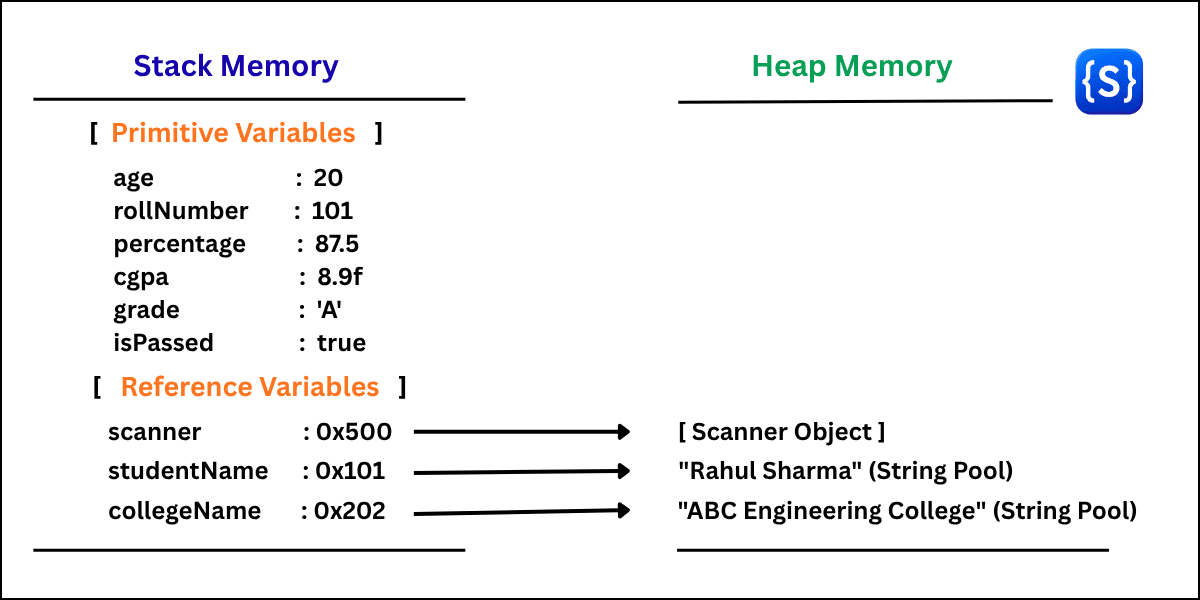
Note:
- Stack Memory: Stores primitive values (int, double, char, boolean) and local object reference addresses (0x101). It is fast and temporary.
- Heap Memory: Stores actual Objects and String data.
Common Beginner Mistakes to Avoid
- Forgetting to import the Scanner class at the top of your file causes a “Cannot find symbol” compilation error.
- Using next() for full names reads only the first word before the space. Therefore, use nextLine() to read the full name.
- Forgetting to call an extra scanner.nextLine() after reading numbers (nextInt(), nextDouble()) leaves a newline character in the buffer, causing the subsequent nextLine() prompt to be skipped.
- Assigning a character using double quotes (“A”) creates a string. Java requires single quotes (‘A’) for primitive char data types.
- Entering True or FALSE instead of the lowercase values true or false for a boolean.
- Forgetting to close the Scanner object.