Many Java applications often contain classes whose main purpose is to store and transfer data. These classes usually have private fields, constructors, getter methods, and implementations of methods such as equals(), hashCode(), and toString().
Writing this boilerplate code repeatedly makes programs longer, harder to maintain, and more prone to mistakes. To solve this problem, Java introduced Records as a restricted, immutable class type.
Records were introduced as a preview feature in Java 14, refined in Java 15, and became a standard language feature in Java 16. They continue to be fully supported in LTS releases like Java 21 and Java 25, making them an essential feature for modern Java development. So, let’s understand what records in Java are.
Prerequisites for Learning Java Records
Before learning Java Records, you should have a basic understanding of a few fundamental Java concepts, such as:
- Variables and Data Types
- Classes and Objects
- Constructor
- Methods
- Encapsulation
Don’t worry if you’re a beginner—none of these topics require advanced knowledge. However, knowing them will make it much easier to understand how Records work and why they were introduced.
Good News: If you are already familiar with standard Java classes and objects, you will find Java Records very straightforward to learn.
What Is a Java Record?
A Java Record is a special type of final class that stores immutable data with minimal code. It automatically generates commonly used members, such as the constructor, accessor methods, equals(), hashCode(), and toString(), so you don’t have to write them manually.
Simple Technical Definition
A Java Record is a special type of final class that represents an immutable data object by automatically generating common methods such as the constructor, accessor methods, equals(), hashCode(), and toString().
Oracle’s Definition (Simplified)
According to Oracle, a Record is a transparent carrier for immutable data. This means that:
- Pure Data Storage: The purpose of a Record is to store data.
- Immutability by Default: The data inside a Record cannot be changed after the object is created.
- Self-Documenting Structure: The components defined in the Record clearly define its exact data.
In other words, a Record makes your code more transparent because anyone reading it can immediately understand what data the object represents.
A Record is an ideal choice when your class is mainly used to hold data rather than implement complex business logic. It reduces the boilerplate code required for creating simple data carrier classes and makes Java programs cleaner, more readable, and easier to maintain.
Why Is It Called a “Record”?
In computer science and database management, the word record refers to a fixed collection of related information that describes a single entity. For example:
- A student record stores a student’s roll number, name, and enrolled course.
- An employee record stores an employee’s ID, full name, and department.
- A product record stores a product’s ID, name, and price.
Similarly, a Java Record stores a fixed set of related data values that together describe a single, immutable object.
Key Characteristics of a Java Record
A Java Record has several important characteristics:
- A Record in Java is a special restricted form of a class designed specifically for state modeling.
- It is implicitly declared final by default, meaning no other class can extend or subclass it.
- Each declared component inside the record automatically becomes a private final field.
- The Record class is immutable by design, meaning the state of a record object cannot be modified after instantiation.
- The Java compiler automatically generates useful methods, such as accessors, equals(), hashCode(), toString(), and a canonical constructor.
- You can declare custom constructors, instance methods, static fields, and static methods inside a record.
- The record class can implement one or more Java interfaces.
- A record cannot extend any other class because Java does not support multiple class inheritance, and all records already implicitly extend java.lang.Record.
Real-World Analogy: The Employee ID Card
Imagine an employee ID card issued by a company. It contains a fixed set of details:
- Employee ID
- Employee Name
- Department
- Designation
Once the ID card is printed, these details normally do not change on the physical card. If any information changes, a new ID card is issued instead of modifying the existing one.
A Java Record works the exact same way:
- It holds a fixed set of related data.
- Its data remains completely unchanged after the object is created.
- If you need different data, you create a new Record object.
This real-world behavior is what makes Java Records ideal for representing immutable data in your applications.
Java Record Syntax
The general syntax for declaring a Java Record is:
record RecordName(DataType component1, DataType component2, ..., DataType componentN) {
    // Optional compact, canonical, or custom constructors
    // Optional instance methods
    // Optional static fields and static methods
    // Optional nested types
}
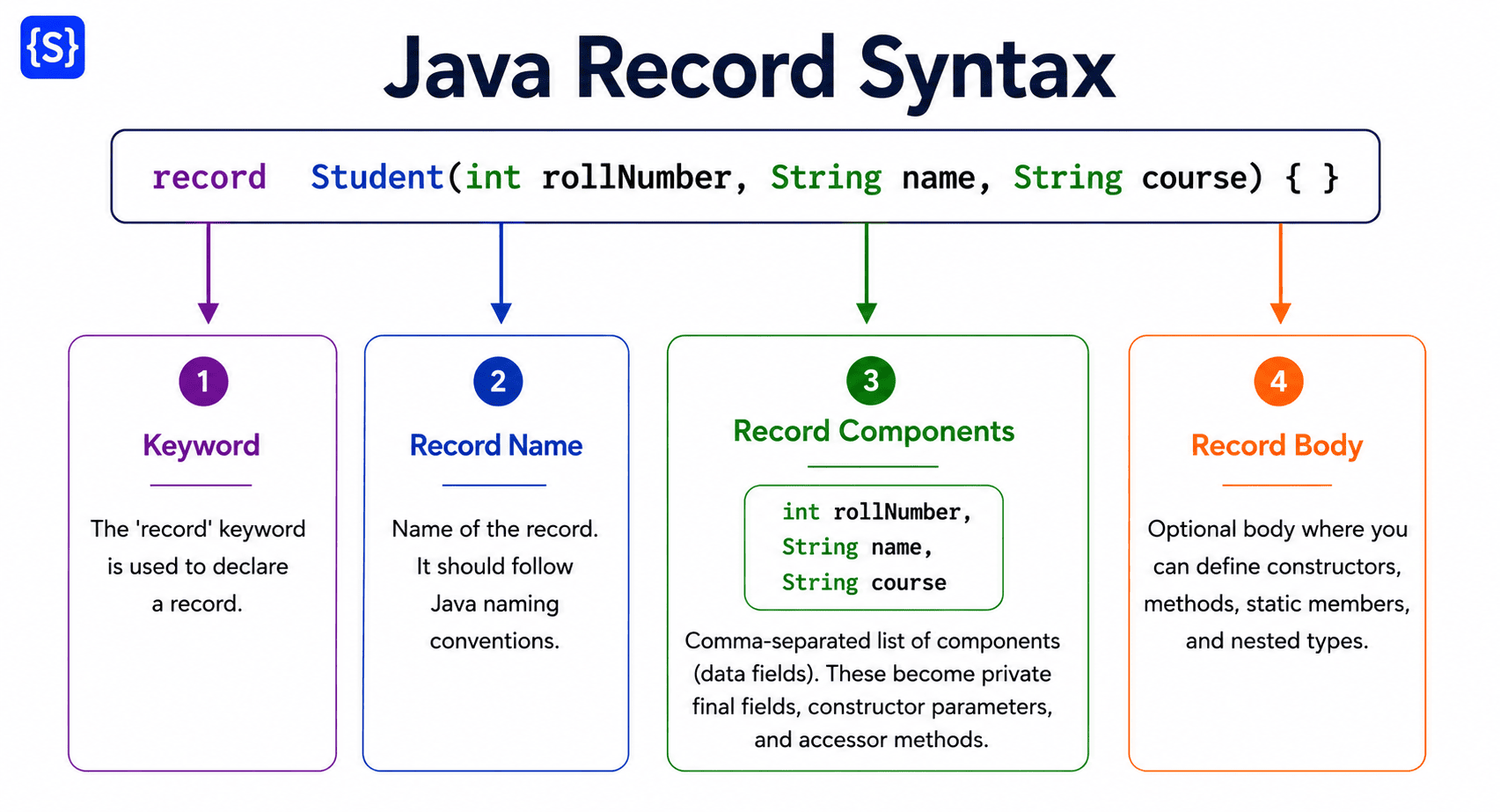
Syntax Explanation
Let’s understand each part of the syntax.
| Syntax Component | Description |
|---|---|
record | A restricted Java keyword used to declare a Record type. |
RecordName | The name of the Record. It should follow Java naming conventions (PascalCase). |
component1, component2... | The state parameters defined in the record header, officially known as record components. |
DataType | Specifies the type of each record component, such as int, String, double, generic or custom objects. |
Record Body {} | An optional block where you can define constructors, methods, static members, and nested types. |
Basic Syntax Example
The following example declares a Student Record with three components.
record Student(int rollNumber, String name, String course) {
}
Although this declaration contains only one line of code, the Java compiler automatically creates:
- Three private final fields: rollNumber, name, and course
- A public canonical constructor: Student(int rollNumber, String name, String course)
- Three accessor methods: rollNumber(), name(), and course()
- Standard methods: equals(), hashCode(), and toString()
This significantly reduces boilerplate compared to a traditional Java class—you don’t need to write any of it manually. Look at the below diagram.
Record with an Empty Body
A Record body is optional. If you don’t need additional constructors or methods, you can leave the body empty.
Record with a Body
If required, you can add methods or constructors inside the Record body.
record Product(int id, String name, double price) {
    public String display() {
        return id + " - " + name;
    }
}
In this example:
- The compiler still generates the constructor and other methods.
- You have added your own custom method named display().
Important Points About Record Syntax
- A Record declaration always starts with the record keyword.
- The record name should be unique within its package.
- Record components are declared inside parentheses (), not inside the body.
- Record components automatically become immutable fields.
- The Record body is optional.
- You can define constructors, methods, static members, and nested types inside the body.
- You cannot declare additional instance fields in a Record.
Naming Conventions for Java Records
Because a Record is a specialized type of class, it follows the standard Java naming conventions:
- Use upper camel case for the record declaration (e.g., BankAccount, Employee).
- Use lower camel case for component parameters (e.g., accountNumber, holderName).
- Choose names that clearly represent the data being stored.
Good Examples
record Student(int rollNo, String name) {}
record Employee(int id, String name) {}
record BankAccount(long accountNumber, String holderName) {}
Poor Examples
record s(int a, String b) {} // Unclear entity and component names
record xyz(int x, String y) {} // Non-descriptive placeholders
Always remember meaningful names make your code easier to understand and maintain.
Important Note:
Although you can add methods and constructors, the primary purpose of a Record is to represent immutable data rather than complex behavior.
Common Beginner Mistakes
Mistake 1: Declaring Components Inside Curly Braces
❌ Incorrect:
record Student {
    int rollNo;
    String name;
}
Why is it incorrect?
Record components must be declared inside parentheses (…) in the header, immediately after the record name.
✅ Correct:
record Student(int rollNo, String name) {
}
Mistake 2: Declaring Additional Instance Fields
❌ Incorrect:
record Student(int rollNo, String name) {
    int age; // Compilation Error!
}
Why is it incorrect?
A Java Record cannot declare additional instance fields inside its body. Its entire state is strictly defined by the components declared in its header. You can, however, declare static fields inside a Record.
Java Record Example Program
Now that you understand the syntax of a Java Record, it is time to write your first program!
Note: This example uses Java 21 LTS, but it works on Java 16 or later, where Records became a standard language feature.
Example: Creating Your First Java Record
Let’s create a simple Student Record that stores a student’s roll number, name, and course.
// 1. Declare the Student record
record Student(int rollNumber, String name, String course) {}

// 2. Main class to test and run the record
public class Main {
    public static void main(String[] args) {
        // Instantiate the Student record using the auto-generated canonical constructor
        Student student1 = new Student(101, "Alice Smith", "Computer Science");
        Student student2 = new Student(102, "Bob Jones", "Information Technology");

        // Access record components using auto-generated accessor methods
        System.out.println("--- Student Details ---");
        System.out.println("ID: " + student1.rollNumber());
        System.out.println("Name: " + student1.name());
        System.out.println("Course: " + student1.course());

        // Demonstrate the auto-generated toString() method
        System.out.println("\n--- Auto-generated toString() Output ---");
        System.out.println(student1);

        // Demonstrate the auto-generated equals() and hashCode() methods
        Student student3 = new Student(101, "Alice Smith", "Computer Science");
        System.out.println("\n--- Equality Check ---");
        System.out.println("Is student1 equal to student3? " + student1.equals(student3)); // true
        System.out.println("Is student1 equal to student2? " + student1.equals(student2)); // false
    }
}
Output:
--- Student Details ---
ID: 101
Name: Alice Smith
Course: Computer Science

--- Auto-generated toString() Output ---
Student[rollNumber=101, name=Alice Smith, course=Computer Science]

--- Equality Check ---
Is student1 equal to student3? true
Is student1 equal to student2? false
In this example program:
- We declared a Record named Student, which contains three record components: rollNumber, name, and course. These components represent the data that every Student object will store.
- Inside the main() method, we instantiated the Student record by passing arguments directly into the auto-generated canonical constructor.
- Then, we accessed record components using auto-generated accessor methods.
What Does the Compiler Generate?
Although you wrote only one line of code, the Java compiler automatically generates:
- Three private final fields
- One public canonical constructor
- Three public accessor methods
- equals()
- hashCode()
- toString()
You don’t need to write any of these methods manually.
Equivalent Generated Java Code
// record Student(int rollNunber, String name, String course) {}

// What the Java Compiler generates behind the scenes:
public final class Student extends java.lang.Record {

    // 1. Three private final fields
    private final int rollNumber;
    private final String name;
    private final String course;

    // 2. One public canonical constructor
    public Student(int rollNumber, String name, String course) {
        this.rollNumber = rollNumber;
        this.name = name;
        this.course = course;
    }

    // 3. Three public accessor methods (Note: no 'get' prefix)
    public int rollNumber() {
        return this.rollNumber;
    }
    public String name() {
        return this.name;
    }
    public String course() {
        return this.course;
    }

    // 4. State-based equals() method
    @Override
    public final boolean equals(Object o) {
        if (this == o) return true;
        if (!(o instanceof Student other)) return false;
        return this.rollNumber == other.rollNumber &&
               java.util.Objects.equals(this.name, other.name) &&
               java.util.Objects.equals(this.course, other.course);
    }

    // 5. State-based hashCode() method
    @Override
    public final int hashCode() {
        return java.util.Objects.hash(rollNumber, name, course);
    }

    // 6. Descriptive toString() method
    @Override
    public final String toString() {
        return "Student[rollNumber=" + rollNumber + ", name=" + name + ", course=" + course + "]";
    }
}
In this generated Java code:
- Class Declaration: The compiler marks the class public final and makes it implicitly extend java.lang.Record.
- Method Names: The generated getter methods match the component names directly (rollNumber(), name(), course()) instead of using JavaBeans naming conventions like getRollNumber().
- Methods marked final: The generated equals(), hashCode(), and toString() implementations are declared final.
Why Are There No Traditional Getter Methods?
Many beginners coming from standard Java classes expect getter methods with a get prefix, such as:
student.getName(); // ❌ Does not exist in Java Records
However, Java Records intentionally breaks away from the traditional JavaBeans convention. Instead of getX() getters, the compiler generates accessor methods whose names match the record components directly:
| Traditional JavaBeans Getter | Java Record Accessor Method |
|---|---|
getRollNo() | rollNo() |
getName() | name() |
getCourse() | course() |
To read a component value from a record, you call the method matching the component name:
String studentName = student.name(); // Correct syntax
This eliminates unnecessary verbosity and makes the API cleaner, more concise, and directly aligned with the component names defined in the record header.
Key Advantages of Using Java Records
Based on this example, we can see several key benefits of using Java Records over traditional classes:
- Minimal code is required, which significantly reduces boilerplate compared to standard POJOs or DTOs.
- You do not need to write constructors, field declarations, or accessor (getter) methods manually.
- You do not need to write getter methods.
- The equals(), hashCode(), and toString() methods are generated automatically with robust, value-based implementations.
- Fields are implicitly private final, ensuring thread safety and preventing accidental state modification after instantiation.
- The code is easier to read, simpler to maintain, and much less prone to bugs.
Best Practices for Using Java Records
Following these best practices will help you use Java Records effectively and avoid common design mistakes:
- Use records only for immutable data. If your object’s state requires setter methods or frequent state changes, use a traditional class instead.
- Choose descriptive names that clearly indicate what the Record represents.
- Use the meaningful name of components of record, which should clearly describe the values they store.
- Use a compact constructor to validate record components before the object is created.
- Keep records focused on data. You should avoid placing large amounts of business logic inside a Record.
- Ideal Use Cases for Java Records:
- Data Transfer Objects (DTOs)
- API Request and Response Payloads (e.g., Jackson JSON serialization)
- Configuration Properties
- Value Objects and Tuples
- Database Query Projections (e.g., Spring Data JPA)
- Avoid mutable Record components. Although a Record’s components are final, if a component references a mutable object (Like List, Map, or Date), the underlying collection can still be modified.
- Override compiler-generated methods only when necessary.
Real-World Example: Using Java Records as DTOs
One of the most common real-world uses of Java Records is to represent a Data Transfer Object (DTO). A DTO is an object whose primary purpose is to transfer data between different layers of an application, such as the database layer, business layer, and presentation layer.
Since a DTO only stores data and usually does not contain complex business logic, it is an excellent choice for a Java Record.
Scenario: Employee Management System
Suppose you are building an Employee Management System. When an employee logs in to the system, the API fetches their profile details to display on the dashboard.
- Employee ID
- Employee Name
- Department
- Salary
Because these values are read-only and passed directly to the UI without modification, a Java Record is a perfect choice for declaring them.
// 1. Declare the Employee record
record Employee(int id, String name, String department, double salary) {
    // Compact constructor for input validation
    public Employee {
        if (id <= 0) {
            throw new IllegalArgumentException("Employee ID must be positive.");
        }
        if (name == null || name.isBlank()) {
            throw new IllegalArgumentException("Employee name cannot be null or blank.");
        }
        if (salary < 0) {
            throw new IllegalArgumentException("Salary cannot be negative.");
        }
    }
}

// 2. Main execution class
public class Main {
    public static void main(String[] args) {
        // Instantiate the Employee Record using the canonical constructor
        Employee employee = new Employee(1001, "Sarah Jenkins", "Engineering", 85500.00);

        // Access individual components using auto-generated accessor methods
        System.out.println("=== Employee Profile Details ===");
        System.out.println("ID: " + employee.id());
        System.out.println("Name: " + employee.name());
        System.out.println("Department: " + employee.department());
        System.out.println("Salary: $" + employee.salary());

        // Print auto-generated toString() output
        System.out.println("\n=== Record toString() Output ===");
        System.out.println(employee);
    }
}
Output:
=== Employee Profile Details ===
ID: 1001
Name: Sarah Jenkins
Department: Engineering
Salary: $85500.0

=== Record toString() Output ===
EmployeeDTO[id=1001, name=Sarah Jenkins, department=Engineering, salary=85500.0]
Why Is a Java Record the Ideal Choice Here?
This Employee record acts purely as a data carrier, transporting employee information across different layers of the application. For example:
- Database → Service Layer
- Service Layer → REST API
- REST API → Web Browser
- REST API → Mobile App
The employee data is strictly read-only during this transmission process. Since no modification is required, a Record is a better choice than a traditional mutable class.
Traditional Class vs. Java Record
1. Traditional Java Class (~50 Lines of Code)
To create this data carrier using a traditional class, you would have to write:
- 4 private final fields
- 1 full parameter constructor
- 4 getter methods (getId(), getName(), etc.)
- Manual equals(), hashCode(), and toString() implementations
This could easily exceed 40–60 lines of code, depending on formatting.
2. Java Record (1 Line of Code)
With a Java Record, the exact same model takes only one line:
record Employee(int id, String name, String department, double salary) {}When Should You Use Java Records?
A Record is a good choice when:
- Your class exists mainly to carry data rather than execute complex business logic.
- The object’s state must remain unchanged after instantiation.
- You want clean code without manually writing constructors, accessors, equals(), hashCode(), or toString().
- You are creating Data Transfer Objects (DTOs), value objects, or API request/response models.
When Should You Avoid Using Java Records?
A Record may not be the right choice when:
- The object’s fields need to change frequently after creation. Records have no setters.
- Your class requires mutable fields.
- You need to extend another class.
- Your class manages complex internal state or lifecycle.
- The class represents behavior more than data.
In such cases, a traditional Java class is usually a better option.