Introduction
In this tutorial, you will learn how to update variables in Java. Here, we will write a simple Java program to update and display an employee profile using variable reassignment.
Imagine a company building a basic Employee Management System to digitize its staff records. We will build a program that captures initial employee details using the Scanner class and displays formatted output on the console.
When an employee receives a promotion, their profile must be updated. Instead of creating new variables for the new values, we will overwrite the existing variables with the updated information.
Learning Objectives
After completing this exercise, you will be able to:
- Understand the concept of variable reassignment in Java.
- Update values stored in existing variables without redeclaring them.
- Observe how new values overwrite old values in a program’s execution flow.
- Differentiate between variable declaration, initialization, and reassignment.
- Visualize how memory contents change after variable reassignment.
What is Variable Reassignment?
Think of a variable as a labeled storage box in your computer’s memory. When you assign a value to a variable, you place a value inside that box.
A variable can store only one value at a time. When a new value is assigned to an existing variable, the old value is replaced. This process is called variable reassignment.
In simple terms, variable reassignment means removing the old value and overwriting it with a new one. The storage box (memory location) remains the same, but its contents change. This is essential when updating real-world records—such as a person’s age, a job promotion, a pay raise, or a department change—without wasting memory on extra variables.
Example:
int age = 20; // Declaration and Initialization
age = 21; // Reassignment (Notice: 'int' is omitted here)
After reassignment, the value of age becomes 21. The previous value (20) is overwritten and no longer stored in that variable.
Problem Statement
Write a Java program that performs the following steps:
- Read: Capture an employee’s initial information using the Scanner class.
- Display: Print the original employee profile on the console.
- Update: Modify the existing variables with new values representing a promotion.
- Display: Print the updated employee profile on the console.
Constraint: Do not create new variables for the updated information. You must reuse the existing variables by reassigning them new values.
Prerequisites
Before starting this exercise, you should be familiar with:
- Basic Java program structure
- Variables
- Primitive data types
- Non-primitive data types
- String class
- Scanner class
- System.out.println() method
Difficulty Level: Intermediate
Input Format
The program should accept the following input from the keyboard.
- Employee ID
- Employee Name
- Department
- Designation
- Salary
Output Format
Display all original employee information and updated employee information in a neatly formatted report on the console.
Expected Solution Approach (Step Breakdown)
We can break down the expected solution into a simple sequence of steps. Using Java’s Scanner class, we will read the user’s input, display the initial profile, reassign the variables, and print the updated results.
Start
 ↓
Read Employee Information
 ↓
Store Data in Variables (Declaration & Initialization)
 ↓
Display Original Information
 ↓
Reassign New Values to Existing Variables
 ↓
Display Updated Information
 ↓
End
Step-by-Step Program Code
Below is the complete Java program. Read through the code and comments to see how variables are first initialized with original details and then reassigned with updated values after a promotion.
import java.util.Scanner;

public class EmployeeProfileUpdate {
    public static void main(String[] args) {
        // Create a Scanner object to capture keyboard input
        Scanner scanner = new Scanner(System.in);

        // --- STEP 1: Capture Initial Employee Details ---
        System.out.println("=== Enter Initial Employee Details ===");

        System.out.print("Enter Employee ID: ");
        int empId = scanner.nextInt();
        scanner.nextLine(); // Clear the remaining newline character

        System.out.print("Enter Employee Name: ");
        String empName = scanner.nextLine();

        System.out.print("Enter Department: ");
        String department = scanner.nextLine();

        System.out.print("Enter Designation/Job Title: ");
        String designation = scanner.nextLine();

        System.out.print("Enter Monthly Salary: ");
        double salary = scanner.nextDouble();
        scanner.nextLine(); // Clear newline

        // --- STEP 2: Display Initial Profile ---
        System.out.println("\n----------------------------------");
        System.out.println("     INITIAL EMPLOYEE PROFILE     ");
        System.out.println("----------------------------------");
        System.out.println("ID:          " + empId);
        System.out.println("Name:        " + empName);
        System.out.println("Department:  " + department);
        System.out.println("Designation: " + designation);
        System.out.println("Salary:      $" + salary);

        // --- STEP 3: Reassign Variables with Promoted Details ---
        System.out.println("\n=== Enter Promotion / Updated Details ===");

        // Notice we do NOT use 'String' or 'double' here because
        // the variables were already declared above.
        System.out.print("Enter New Department: ");
        department = scanner.nextLine(); // Reassigned!

        System.out.print("Enter New Designation: ");
        designation = scanner.nextLine(); // Reassigned!

        System.out.print("Enter New Salary: ");
        salary = scanner.nextDouble(); // Reassigned!

        // --- STEP 4: Display Updated Profile ---
        System.out.println("\n----------------------------------");
        System.out.println("     UPDATED EMPLOYEE PROFILE     ");
        System.out.println("----------------------------------");
        System.out.println("ID:          " + empId + " (Unchanged)");
        System.out.println("Name:        " + empName + " (Unchanged)");
        System.out.println("Department:  " + department + " (Updated)");
        System.out.println("Designation: " + designation + " (Updated)");
        System.out.println("Salary:      $" + salary + " (Updated)");

        // Close the scanner to prevent resource leaks
        scanner.close();
    }
}
Expected Output:
=== Enter Initial Employee Details ===
Enter Employee ID: 101
Enter Employee Name: Sarah Jenkins
Enter Department: Software Engineering
Enter Designation: Junior Developer
Enter Monthly Salary: 60000

----------------------------------
     INITIAL EMPLOYEE PROFILE
----------------------------------
ID:          101
Name:        Sarah Jenkins
Department:  Software Engineering
Designation: Junior Developer
Salary:      $60000.0

=== Enter Promotion / Updated Details ===
Enter New Department: Product & Engineering
Enter New Designation: Senior Developer
Enter New Salary: 85000

----------------------------------
     UPDATED EMPLOYEE PROFILE
----------------------------------
ID:          101 (Unchanged)
Name:        Sarah Jenkins (Unchanged)
Department:  Product & Engineering (Updated)
Designation: Senior Developer (Updated)
Salary:      $85000.0 (Updated)
Step-by-Step Code Breakdown
Step 1: Declare and Initialize Variables
First, declare the variables with their initial data types and capture the employee’s starting details using Scanner:
String employeeName = "Sarah Jenkins";
int age = 25;
double salary = 45000.0;
What happens in memory: Three storage boxes (employeeName, age, and salary) are created in memory and populated with their initial values.
Step 2: Display Original Values
Print the initial employee profile to the console:
System.out.println("Name: " + employeeName);
System.out.println("Age: " + age);
System.out.println("Salary: $" + salary);
Console Output:
Name: Sarah Jenkins
Age: 25
Salary: $45000.0
Step 3: Reassign Variables with Updated Values
When the employee profile gets any update, assign new values directly to the existing variables. Notice that data types (int, double) are omitted during reassignment.
age = 26; // Overwrites 25 with 26
salary = 65000.0; // Overwrites 45000.0 with 65000.0
What happens in memory:
age: The old value (25) is deleted and replaced by26.salary: The old value (45000.0) is deleted and replaced by65000.0.
Step 4: Display Updated Values
Print the variables again to show that their contents have changed:
System.out.println("Updated Age: " + age);
System.out.println("Updated Salary: $" + salary);
Console Output:
Updated Age: 26
Updated Salary: $65000.0
Key Takeaway
Notice how the printing age and salary in Step 4 output the new values (26 and 65000.0) instead of the original ones. The variable names remained identical, but the data inside them changed!
Java Variable Assignment: Memory Diagram
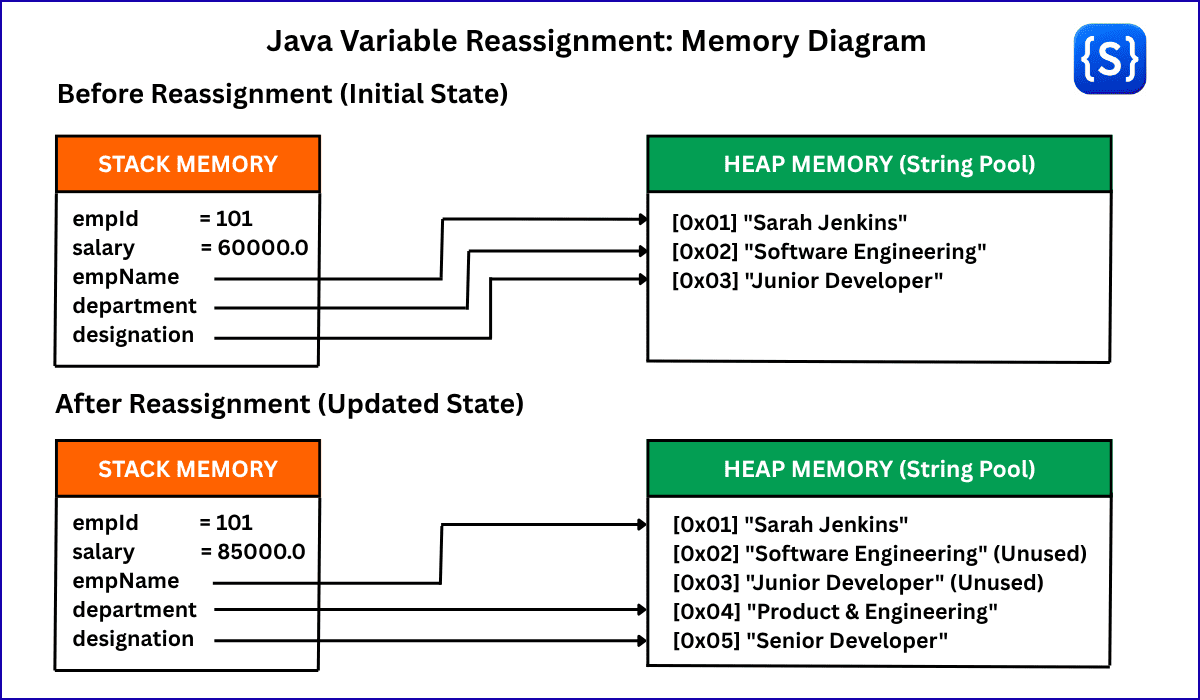
During program execution, the JVM splits memory management into two primary areas:
- Stack Memory: Stores primitive values (such as int, double, boolean) directly alongside variable names and object reference pointers (memory addresses).
- Heap Memory (String Pool): Stores actual String objects (e.g., “Sarah Jenkins”, “Junior Developer”), which are immutable in Java.
Because strings are immutable in Java, reassigning a String variable does not mutate the original object in place. Instead, the JVM creates a new String object in the Heap and updates the variable’s reference pointer on the Stack to point to the new memory location. Look at the diagram below and see how Java memory behaves when you update variables in Java.
Does Memory Address Change When Updating Variables in Java?
In Java, whether a variable’s memory address changes during an update depends on whether you are reassigning a primitive type or a reference type (like String).
1. Primitive Types (int, double, boolean, etc.)
For primitive types, the variable name directly refers to a specific memory slot on the Stack. When you reassign a primitive variable, Java directly overwrites the binary value inside that exact same memory slot.
- Initial State: salary = 60000.0 (Stack slot holds 60000.0)
- After Reassignment: salary = 85000.0 (Stack slot now holds 85000.0)
- Address Result: Does not change (updated in-place on the Stack).
2. Reference Types (String, Objects, Arrays)
For reference variables, the Stack slot doesn’t hold the actual data—it holds a memory pointer (address) pointing to an object stored in the Heap.
Since String objects in Java are immutable, meaning that they cannot be changed after creation, updating a String variable triggers two steps:
- Java creates a new String object in the Heap at a new memory address.
- Java updates the variable on the Stack to point to that new address.
- Initial State: The variable department holds reference address 0x02, which points to “Software Engineering” in the Heap.
- After Reassignment (department = “Product & Engineering”): Java creates “Product & Engineering” at a new address, 0x04, in the Heap.
- The variable department now holds reference address 0x04.
- Address Result: Does change (pointer updated from 0x02 to 0x04).
Follow-up Challenge
Modify the program to update all of the following fields using the same variables:
- Employee ID
- Employee Name
- Department
- Designation
- Salary
- Experience
- Office Location
Do not declare any new variables for the updated values.