
The SQL IS NULL operator is a special type of operator that is used to check whether a specified column contains a NULL value in a database table.
A NULL value represents missing, unknown, or unavailable information in a database. When you retrieve data from a database, you may find that some columns do not contain values.
For example, an employee’s phone number might not be provided, or a customer’s email address might be unavailable. You can use the IS NULL operator to find or identify such records. If the condition is true, SQL returns the matching rows.
Syntax of SQL IS NULL Operator
The general syntax of the SQL IS NULL operator is:
SELECT column_name(s)
FROM table_name
WHERE column_name IS NULL;
In the above syntax:
SELECT: Specifies the columns you want to retrieve in the query results.FROM: Identifies the database table containing the target data.WHERE: Filters the rows to return only those that meet a specified condition.IS NULL: Evaluates whether a specific column contains a missing or unknown value.
Example:
SELECT *
FROM Employees
WHERE Department IS NULL;
This query retrieves all employees whose Department column contains a NULL value.
Simple Example of IS NULL Operator in SQL
Let us create an Employees table, insert employee records, and use the SQL IS NULL operator to find employees whose department information is missing.
Step 1: Create the Employees Table
First, create a table named Employees with three columns: EmployeeID, Name, and Department.
CREATE TABLE Employees (
    EmployeeID INT PRIMARY KEY,
    Name VARCHAR(100),
    Department VARCHAR(50)
);
In this SQL query:
CREATE TABLE Employeescreates a new table named Employees in the database.EmployeeID INT PRIMARY KEYstores a unique employee ID.Name VARCHAR(100)stores the employee’s name up to 100 characters.Department VARCHAR(50)stores the employee’s department up to 50 characters. It allowsNULLvalues because we have not specified aNOT NULLconstraint.
Step 2: Insert Data into the Employees Table
Now, insert eight employee records. Some employees have a NULL value in the Department column.
INSERT INTO Employees (EmployeeID, Name, Department)
VALUES
    (101, 'John Smith', 'IT'),
    (102, 'Emily Johnson', NULL),
    (103, 'Michael Brown', 'HR'),
    (104, 'Sarah Davis', NULL),
    (105, 'James Wilson', 'Finance'),
    (106, 'Jessica Miller', 'Marketing'),
    (107, 'William Anderson', NULL),
    (108, 'Ashley Taylor', 'Sales');
In this SQL query:
INSERT INTO Employeesspecifies the table into which the records will be inserted.- The column list identifies the columns receiving data.
- Each set of parentheses represents one employee record.
- The
NULLkeyword indicates that the department information is missing or unknown for that employee.
Step 3: Display All Employee Records
Before using the IS NULL operator, retrieve all records to inspect the table.
SELECT *
FROM Employees;
Expected Output:
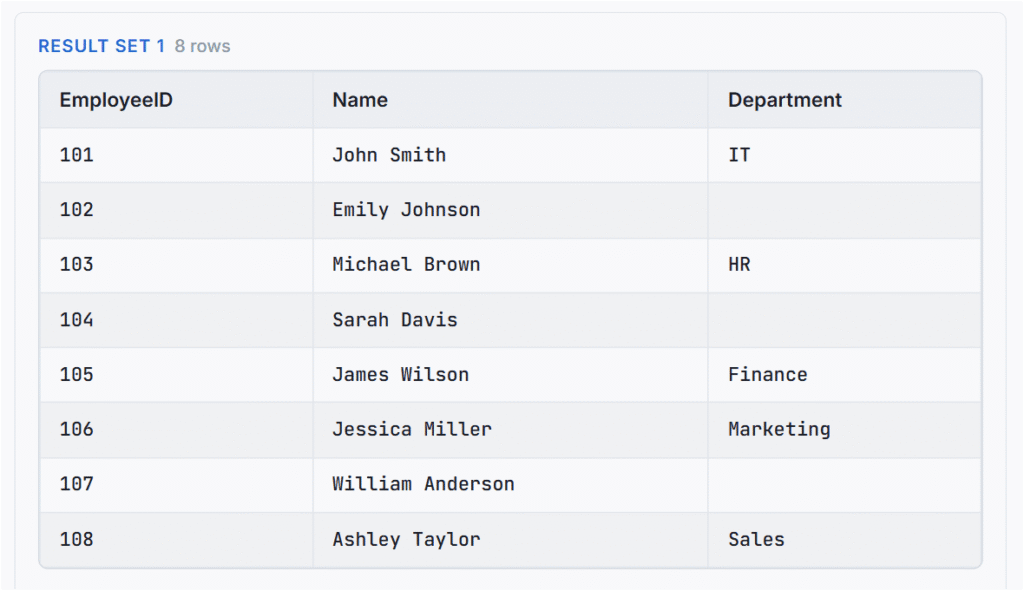
The table contains eight employees. Three employees have NULL values in the Department column.
Step 4: Use the SQL IS NULL Operator
Suppose you want to find all employees whose department information is missing. Run the following SQL query:
SELECT *
FROM Employees
WHERE Department IS NULL;
Expected Output:
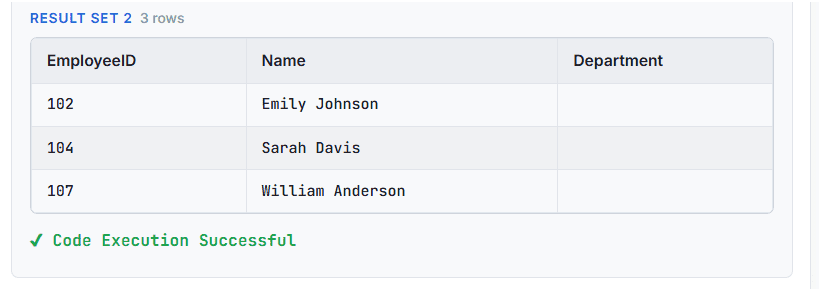
In this SQL query:
SELECT *retrieves all columns from the Employees table.FROM Employeesspecifies the table to search.WHERE Department IS NULLchecks whether the Department column contains aNULLvalue.- SQL returns only the three matching employee records.
SQL IS NOT NULL Operator
The SQL IS NOT NULL operator is a special type of operator that checks whether a column contains a value that is not NULL. It helps retrieve records where the required information is available.
For example, in an Employees table, some employees may have a department assigned, while others may have a NULL value in the Department column. You can use the IS NOT NULL operator to retrieve employees whose department information is available.
The basic syntax to use IS NOT NULL operator in SQL is:
SELECT column_name(s)
FROM table_name
WHERE column_name IS NOT NULL;
Example: Find Employees Whose Department Is Available
You can also use the IS NOT NULL operator to retrieve employees whose department information is available. Now, execute the following SQL query:
SELECT *
FROM Employees
WHERE Department IS NOT NULL;
Output:
| EmployeeID | Name | Department |
|---|---|---|
| 101 | John Smith | IT |
| 103 | Michael Brown | HR |
| 105 | James Wilson | Finance |
| 106 | Jessica Miller | Marketing |
| 108 | Ashley Taylor | Sales |
This query returns the five employees whose department values are not NULL.
Important Note: IS NOT NULL evaluates only whether a value is missing (NULL), meaning it will always include strings containing spaces, while its handling of empty strings (' ') varies by RDBMS.
