SQL keywords are reserved words with predefined meanings used to construct database queries and commands. They instruct relational database management systems (RDBMS) like MySQL, PostgreSQL, and SQL Server on how to create, manipulate, and retrieve data.
For example:
SELECT name
FROM employees
WHERE department = 'IT';
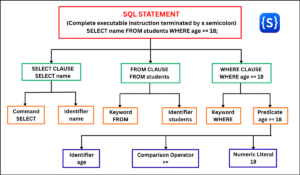
In this query, SELECT, FROM, and WHERE are SQL keywords. Each keyword has a specific purpose:
- SELECT tells the database which data you want to retrieve.
- FROM specifies the table from which the data should be retrieved.
- WHERE filters the records according to a condition.
Real-World Analogy of Keywords in SQL
Think of SQL keywords as the core instruction words of the SQL language, telling the database engine exactly what action to perform. Just as we use specific words to give instructions in everyday communication, SQL uses keywords to give instructions to a database.
For example, imagine you are asking a librarian:
“Please find the titles of books written by authors from India.”
The words “find,” “from,” and “where” help express the instruction.
SQL works in a similar way:
SELECT title
FROM books
WHERE country = 'India';
Here, each keyword specifies a part of that instruction:
- SELECT (Find): Specifies the exact details you want to see (title).
- FROM (From): Identifies the source location or table (books).
- WHERE (Where): Filters the results based on a condition (country = ‘India’).
Simple Definition of SQL Keywords
SQL keywords are predefined reserved words that give structure and meaning to SQL statements. They work alongside identifiers, operators, literals, and functions to send clear instructions to a database.
Why SQL Uses Predefined Keywords
SQL uses predefined keywords to keep database commands simple, consistent, and easy to understand. Instead of everyone inventing their own words, SQL provides a set of standard words that every database recognizes.
Here is why SQL uses them:
- Creates a Consistent Structure: Keywords give every query a predictable pattern so the database always understands what to do.
- Gives Clear Instructions: Each keyword has only one task (like SELECT to fetch data or DELETE to remove data), which prevents confusion.
- Makes Code Easy to Read: Because SQL uses plain English words, anyone can read a query and quickly understand its purpose.
- Covers Different Database Operations: Keywords allow you to easily perform various operations, like creating tables, adding data, or filtering records.
- Works Across Different Databases: Standard keywords work the same way in popular databases like MySQL, PostgreSQL, and SQL Server.
Common SQL Keywords by Category
We can group SQL keywords into different categories based on the type of operation they perform. Learning keywords by category is easier for beginners than trying to memorize a long alphabetical list. This is because each group serves a specific purpose in database programming.
For example, keywords such as SELECT, FROM, and WHERE are primarily associated with retrieving and filtering data, while INSERT, UPDATE, and DELETE are used to modify data.
Here is the classification of keywords in SQL by category:
| Category | Common Keywords | Main Purpose |
|---|---|---|
| Data Query | SELECT, FROM, DISTINCT, AS | Retrieve data. |
| Filtering | WHERE, AND, OR, NOT, IN, BETWEEN, LIKE | Filter data. |
| Sorting | ORDER BY, ASC, DESC | Sort results. |
| Grouping | GROUP BY, HAVING | Group and filter groups. |
| Joins | JOIN, ON, USING | Combine data from tables. |
| Data Manipulation | INSERT, INTO, VALUES, UPDATE, SET, DELETE | Add, modify, and remove data. |
| Data Definition | CREATE, ALTER, DROP, TRUNCATE | Define database objects. |
| Constraints | PRIMARY KEY, FOREIGN KEY, REFERENCES, UNIQUE, CHECK | Enforce data rules. |
| Transactions | COMMIT, ROLLBACK, SAVEPOINT | Manage transactions. |
| Permissions | GRANT, REVOKE | Manage database privileges. |
| Subqueries and CTEs | WITH, EXISTS, ANY, ALL | Work with complex queries. |
| Set Operations | UNION, INTERSECT, EXCEPT | Combine query results. |
| Conditional Expressions | CASE, WHEN, THEN, ELSE, END | Perform conditional logic. |
| Window Queries | OVER, PARTITION BY, ROWS, RANGE | Perform calculations across related rows. |
Note:
Different database systems (like MySQL, PostgreSQL, SQL Server, Oracle, and SQLite) may have slight differences in their keywords and syntax. Use this guide as a standard foundation for learning.
Are SQL Keywords Case-Sensitive?
No, SQL keywords are not case-sensitive. Relational Database Management Systems (RDBMS) like MySQL, PostgreSQL, SQL Server, Oracle, and SQLite treat uppercase, lowercase, and mixed-case versions of keywords identically.
For example, all three queries below execute the exact same operation:
-- 1. Uppercase (Standard Practice)
SELECT name FROM employees;

-- 2. Lowercase (Valid)
select name from employees;

-- 3. Mixed-case (Valid, but discouraged)
SeLeCt name FrOm employees;
Best Practice: Why Use Uppercase?
Although SQL keywords are generally case-insensitive in major database systems, writing them in uppercase is an industry convention. It is not required by SQL, but it improves readability and consistency.
Where Case Sensitivity Does Matter in SQL
Although keywords are generally case-insensitive, SQL is not entirely case-insensitive everywhere:
- String Literals (Data): Values inside single quotes are case-sensitive depending on the collation settings. A query filtering
WHERE name = 'John'will not match'john'. - Table & Column Names: Depends on the underlying operating system and database configuration. On Linux-based MySQL setups, table names match file names and are often case-sensitive.
- Quoted Identifiers: In PostgreSQL and Oracle, enclosing table or column names in double quotes (“EmployeeName”) enforces strict case sensitivity.
Key Takeaway
You can understand SQL keywords when grouped by their function—including querying, filtering, sorting, data manipulation, table definition, transactions, and advanced operations. We will examine each category separately with syntax, examples, expected output, and practical explanations.