SQL syntax is the set of grammatical rules and conventions used to write valid SQL statements. In simple words, SQL syntax is the correct way of writing an SQL statement.
These rules determine how keywords, identifiers, operators, clauses, expressions, and other elements are arranged so that a database system can parse, understand, and execute the SQL statement correctly.
Basic SQL Syntax Example
The following SQL statement retrieves all columns from a table named students:
SELECT *
FROM students;
This statement contains several important parts:
SELECTis an SQL keyword that tells the database that we want to retrieve data.*specifies that we want to retrieve all available columns from the table.FROMindicates the table from which the data should be retrieved.studentsis the name of the table.;marks the end of the SQL statement. It is used as a statement terminator.
If a small mistake, such as a missing keyword, comma, quotation mark, or incorrectly ordered clause, occurs in the syntax, it can cause a database system to reject a statement.
Real-World Analogy
You can think of SQL syntax as the grammar of a programming language used to communicate with a database.
Imagine you are telling a librarian:
“Give me the names of students whose age is greater than 18.”
In SQL, this instruction can be expressed as:
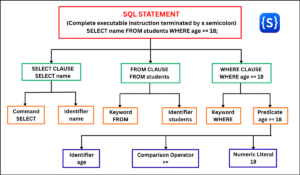
SELECT name
FROM students
WHERE age > 18;
The SQL statement breaks the request into structured instructions:
SELECT name→ What information do I need? (The columns)FROM students→ Where should I get it from? (The table)WHERE age > 18→ What are the exact conditions? (The filter)
This structure makes the instruction precise and understandable to the database system.
Fundamental Rules of SQL Syntax
The following are some fundamental rules and conventions of SQL syntax:
1. Case Sensitivity
SQL keywords such as SELECT, FROM, and WHERE are case-insensitive. For example, SELECT, select, and Select are interpreted in the exact same way.
However, writing SQL keywords in UPPERCASE is a standard industry convention because it improves readability and makes keywords easy to distinguish from table and column names.
The case sensitivity of identifiers, such as table names, column names, and database names, depends on the underlying database engine, operating system, and configuration settings. Therefore, the case behavior of identifiers is not the same across all RDBMSs.
2. String and Date Literals
In SQL, string literals (text values) must be enclosed in single quotation marks ('...'). For example:
SELECT *
FROM students
WHERE status = 'Active';
Date and time literals are also enclosed in single quotation marks, commonly following the ISO standard format (‘YYYY-MM-DD’ or ‘YYYY-MM-DD HH:MM:SS’):
SELECT *
FROM students
WHERE enrollment_date >= '2026-01-01';
3. Whitespace and Line Breaks
SQL database engines ignore extra spaces, tabs, and line breaks between SQL keywords and identifiers. Whitespace is only syntactically significant when it separates distinct tokens or appears inside a string literal.
For example, these two statements are functionally identical:
SELECT name FROM students;SELECT name
FROM students;While writing a query on a single line is syntactically valid, organizing clauses across multiple lines with consistent indentation improves readability, debugging, and long-term code maintenance.
4. Comments
SQL comments are used to document query logic, explain complex joins, or temporarily disable clauses during testing. The database engine completely ignores commented text during execution.
A single-line comment commonly begins with –:
-- Retrieve all students
SELECT * FROM students;
A multi-line comment is enclosed between /* and */:
/*
Retrieve students
from the students table
*/
SELECT * FROM students;
Common SQL Syntax Errors (And How to Fix Them)
Even a single missing character can cause the database query engine to reject a statement. Here are the three most frequent syntax mistakes beginners make:
1. Missing or Trailing Commas: Commas are only used to separate items in a list, never after the final item.
-- Error: Trailing comma before FROM
SELECT first_name, last_name,
FROM students;

-- Correct
SELECT first_name, last_name
FROM students;
2. Mismatched or Improper Quotation Marks: Using double quotes for string literals or forgetting to close a quote causes immediate syntax failure.
-- Error: Double quotes used for a string value
SELECT * FROM students WHERE status = "Active";

-- Correct: Use single quotes for text values
SELECT * FROM students WHERE status = 'Active';
3. Incorrect Clause Ordering: SQL statements must strictly follow a fixed lexical structure. You cannot filter data before specifying the table.
-- Error: WHERE placed before FROM
SELECT name WHERE age > 18 FROM students;

-- Correct: Follow SELECT -> FROM -> WHERE order
SELECT name FROM students WHERE age > 18;
Syntax Variations Across Different SQL Statements
Different SQL statements have different syntax structures. There is no single syntax pattern that applies to every SQL statement.
1. Data Retrieval (SELECT)
A basic SELECT statement is used to retrieve data from one or more tables. It commonly follows this structure:
SELECT column_name
FROM table_name
WHERE condition;
2. Data Insertion (INSERT)
An INSERT statement is used to add new rows into a target table. It has a different structure:
INSERT INTO students (name, age)
VALUES ('Rahul', 21);
3. Data Modification (UPDATE)
An UPDATE statement is used to alter existing table records. It follows another structure:
UPDATE students
SET age = 22
WHERE name = 'Rahul';
4. Data Deletion (DELETE)
A DELETE statement is used to remove specific records from a table. It has its own syntax:
DELETE FROM students
WHERE name = 'Rahul';
Although each SQL statement has its own syntax structure, all SQL statements follow defined syntax rules, including the proper arrangement of keywords, clauses, operators, and other elements. We will explore these syntax patterns with practical, hands-on examples in the upcoming tutorials.