The EXISTS operator in SQL is a special type of logical operator that checks whether a subquery returns at least one row. This operator is commonly used in the WHERE clause to filter records based on the existence of related data in another table.
If the subquery returns one or more rows, the EXISTS operator evaluates to TRUE. If the subquery returns no rows, it evaluates to FALSE.
The EXISTS operator does not return the data retrieved by the subquery. Instead, it checks whether qualifying rows exist and allows the outer query to determine which records to return.
Real-World Analogy of SQL EXISTS
Imagine a school maintaining two lists: a list of students and a list of students who have submitted their assignments.
A teacher wants to identify students who have submitted at least one assignment. The teacher checks whether each student has a matching entry in the assignment list.
- If a matching entry exists, the student qualifies.
- If no matching entry exists, the student does not qualify.
The SQL EXISTS operator works similarly. It checks whether a subquery finds at least one matching row.
Syntax of EXISTS Operator in SQL
We generally use the EXISTS operator in the SQL WHERE clause to check whether a subquery returns at least one matching row. The outer query returns only those records for which the EXISTS condition evaluates to TRUE.
The general syntax of the EXISTS operator in SQL is:
SELECT column1, column2, ...
FROM table_name
WHERE EXISTS (
    SELECT column_name
    FROM another_table
    WHERE condition
);
In the above syntax:
SELECT column1, column2, ...: Specifies the columns to retrieve from the outer query.FROM table_name: Specifies the table from which the outer query retrieves records.WHERE EXISTS: Checks whether the subquery returns at least one row.SELECT column_name: Specifies the select list inside the subquery. The selected value is not used by EXISTS to determine whether a row exists.FROM another_table: Specifies the table examined by the subquery.WHERE condition: Defines the condition that determines which rows qualify in the subquery.
The condition inside the subquery often references a column from the outer query. This creates a correlated subquery, allowing SQL to check for matching records related to each outer row.
Basic Example of SQL EXISTS Operator
Let’s create two database tables: Customers and Orders. The Customers table stores customer information, while the Orders table stores the orders placed by those customers. Both tables are connected through the CustomerID column.
1. Create the Customers Table
CREATE TABLE Customers (
    CustomerID INT PRIMARY KEY,
    CustomerName VARCHAR(50),
    City VARCHAR(50)
);
In this SQL query:
CREATE TABLE Customerscreates a table named Customers in the database.CustomerID INT PRIMARY KEYstores a unique integer ID for each customer in the database table.CustomerName VARCHAR(50)stores the customer’s name of length 50 characters.City VARCHAR(50)stores the customer’s city of length 50 characters.PRIMARY KEYprevents duplicate customer IDs and does not allow NULL values in the columns.
2. Create the Orders table
CREATE TABLE Orders (
    OrderID INT PRIMARY KEY,
    CustomerID INT,
    ProductName VARCHAR(50),
    Amount DECIMAL(10, 2),
    FOREIGN KEY (CustomerID)
        REFERENCES Customers(CustomerID)
);
In this SQL query:
OrderIDuniquely identifies each order.CustomerIDidentifies the customer who placed the order.ProductNamestores the product name.Amountstores the order amount, including decimal values.FOREIGN KEYestablishes a relationship betweenOrders.CustomerIDandCustomers.CustomerID.
The foreign key ensures that each non-NULL customer ID in Orders refers to an existing customer.
3. Insert Records into Database Tables
Run the following SQL query to insert records into the Customers table:
INSERT INTO Customers (CustomerID, CustomerName, City)
VALUES
    (1, 'Amit', 'Dhanbad'),
    (2, 'Priya', 'Mumbai'),
    (3, 'Rahul', 'Patna'),
    (4, 'Neha', 'Dhanbad'),
    (5, 'Ravi', 'Kolkata');
Now we will insert records into the Orders table:
INSERT INTO Orders (OrderID, CustomerID, ProductName, Amount)
VALUES
    (101, 1, 'Laptop', 55000.00),
    (102, 2, 'Mouse', 800.00),
    (103, 1, 'Keyboard', 1500.00),
    (104, 3, 'Monitor', 12000.00),
    (105, 2, 'Headphones', 2500.00);
Both INSERT statements add five records to their respective tables.
4. View the Database Tables
To check the inserted records in the Customers table, execute these queries.
SELECT * FROM Customers;Expected Output:
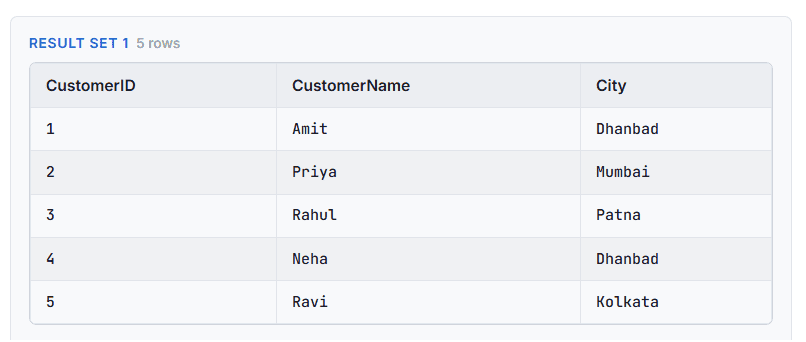
Next, execute the following SQL query to view records in the Orders table:
SELECT * FROM Orders;Expected Output:
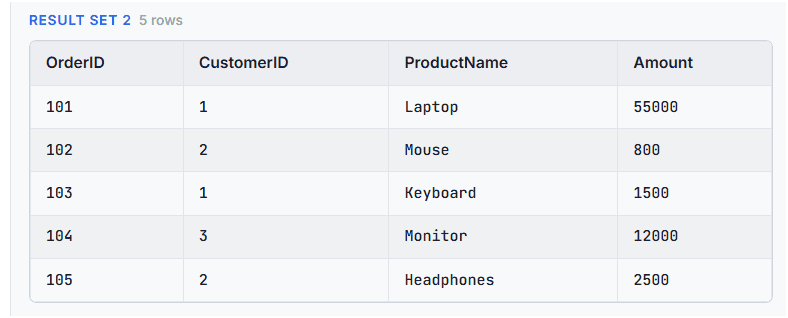
Notice that Amit has two orders, Priya has two orders, and Rahul has one order. Neha and Ravi have no orders.
5. Use of the SQL EXISTS Operator
Suppose we want to find all customers who have placed at least one order. To achieve this, we can use the EXISTS operator to check whether each customer has a matching record in the Orders table. Execute the following SQL query:
SELECT CustomerID, CustomerName, City
FROM Customers AS c
WHERE EXISTS (
    SELECT 1
    FROM Orders AS o
    WHERE o.CustomerID = c.CustomerID
);
Expected Output:
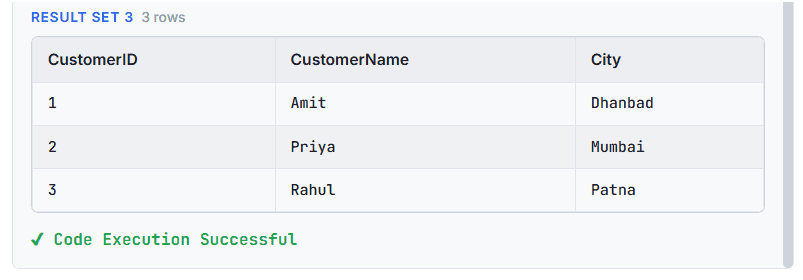
In the above SQL query:
SELECT CustomerID, CustomerName, Cityspecifies the table columns to display.FROM Customers AS cselects the Customers table and assigns it the alias c.WHERE EXISTSchecks whether the subquery returns at least one row.SELECT 1 FROM Orders AS osearches the Orders table.- The
SELECT 1inside an EXISTS subquery is a placeholder that tells SQL to produce a constant value for each qualifying row in the subquery. - SQL EXISTS does not use it to determine whether a match exists.
WHERE o.CustomerID = c.CustomerIDchecks whether an order belongs to the customer currently being considered.- If a matching order exists, the customer appears in the output. Otherwise, the customer is excluded from the result set.
Result: Amit, Priya, and Rahul appear in the result set because they have placed orders. Neha and Ravi do not appear because they have no matching orders.
An important point is that Amit appears only once, even though he has two orders. The SQL EXISTS filters customer records rather than returning one row for every matching order.
SQL NOT EXISTS Operator
The NOT EXISTS operator in SQL works opposite to the EXISTS operator. It checks whether a subquery returns no rows. This operator is commonly used in the WHERE clause to find records in one table that have no matching records in another table.
The general syntax of the NOT EXISTS operator is:
SELECT column1, column2, ...
FROM table_name
WHERE NOT EXISTS (
    SELECT 1
    FROM another_table
    WHERE condition
);
The NOT EXISTS operator evaluates to TRUE when the subquery returns no rows and to FALSE when the subquery returns at least one row. For example, you can use NOT EXISTS to find customers who have never placed an order.
Example of NOT EXISTS Operator in SQL
Now, suppose we want to find customers who have never placed an order. Run the following SQL query to find customers:
SELECT CustomerID, CustomerName, City
FROM Customers AS c
WHERE NOT EXISTS (
    SELECT 1
    FROM Orders AS o
    WHERE o.CustomerID = c.CustomerID
);
Expected Output:
| CustomerID | CustomerName | City |
|---|---|---|
| 2 | Priya | Dhanbad |
| 4 | Neha | Kolkata |
In this example, the WHERE NOT EXISTS checks whether the subquery returns no matching rows. If a matching order exists, NOT EXISTS evaluates to FALSE, and the customer is excluded from the result set.
If no matching order exists, NOT EXISTS evaluates to TRUE, and the customer is included in the result set.
In this example, Priya and Neha appear in the output because neither has a matching record in the Orders table.
Advanced Examples of SQL EXISTS
Example 1: Use EXISTS with an Additional Condition
You can include additional conditions inside an EXISTS subquery. For example, suppose we want to find customers who have placed an order worth more than ₹10,000.
SELECT CustomerID, CustomerName
FROM Customers AS c
WHERE EXISTS (
    SELECT 1
    FROM Orders AS o
    WHERE o.CustomerID = c.CustomerID
      AND o.Amount > 10000
);
Expected Output:
| CustomerID | CustomerName |
|---|---|
| 1 | Amit |
| 3 | Rahul |
Example 2: Use EXISTS with Multiple Conditions
You can use AND and OR inside the subquery to build more specific conditions. Suppose we want to find customers who have ordered a laptop or a monitor. To find these customers, run the following query.
SELECT CustomerID, CustomerName
FROM Customers AS c
WHERE EXISTS (
    SELECT 1
    FROM Orders AS o
    WHERE o.CustomerID = c.CustomerID
      AND (
          o.ProductName = 'Laptop'
          OR o.ProductName = 'Monitor'
      )
);
Expected Output:
| CustomerID | CustomerName |
|---|---|
| 1 | Amit |
| 3 | Rahul |
In this example, the subquery first matches an order to its customer. It then checks whether the product is a laptop or a monitor. A customer appears if at least one order satisfies these conditions.
Example 3: Combine SQL EXISTS with Outer-Query Condition
You can also combine an outer-query condition with EXISTS. Suppose we want to find customers from a specific city who have placed at least one order. Let’s run this query.
SELECT CustomerID, CustomerName, City
FROM Customers AS c
WHERE City = 'Dhanbad'
  AND EXISTS (
      SELECT 1
      FROM Orders AS o
      WHERE o.CustomerID = c.CustomerID
  );
Expected Output:
| CustomerID | CustomerName | City |
|---|---|---|
| 1 | Amit | Dhanbad |
In this example:
WHERE City = 'Dhanbad'selects customers whose city is Dhanbad.- The SQL
EXISTSthen checks whether each of these customers has at least one matching record in theOrderstable. Only customers who satisfy both conditions appear in the result.
Amit satisfies both conditions. Neha is excluded because she has no orders. This example demonstrates that EXISTS can work alongside other conditions in the outer query.