The SQL LIKE operator is a special operator used to search for records that match a specified text pattern. It commonly works with the WHERE clause to filter rows based on partial or complete text values.
For example, suppose a company stores thousands of employee records. You want to find employees whose names begin with A, but you do not know their complete names. Instead of checking every record manually, you can use the LIKE operator with the percent (%) wildcard. This operator allows you to retrieve those records with a simple SQL query.
SELECT *
FROM Employees
WHERE employee_name LIKE 'A%';
This query retrieves all employees whose names begin with A, followed by zero or more characters.
Similarly, you can use the LIKE operator to find email addresses ending with a particular domain, product names containing a specific word, or customer names matching a partial pattern.
Basic Syntax of the SQL LIKE Operator
The SQL LIKE operator is used with the WHERE clause to retrieve records that match a specified text pattern. The general syntax of the SQL LIKE operator is:
SELECT column1, column2, ...
FROM table_name
WHERE column_name LIKE 'pattern';
In this syntax:
- SELECT specifies the columns you want to retrieve.
- FROM identifies the table containing the data.
- WHERE filters the records in the table according to a condition.
- column_name specifies the column whose values you want to search.
- LIKE compares the column values against a specified pattern.
- ‘pattern’ defines the text pattern that SQL should match. It can contain ordinary characters and wildcard characters.
Basic Example of the SQL LIKE Operator
Let’s create an Employees table, insert employee names, and use the SQL LIKE operator to find employees whose names start with the letter A. Follow all the steps below.
Step 1: Create the Employees table
First, create a table to store employee IDs and names. Run the following SQL query to create a table in the database.
CREATE TABLE Employees (
    employee_id INT PRIMARY KEY,
    employee_name VARCHAR(50)
);
In this SQL query:
CREATE TABLE Employeescreates a table named Employees in the database.employee_id INTstores each employee’s numeric ID.PRIMARY KEYuniquely identifies each employee.employee_name VARCHAR(50)stores employee names up to 50 characters long.
Step 2: Insert employee records
Now, we will insert five employee records into the table.
INSERT INTO Employees (employee_id, employee_name)
VALUES
    (1, 'Amit'),
    (2, 'Anita'),
    (3, 'Rahul'),
    (4, 'Arun'),
    (5, 'Priya');
The INSERT INTO statement adds these records to the Employees table.
Step 3: Display all employee records
Before using the LIKE operator, we will retrieve all the records to see the available data.
SELECT * FROM Employees;Expected Output:
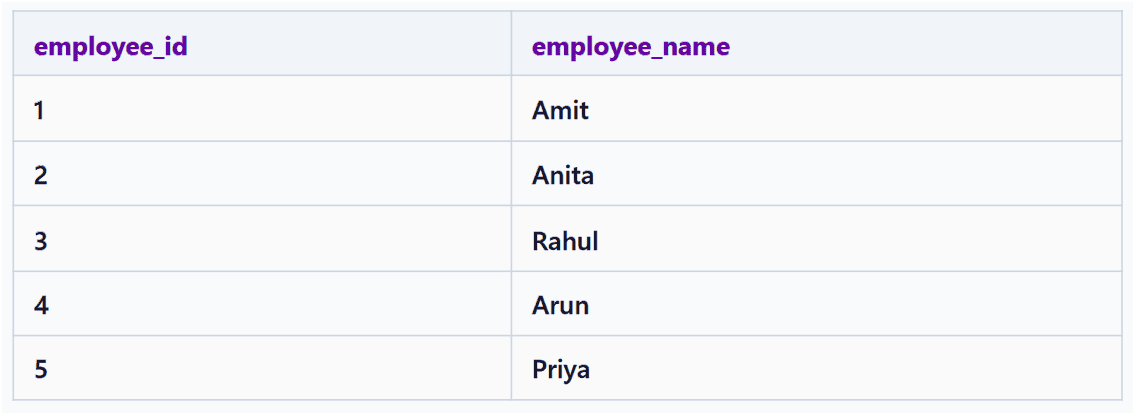
The SELECT * statement retrieves all columns and all rows from the table.
Step 4: Use the SQL LIKE operator
Suppose you want to find all employees whose names start with the letter A. Execute this query to get the result set:
SELECT *
FROM Employees
WHERE employee_name LIKE 'A%';
Expected Output:
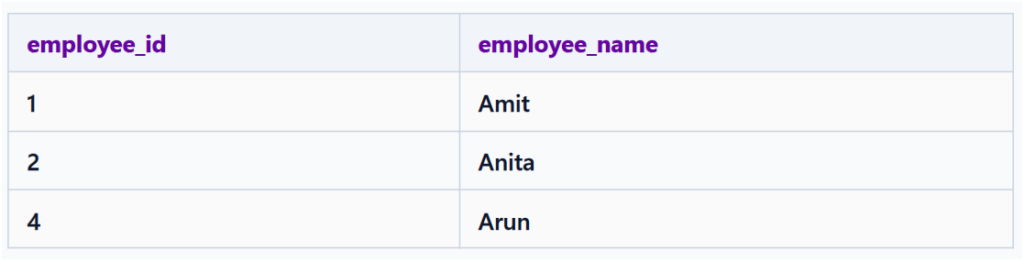
How does this query work?
SELECT *retrieves all columns from the matching records in the table.FROM Employeesspecifies the table to search.WHEREfilters the records according to a condition.employee_name LIKE 'A%'finds names that begin with A.%is a wildcard that matches zero or more characters after A.
For example:
- Amit matches because it starts with A.
- Anita matches because it starts with A.
- Arun matches because it starts with A.
- Rahul does not match because it starts with R.
- Priya does not match because it starts with P.
SQL LIKE Wildcards
Unlike the equality operator (=), which checks for an exact match, the LIKE operator allows pattern searching using wildcard characters. Standard SQL uses two primary wildcards with LIKE:
- Percent sign (%): Matches zero, one, or multiple characters.
- Underscore (_): Matches exactly one single character.
The Percent (%) Wildcard in SQL
The percent (%) wildcard is one of the most commonly used wildcards with the SQL LIKE operator. It matches zero, one, or multiple characters in a text value.
You can place % at the beginning, at the end, or on both sides of a pattern depending on the match criteria:
'A%': Matches values starting with “A”.'%A': Matches values ending with “A”.'%A%': Matches values containing “A” anywhere.
The basic syntax to use the percent wildcard in SQL is:
SELECT column_name
FROM table_name
WHERE column_name LIKE 'pattern%';
The placement of % determines how the string pattern is evaluated.
Example 1: Names starting with A
SELECT *
FROM Employees
WHERE employee_name LIKE 'A%';
Expected Output:
| employee_id | employee_name |
|---|---|
| 1 | Amit |
| 2 | Anita |
| 4 | Arun |
In this example, 'A%' matches names that begin with A, followed by zero or more characters.
Example 2: Names ending with a
SELECT *
FROM Employees
WHERE employee_name LIKE '%a';
Expected Output:
| employee_id | employee_name |
|---|---|
| 2 | Anita |
| 5 | Priya |
In this example, '%a' matches names that end with a, with any sequence of characters before it.
Example 3: Names containing it
SELECT *
FROM Employees
WHERE employee_name LIKE '%it%';
Expected Output:
| employee_id | employee_name |
|---|---|
| 1 | Amit |
| 2 | Anita |
In this example, the pattern '%it%' matches names containing the consecutive characters it anywhere in the name.
- Amit — matches because it contains it.
- Anita — matches because it contains it.
Example 4: Matching any name
SELECT *
FROM Employees
WHERE employee_name LIKE '%';
Expected Output:
All five employee records, because every listed name contains a string of characters and % matches any sequence, including an empty sequence.
Important: Rows where employee_name is NULL are not returned by this condition.
How the percent wildcard works
| Pattern | Meaning | Example matches |
|---|---|---|
'%' | Matches zero or more characters in any sequence | Amit, Anita, Arun |
'A%' | Searches for text starting with A | Amit, Anita, Arun |
'%a' | Searches for text ending with a | Anita, Priya |
'%it%' | Searches for text containing it | Amit |
'R%l' | Searches for text starting with R and ending with l | Rahul |
'%i%' | Searches for text containing i | Amit, Anita, Priya |
The Underscore (_) Wildcard in SQL
The underscore (_) wildcard in SQL is used with the LIKE operator to match exactly one character at a specific position in a string.
Unlike the percent (%) wildcard, which matches zero, one, or multiple characters, each underscore represents precisely one single character.
The basic syntax to use the underscore (_) wildcard in SQL is:
SELECT column_name
FROM table_name
WHERE column_name LIKE 'pattern_';
In this syntax, the underscore (_) reserves a place for any single character. You can also combine multiple underscores. For example, ‘___‘ matches any value that is exactly 3 characters long.
Example 5: Find Employee Names with a Specific Pattern
To find employee names that begin with A and contain exactly one additional character, run the following SQL query:
SELECT *
FROM Employees
WHERE employee_name LIKE 'A_';
Expected Output:
No rows are returned because none of the employee names consists of exactly two characters beginning with A. The pattern ‘A_’ matches a two-character name such as An, but it does not match Amit or Anita.
Example 6: Find Names Beginning with A and Having Exactly Four Characters
To find employee names that start with A and contain exactly four characters, execute the following query:
SELECT *
FROM Employees
WHERE employee_name LIKE 'A___';
Expected Output:
| employee_id | employee_name |
|---|---|
| 1 | Amit |
| 4 | Arun |
In this example:
- A matches the first character.
- Each underscore (_) matches exactly one additional character. Therefore, A___ matches names with four characters that begin with A.
- Anita does not match because it contains five characters.
Example 7: Find Names with i as the Second Character
To find employee names whose second character is i, execute the query below:
SELECT *
FROM Employees
WHERE employee_name LIKE '_i%';
Expected Output:
None of the five employee names matches.
Common Underscore (_) Wildcard Patterns
| Pattern | Meaning | Example that matches |
|---|---|---|
'A_' | Two-character value starting with A | An |
'A___' | Four-character value starting with A | Amit |
'_i%' | Second character is i | Rita |
'___' | Exactly three characters | Raj |
'%a_' | Ends with a followed by exactly one character | Raja |
Combining Percent (%) and Underscore (_) Wildcards in SQL
In SQL, you can combine the percent (%) and underscore (_) wildcards within a single LIKE pattern to search for strings that match precise positioning and length rules:
- Percent (
%): Matches zero or more characters. - Underscore (
_): Matches exactly one character.
Combining these wildcards allows you to search for values based on character positions, string lengths, prefixes, suffixes, and other text patterns.
Basic Syntax
SELECT column_name
FROM table_name
WHERE column_name LIKE 'pattern';
The pattern can contain ordinary characters, %, _, or a combination of these symbols.
Example 8: Find Employee Names Starting with A and Having at Least Two Characters
SELECT *
FROM Employees
WHERE employee_name LIKE 'A_%';
Expected Output:
| employee_id | employee_name |
|---|---|
| 1 | Amit |
| 2 | Anita |
| 4 | Arun |
In this example:
- The character A requires the name to begin with A.
- The underscore (_) matches exactly one character after A.
- The percent (%) matches zero or more characters after that.
Consequently, the pattern matches names beginning with A that contain at least two characters.
Example 9: Find Names Ending with a and Having at Least Three Characters
To find names ending in a with and having at least three characters, run the following SQL query:
SELECT *
FROM Employees
WHERE employee_name LIKE '___%a';
Here, the three underscores require at least three characters before the final a, and % allows additional characters between those required characters and the ending a.
Output:
| employee_id | employee_name |
|---|---|
| 2 | Anita |
| 5 | Priya |
Common Patterns Using Both Wildcards
| Pattern | Meaning | Example that matches |
|---|---|---|
'A_%' | Starts with A and has at least two characters. | Amit |
'_i%' | Second character is i, | Riya |
'A___' | Exactly four characters, starting with A. | Arun |
'__%a' | At least three characters and ends with a, | Priya |
'%a_' | Second-to-last character is a, followed by one character. | Rajat |