Data types in MySQL define the type (or nature) of data that can be stored in a particular column of a table. In other words, a data type specifies the kind of values a column can hold, such as integers, characters (strings), decimal numbers, date and time values, binary data, and more.
In MySQL, each column in a table must have a name and a data type.
Categories of Data Types in MySQL
Data types in MySQL are broadly classified into the following categories:
- Numeric Data Types
- Date and Time Data Types
- String Data Types (Character and Binary)
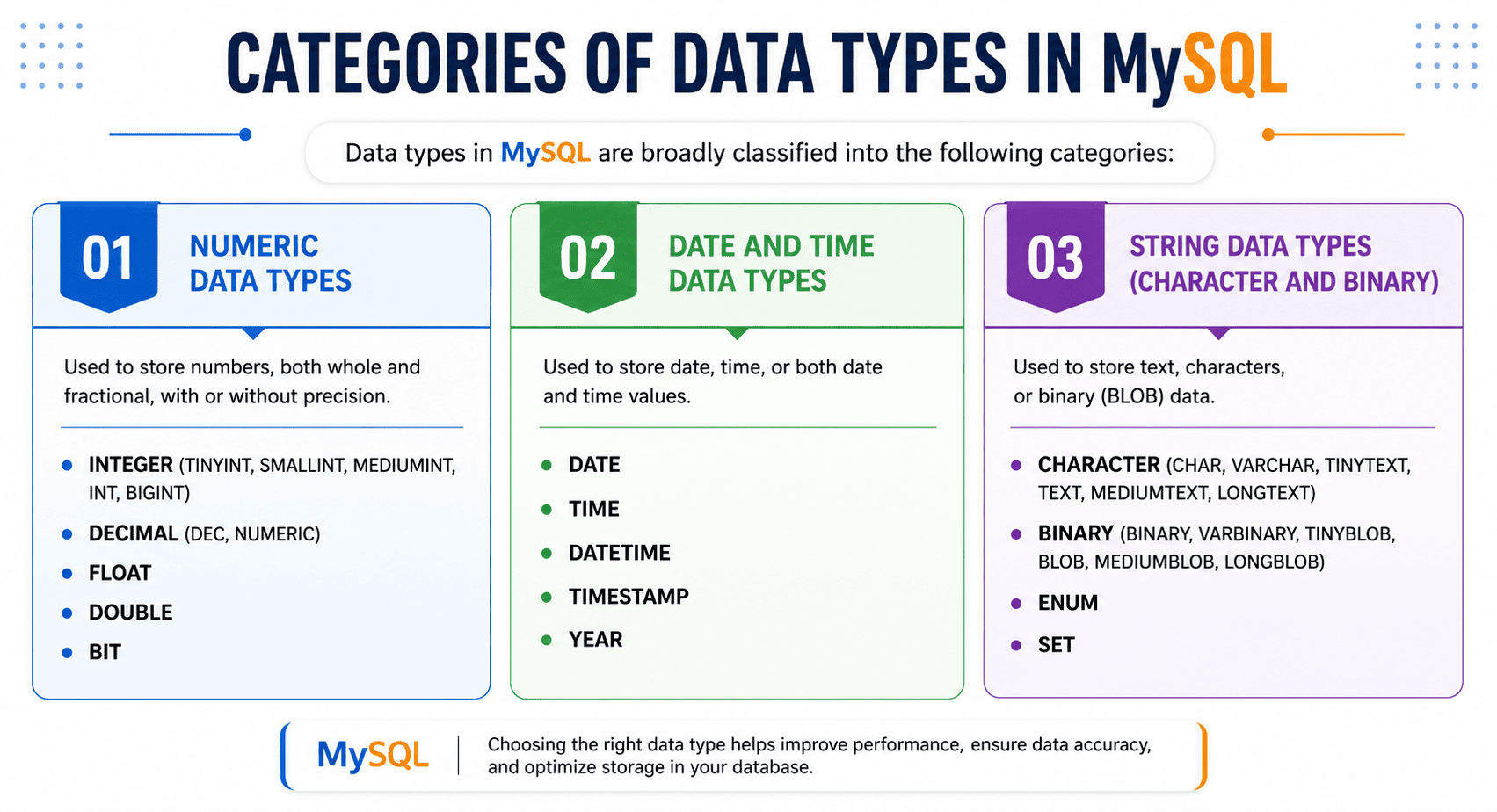
Let us understand each type one by one.
Numeric Data Types in MySQL
Numeric data types in MySQL store numeric values such as integers, decimals (fixed-point), floating-point numbers, and bit values. It is important to choose a data type whose range can accommodate the minimum and maximum values you intend to store.
Integer Types in MySQL
Integer data types in MySQL are used to store whole numbers (integers) without any decimal or fractional part. They can store both positive and negative values. They also support the UNSIGNED attribute, which allows only non-negative (positive) values.
List of Integer Data Types
| Data Type | Storage | Signed Range | Unsigned Range |
|---|---|---|---|
| TINYINT | 1 byte | -128 to 127 | 0 to 255 |
| SMALLINT | 2 bytes | -32,768 to 32,767 | 0 to 65,535 |
| MEDIUMINT | 3 bytes | -8,388,608 to 8,388,607 | 0 to 16,777,215 |
| INT / INTEGER | 4 bytes | -2,147,483,648 to 2,147,483,647 | 0 to 4,294,967,295 |
| BIGINT | 8 bytes | -9,223,372,036,854,775,808 to 9,223,372,036,854,775,807 | 0 to 18,446,744,073,709,551,615 |
Basic Syntax
column_name DATA_TYPE;
Example 1:
age INT;
In this example:
- age → Name of column
- INT → Integer data type
Example 2: Different Data Types
CREATE TABLE numbers (
    a TINYINT,
    b SMALLINT,
    c MEDIUMINT,
    d INT,
    e BIGINT
);
Example 3: Use of UNSIGNED Attribute
age TINYINT UNSIGNED;
In this example, the column age only stores 0 and positive values because the attribute UNSIGNED allows you to store non-negative values only.
Decimal (Fixed-Point) Types
Decimal (fixed-point) data types in MySQL are used to store exact numeric values with a fixed number of decimal places. A fixed-point number means the number of digits before and after the decimal point is fixed. Hence, fixed-point data types are especially useful when precision is critical.
MySQL provides two types of fixed-point data types:
- DECIMAL(M, D)
- NUMERIC(M, D) (same as DECIMAL)
Both data types are working identically in MySQL.
Basic Syntax
column_name DECIMAL(M, D);
In the above syntax:
- M specifies the total number of digits (precision).
- D specifies the number of digits after the decimal point (scale).
Example 4:
price DECIMAL(10,2);
In this example:
- Total digits = 10
- Decimal digits = 2
- Digits before decimal = 8
- The price column can store the value 12345678.99. But, it can not store the invalid value 123456789.99 because it exceeds limit.
Floating-Point Data Types
Floating-point data types in MySQL are used to store approximate numeric values that may contain decimal points but do not require exact precision.
A floating-point number is a number in which the decimal point can “float” (move), meaning the value is stored in an approximate binary format.
MySQL provides two main floating-point types:
| Data Type | Precision Type | Storage | Description |
|---|---|---|---|
| FLOAT | Single Precision | 4 bytes | Stores approximate values with lower precision |
| DOUBLE | Double Precision | 8 bytes | Stores approximate values with higher precision |
Basic Syntax
column_name FLOAT;
column_name DOUBLE;
Example 5:
CREATE TABLE measurements (
    height FLOAT,
    weight DOUBLE
);
BIT Data Type
The BIT data type in MySQL is used to store bit values (binary values) in the form of 0 and 1 or binary combinations such as 1010, 1101, etc. This data type is useful when you want to store binary information.
Basic Syntax
column_name BIT(size)
In this syntax:
- The size specifies the number of bits to store.
- The size can range from 1 to 64.
Example:
CREATE TABLE user_permissions (
    user_id INT,
    username VARCHAR(50),
    permissions BIT(4)
);
In this example, the column BIT(4) stores 4 binary bits. Each bit represents one permission. The possible binary values are 0000, 0001, 0011, and 1111.
String Data Types in MySQL
String data types in MySQL are used to store text data, such as names, emails, addresses, descriptions, and binary data. These data types are broadly classified into the following types:
- Character (Non-binary) String Types
- Binary String Types
Character String Types
Character string types in MySQL are used to store textual (non-binary) data, such as names, emails, addresses, and descriptions. These types store data using a character set (such as UTF-8), meaning the data is stored and interpreted as readable text.
Types of Character String Data Types
The following are the main character string data types in MySQL:
- CHAR (Fixed-length)
- VARCHAR (Variable-length)
- TEXT (TINYTEXT, TEXT, MEDIUMTEXT, LONGTEXT)
- ENUM (stores a single value from a predefined list)
- SET (stores multiple values from a predefined list)
CHAR Data Type
The CHAR data type stores fixed-length strings with a length ranging from 1 to 255 characters. If the value is shorter than the defined length, MySQL pads it with spaces. This data type is most suitable for fixed-size values, such as gender and country codes like ‘IN’, ‘US’, etc.
Syntax of CHAR Data Type
The general syntax to define the CHAR data type is:
column_name CHAR(length);
Example:
CREATE TABLE users (
   gender CHAR(1)
);
VARCHAR Data Type
The VARCHAR (Variable Character) data type is used to store variable-length text data. It is one of the most commonly used string types in MySQL.
This data type is suitable for storing text where the length is not fixed. Unlike CHAR, it does not pad extra spaces to fill the defined length. You can use the VARCHAR data type for:
- Names
- Email addresses
- Addresses
- Usernames/passwords
- Phone numbers (stored as text)
Syntax of VARCHAR Data Type
The general syntax to define the VARCHAR data type is:
column_name VARCHAR(length);
In this syntax:
- column_name → Name of the column.
- length → Specifies the maximum length in bytes (up to 65,535 bytes, limited by row size and character set).
Example:
CREATE TABLE customer (
    id INT AUTO_INCREMENT PRIMARY KEY,
    name VARCHAR(100),
    email VARCHAR(150),
    address VARCHAR(255)
);
TEXT Data Types
The TEXT data types in MySQL are used to store large amounts of text data. These data types are useful when:
- The size of the text exceeds the limit of VARCHAR.
- You need to store long content such as articles, descriptions, or comments.
TEXT data types automatically handle variable-length data, so you do not need to define the length manually.
Types of TEXT Data Types
MySQL provides four TEXT types based on storage size:
| Data Type | Maximum Length | Storage Overhead | Description |
|---|---|---|---|
| TINYTEXT | 255 characters | 1 byte | Very small text |
| TEXT | 65,535 characters (~64 KB) | 2 bytes | Standard text |
| MEDIUMTEXT | 16,777,215 characters (~16 MB) | 3 bytes | Large text |
| LONGTEXT | 4,294,967,295 characters (~4 GB) | 4 bytes | Very large text |
Syntax of TEXT Data Type
column_name TEXT_TYPE;
Example 1: Basic Text
CREATE TABLE articles (
    id INT AUTO_INCREMENT PRIMARY KEY,
    title VARCHAR(200),
    content TEXT
);
Example 2:
CREATE TABLE user_feedback (
    id INT AUTO_INCREMENT PRIMARY KEY,
    user_name VARCHAR(100),
    feedback TEXT
);
ENUM Data Type
ENUM (Enumeration) is a special string data type in MySQL, which allows a column to store only one value from a predefined list of permitted values. The general syntax of ENUM data type is:
column_name ENUM('value1', 'value2', 'value3', ...);Example:
CREATE TABLE users (
    status ENUM('active', 'inactive', 'pending')
);
In this example, the status column can store only one value from the list:
- ‘active’
- ‘inactive’
- ‘pending’
If you try to insert a value not in the list, MySQL may reject it or insert an empty string or default value (non-strict mode).
SET Data Type
SET is a special string data type in MySQL, which allows a column to store multiple values from a predefined list. The general syntax of SET data type is:
column_name SET('value1', 'value2', 'value3', ...);Example 1:
CREATE TABLE users (
    hobbies SET('sports', 'music', 'reading')
);
Example 2:
CREATE TABLE employee (
    id INT AUTO_INCREMENT PRIMARY KEY,
    name VARCHAR(100),
    status ENUM('active', 'inactive'),
    skills SET('java', 'python', 'php', 'mysql')
);
Binary Data Types
Binary data types in MySQL are used to store binary strings or raw byte data instead of normal text characters. These data types do not use character sets or collations for storing data. Comparisons and sorting are performed based on the numeric values of the bytes.
Binary data types are useful for storing:
- Images
- Audio files
- Videos
- PDF documents
- Encrypted data
- Binary files
Binary data is stored exactly as provided, without character set conversion.
Types of Binary Data Types in MySQL
Binary data types are broadly classified into the following categories:
| Binary Data Type | Maximum Size | Description |
|---|---|---|
| BINARY(size) | Up to 255 bytes | Stores fixed-length binary data. Extra spaces or bytes are padded automatically if data is shorter than the specified size. |
| VARBINARY(size) | Up to 65,535 bytes | Stores variable-length binary data. Only actual data bytes are stored without padding. |
| TINYBLOB | 255 bytes | Stores very small binary objects such as small icons or tiny files. |
| BLOB | 65,535 bytes (64 KB) | Stores binary large objects like images, PDF files, and documents. |
| MEDIUMBLOB | 16,777,215 bytes (16 MB) | Stores medium-sized binary data such as audio and video files. |
| LONGBLOB | 4,294,967,295 bytes (4 GB) | Stores very large binary data like HD videos, backups, and multimedia files. |
Example:
CREATE TABLE file_storage (
    id INT PRIMARY KEY,
    small_file TINYBLOB,
    document BLOB,
    large_video MEDIUMBLOB,
    backup_file LONGBLOB
);
Date and Time Data Types
Date and Time data types in MySQL are used to store dates, times, or both in a database table. MySQL provides the following data and time data types:
| Data Type | Description | Format | Example |
|---|---|---|---|
| DATE | Stores only date value. | YYYY-MM-DD | 2026-05-07 |
| TIME | Stores only time value. | HH:MM:SS | 10:30:45 |
| DATETIME | Stores both date and time values. | YYYY-MM-DD HH:MM:SS | 2026-05-07 10:30:45 |
| TIMESTAMP | Stores date and time with automatic current system timestamp. | YYYY-MM-DD HH:MM:SS | 2026-05-07 10:30:45 |
| YEAR | Stores only year value. | YYYY | 2026 |
Example:
CREATE TABLE employee (
    emp_id INT,
    emp_name VARCHAR(50),
    birth_date DATE,
    login_time TIME,
    joining_datetime DATETIME,
    created_at TIMESTAMP DEFAULT CURRENT_TIMESTAMP,
    joining_year YEAR
);