A PRIMARY KEY in MySQL is a constraint that uniquely identifies each row in a database table. It ensures that the values in a specified column or combination of columns are unique and not NULL.
A table can contain only one PRIMARY KEY constraint, although it may consist of multiple columns (composite key). The PRIMARY KEY constraint automatically creates a unique index, which helps access data faster in the table.
Why PRIMARY KEY is Important in MySQL?
A PRIMARY KEY is important because it uniquely identifies each record in a table. Without a PRIMARY KEY, MySQL cannot distinguish one record from another when duplicate data exists.
For example, suppose a table stores student records. Multiple students may have the same name, age, or city. In such cases, identifying the correct student becomes difficult.
That is why we use a PRIMARY KEY such as student_id, which contains a unique value for every student.
Example Without PRIMARY KEY
Suppose we create a table without a PRIMARY KEY.
CREATE TABLE students (
    student_name VARCHAR(50),
    age INT
);
Insert Records
INSERT INTO students
VALUES
('Rahul', 20),
('Rahul', 22),
('Amit', 21);
Table Data
| student_name | age |
|---|---|
| Rahul | 20 |
| Rahul | 22 |
| Amit | 21 |
Problem Without PRIMARY KEY
Suppose you want to update the age of the first Rahul.
UPDATE students
SET age = 25
WHERE student_name = 'Rahul';
What Happens?
Both records having the name Rahul may be updated because MySQL cannot uniquely identify which Rahul you want to modify. This creates confusion and may lead to incorrect data updates.
The solution to this problem is to use a PRIMARY KEY constraint. So, let’s first understand the syntax of the PRIMARY KEY constraint in MySQL.
Syntax of PRIMARY KEY in MySQL
The general syntax for using the PRIMARY KEY constraint in MySQL while creating a table is:
CREATE TABLE table_name (
    column_name1 data_type PRIMARY KEY,
    column_name2 data_type
);
You can also define the PRIMARY KET constraint as:
CREATE TABLE table_name (
    column_name1 data_type PRIMARY KEY,
    column_name2 data_type
    PRIMARY KEY(column1)
);
Example of PRIMARY KEY Constraint in MySQL
Now let’s take the above example and create the table with a PRIMARY KEY.
CREATE TABLE students (
    student_id INT PRIMARY KEY,
    student_name VARCHAR(50),
    age INT
);
Insert Records
INSERT INTO students
VALUES
(101, 'Rahul', 20),
(102, 'Rahul', 22),
(103, 'Amit', 21);
Table Data
| student_id | student_name | age |
|---|---|---|
| 101 | Rahul | 20 |
| 102 | Rahul | 22 |
| 103 | Amit | 21 |
How PRIMARY KEY Solves the Problem
Each student now has a unique student_id. If you want to update only the first Rahul, you can use the following:
UPDATE students
SET age = 25
WHERE student_id = 101;
Now MySQL updates only the student whose student_id is 101.
PRIMARY KEY Does Not Allow Duplicate Values in MySQL
A table can contain many duplicate values in normal columns. MySQL does not allow inserting duplicate values in the PRIMARY KEY columns. If you try to insert a duplicate value into the PRIMARY KEY column, MySQL generates an error and rejects the insertion. This rule ensures that every record in the table remains unique.
Example: Attempt to Insert Duplicate PRIMARY KEY Value
Now we will try to insert another row with student_id = 101.
INSERT INTO students
VALUES (101, 'Priya');
Output:
ERROR 1062 (23000): Duplicate entry '101' for key 'PRIMARY'
Why Does This Error Occur?
The value 101 already exists in the student_id column. Since student_id is defined as a PRIMARY KEY, MySQL does not allow duplicate values in that column. Allowing duplicate PRIMARY KEY values would make it impossible to uniquely identify records in the table.
PRIMARY KEY Does Not Allow NULL Values
The PRIMARY KEY constraint in MySQL does not allow NULL values. When a column is declared as a PRIMARY KEY, MySQL automatically treats it as NOT NULL, so you do not need to explicitly add the NOT NULL constraint.
Example:
INSERT INTO students
VALUES (NULL, 'Priya', 19);
Output:
ERROR 1048: Column 'student_id' cannot be null
Composite PRIMARY KEY in MySQL
When you define the PRIMARY KEY constraint with multiple columns, it is called a composite or combined PRIMARY KEY in MySQL. The general syntax to define PRIMARY KEY with multiple columns is:
CREATE TABLE table_name (
    column-name1 data_type1,
    column_name2 data_type2,
    PRIMARY KEY(column_name1, column_name2)
);
Example:
CREATE TABLE course_enrollment (
    student_id INT,
    course_id INT,
    enrollment_date DATE,
    PRIMARY KEY(student_id, course_id)
);
If you want to define a named PRIMARY KEY constraint on multiple columns, use the following SQL syntax:
CREATE TABLE course_enrollment (
    student_id INT,
    course_id INT,
    enrollment_date DATE,
    CONSTRAINT Course_Enroll PRIMARY KEY(student_id, course_id)
);
In this example, the PRIMARY KEY is named “Course_Enroll”, and the value is made up of two columns (student_id, course_id).
PRIMARY KEY with AUTO_INCREMENT
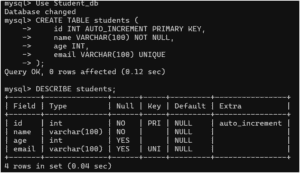
In real-world applications, we often use the PRIMARY KEY constraint with AUTO_INCREMENT. Let’s understand it with an example.
Example:
CREATE TABLE employees (
    emp_id INT AUTO_INCREMENT PRIMARY KEY,
    emp_name VARCHAR(50),
    salary DECIMAL(10,2)
);
Insert Data
INSERT INTO employees(emp_name, salary)
VALUES
('Aman', 50000),
('Riya', 65000),
('Vikas', 70000);
Output:
| emp_id | emp_name | salary |
|---|---|---|
| 1 | Aman | 50000 |
| 2 | Riya | 65000 |
| 3 | Vikas | 70000 |
In this example, MySQL automatically generates unique values for emp_id.
Adding PRIMARY KEY to Existing Table
You can add the PRIMARY KEY constraint to an existing table using ALTER TABLE. The general syntax is:
ALTER TABLE table_name
ADD PRIMARY KEY(column_name);
Example:
ALTER TABLE customers
ADD PRIMARY KEY(customer_id);
Dropping PRIMARY KEY in MySQL
You can remove a PRIMARY KEY constraint by using the following SQL:
ALTER TABLE customers
DROP PRIMARY KEY;
Difference Between PRIMARY KEY and UNIQUE KEY
You may get confused between PRIMARY KEY and UNIQUE KEY. The main differences between them are as:
| Feature | PRIMARY KEY | UNIQUE KEY |
|---|---|---|
| Duplicate Values | Not Allowed | Not Allowed |
| NULL Values | Not Allowed | Allows one or multiple NULL values |
| Number Per Table | Only One | Multiple Allowed |
| Purpose | Unique identification | Maintain uniqueness |
| Automatically Indexed | Yes | Yes |
Key Points of PRIMARY KEY Constraint
- A PRIMARY KEY uniquely identifies each record in a database table.
- It does not allow duplicate values as well as NULL values.
- A table can contain only one PRIMARY KEY constraint.
- A PRIMARY KEY can consist of one or multiple columns (called composite PRIMARY KEY).
- MySQL automatically creates a unique index on the PRIMARY KEY column or columns.
- PRIMARY KEY is commonly used to establish relationships between tables using FOREIGN KEY constraints.
- MySQL generates an error if you try to insert duplicate or NULL values into a PRIMARY KEY column.