SQL statements are instructions written in SQL that tell a database management system to perform a particular operation. In simple words, an SQL statement is a command that tells a database what you want it to do.
For example, you can use one statement to create a table, another to insert data, and another to retrieve information from that table. Consider a simple SQL statement that retrieves student information.
SELECT name, email
FROM students;
This statement tells the database to retrieve the name and email values (columns) from the students table. The database receives the statement, processes it, and returns the requested result.
SQL statements are not limited to retrieving data. Depending on the database system and the operation, SQL statements can also:
- Create databases, tables, views, and indexes.
- Insert new records into tables.
- Modify or delete existing records.
- Retrieve, aggregate, and analyze data.
- Control access permissions and user privileges.
- Manage transactions using commit and rollback operations.
- Enforce schema constraints and data integrity rules.
- Automate database logic using stored procedures and triggers.
Basic Structure of an SQL Statement
A simple SQL statement generally contains one or more SQL keywords, identifiers, values, operators, and clauses.
For example:
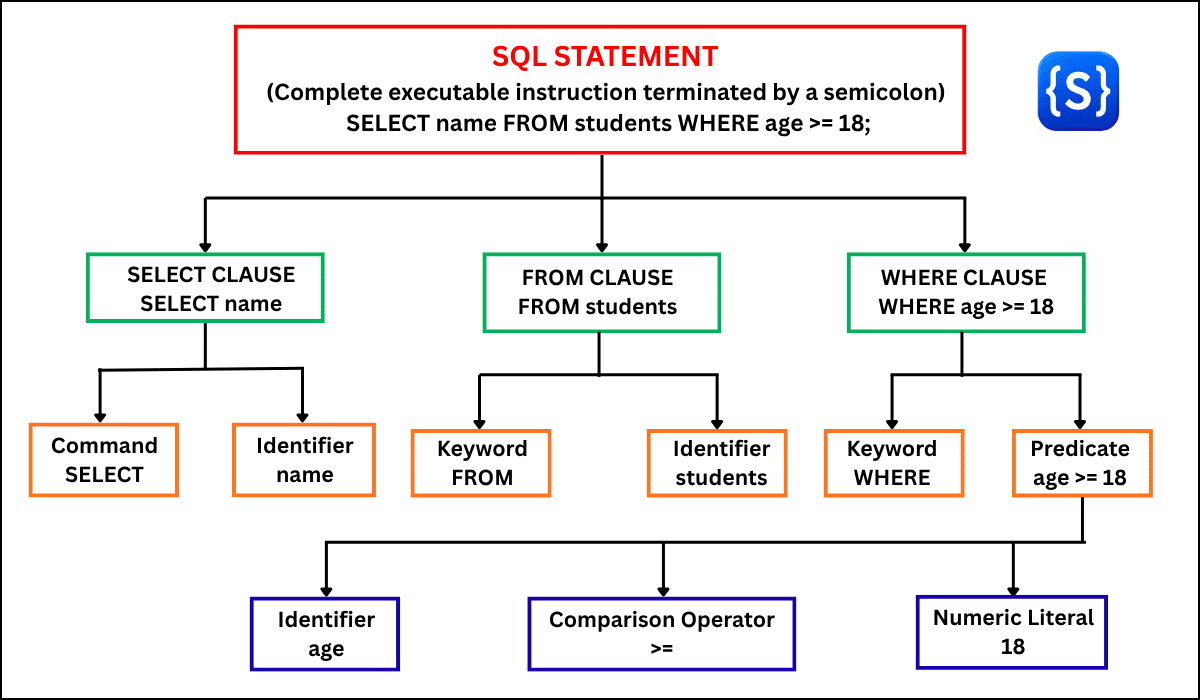
SELECT name
FROM students
WHERE age >= 18;
Here is what each part means:
SELECT— tells the database which data to retrieve.name— specifies the column to retrieve.FROM— specifies the source table.students— identifies the table.WHERE— applies a condition to filter the rows.age >= 18— specifies the condition.;— marks the end of the statement in environments where the statement terminator is used.
The complete instruction is the SQL statement.
SQL Statement vs. SQL Command
The terms SQL statement and SQL command are often used interchangeably in tutorials and database discussions. However, they can have slightly different meanings depending on the context.
An SQL statement generally refers to a complete SQL instruction that a database executes. For example:
SELECT * FROM students;
is a complete SQL statement.
The term SQL command often refers to the core keyword or verb indicating the action to perform. For example, SELECT, INSERT, UPDATE, DELETE, CREATE, and DROP are common examples of SQL commands.
SQL Statement vs. SQL Query
These two terms are related but are not always identical.
1. SQL Query (Fetches data)
An SQL query is a specific type of statement used only to read or fetch data. It asks the database a question to retrieve information. It does not create or change anything.
SELECT name
FROM students;
This is a query because it retrieves data. However, it is also an SQL statement.
2. SQL Statement (Performs any action)
An SQL statement is any complete instruction you give to a database. “Statement” is the general term for any complete instruction. A statement can create a table, insert a row, delete data, or fetch data.
CREATE TABLE students (
id INT,
name VARCHAR(100)
);
This is an SQL statement, but it is not a query because it creates a table rather than fetching data.
The Simple Rule to Remember
- All queries are statements.
- Not all statements are queries.
Note on Terminology:
- In practice, database documentation, textbooks, and developer discussions often use terms like command, statement, and query interchangeably.
- If you understand the formal differences, it helps you write cleaner code and read official documentation accurately.
- However, these terms should not be treated as universal strict rules across every database platform.
SQL Statement vs. SQL Clause
A clause is basically a component of an SQL statement. Consider this statement:
SELECT name
FROM students
WHERE age >= 18
ORDER BY name;
The complete instruction is the SQL statement. In this statement, it contains several clauses:
SELECT name— SELECT clause specifying which columns to output.FROM students— FROM clause specifying where to read data.WHERE age >= 18— WHERE clause specifying row conditions.ORDER BY name— ORDER BY clause specifying the ordering of the result set.
Thus, we can say that a statement can contain multiple clauses, while a clause is only one part of a statement.
Simple Analogy
- SQL Statement = A complete sentence (“
Retrieve the student names from the table where age is at least 18 and sort them by name.“) - SQL Clause = A phrase within the sentence (“
from the table", "where age is at least 18“).
SQL Statement vs. SQL Expression
An expression is any combination of column identifiers, literals, operators, and functions that the database engine evaluates to produce a single value or result. For example:
SELECT age + 1
FROM students;
Here:
- age + 1 → Arithmetic expression
- SELECT age + 1 → The SELECT Clause
- SELECT age + 1 FROM students; → The complete SQL statement
Expressions live inside clauses, which live inside statements. An expression cannot be executed independently as a database instruction—it requires a complete statement context (like SELECT).
Types of SQL Statements
SQL provides different types of statements for performing different operations on a database management system. Some statements create database structures, some retrieve or modify data, while others manage permissions or transactions.
For learning purposes, we commonly divide SQL statements into five major categories:
- DDL — Data Definition Language
- DML — Data Manipulation Language
- DQL — Data Query Language
- DCL — Data Control Language
- TCL — Transaction Control Language
These categories make SQL easier to understand because each group has a specific purpose. We will learn each category one by one with syntax and examples in further tutorials.