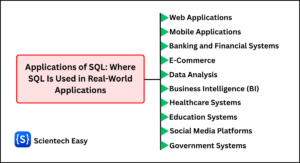
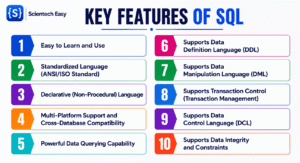
Today, data is one of the most valuable assets in this digital world. Almost every website, mobile application, banking system, online shopping platform, hospital, school, and government organization stores and manages a huge amount of data using databases.
As the volume of data continues to grow, organizations need an efficient way to store, retrieve, update, and secure that information. This is where SQL plays a vital role.
Whether you are developing a website, building enterprise applications, analyzing business data, or managing cloud databases, SQL is one of the most essential languages to learn. So, let’s first understand what SQL is.
What is SQL?
SQL, which stands for Structured Query Language, is a standardized database language used to create, access, manipulate, and manage data stored in relational database management systems (RDBMS). It serves as the universal language used to communicate with relational databases.
SQL acts as a communication bridge between users (or applications) and relational databases. It allows you to create database structures, store records, retrieve information, update existing data, delete unwanted records, and control user access.
Whenever you need to retrieve customer details, insert a new employee record, update product prices, or delete outdated entries, you use SQL statements.
SQL enables users to perform a wide variety of database operations efficiently without understanding the internal storage mechanisms of the database. Let’s look at a quick example query to see how it works in practice.
Simple Example of an SQL Query
To understand how SQL works, let’s consider a practical scenario. Imagine you run an online store and have a database table named Customers containing the following records:
| CustomerID | FirstName | City | Country |
|---|---|---|---|
| 101 | Sarah | London | UK |
| 102 | Alex | New York | USA |
| 103 | Saanvi | Dhanbad | India |
| 104 | Emily | Chicago | USA |
If you want to find all customers who live in the USA, you write a simple SQL query like this:
SELECT FirstName, City
FROM Customers
WHERE Country = 'USA';
How This Query Works
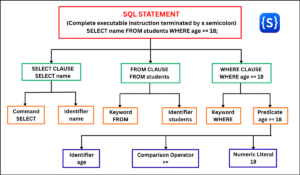
An SQL statement is composed of simple keywords that tell the database exactly what action to take:
SELECT FirstName, City: Tells the database which specific columns of information you want to retrieve.FROM Customers: Specifies the database table where the information is stored.WHERE Country = 'USA': Filters the results so you only get records where the country matches “USA”.;(Semicolon): Signals the end of the SQL statement.
The Expected Result
When you execute this query, the database filters the data instantly and returns only the matching rows:
| FirstName | City |
| Alex | New York |
| Emily | Chicago |
This is a simple example demonstrating how SQL retrieves specific information quickly and accurately. As you can see, SQL allows you to request data in plain, English-like syntax without needing to write complex programming logic to search through files manually.
Why is SQL Called “Structured Query Language”?
The name Structured Query Language has three important parts:
1. Structured
The word “Structured” has two important meanings in SQL:
- Structured Data: SQL is designed specifically to work with data organized into structured tables made of rows and columns.
- Structured Syntax: SQL follows strict grammar rules and predefined syntax. Every command must be written in a specific order for the database engine to execute it.
Example:
SELECT Name FROM Students;2. Query
A query is simply a request sent to the database to extract or retrieve specific information.
Example:
SELECT Name, Age FROM Students;This query especially requests the Name and Age columns from the Students table.
3. Language
SQL provides a complete set of standardized commands to manage every aspect of a database system. It allows you to:
- Define structures: Create and modify databases, tables, and views.
- Manipulate data: Insert, retrieve, update, and delete records.
- Control security: Manage user access and assign permissions.
The History of SQL
The history of SQL dates back to the early 1970s, when researchers began exploring efficient ways to manage relational database management systems (RDBMS).
1. The Beginning of Relational Databases
In 1970, computer scientist Edgar F. Codd (commonly known as E. F. Codd) published a groundbreaking research paper titled “A Relational Model of Data for Large Shared Data Banks.”
This paper introduced the Relational Database Model, which organized data into structured tables consisting of rows and columns. Before the relational model, database systems were difficult to manage because they relied on hierarchical or network structures.
Before the relational model, databases relied on complex hierarchical or network structures that were rigid and difficult to query. Codd’s model revolutionized data storage by making database management far simpler and more logical.
2. The IBM System R & SEQUEL Project (1974)
Inspired by Codd’s work, Donald D. Chamberlin and Raymond F. Boyce at IBM’s San Jose Research Laboratory developed a query language called SEQUEL (Structured English Query Language) in 1974.
IBM developed SEQUEL for an experimental database project called System R. It was designed to use simple English words so that non-programmers could easily view, search, and manage data without writing complex code.
Later, due to a trademark dispute with the British aircraft company Hawker Siddeley, IBM shortened the name from SEQUEL to SQL (Structured Query Language).
Although the official name is SQL, many tech professionals still pronounce it as “sequel” today.
3. Commercial Adoption (Late 1970s–1980s)
As companies realized how powerful relational databases were, software businesses started building products based on SQL:
- Oracle (1979): A company named Relational Software (now known as Oracle) became the first to release a commercial SQL database in the market.
- IBM DB2 (1983): IBM released its own enterprise-grade SQL relational database for large businesses.
- Other Popular Systems: Soon after, other well-known database systems like Informix, Sybase, and Microsoft SQL Server were introduced.
4. Official Standardization (1986–Present)
To ensure compatibility among different database vendors, SQL was standardized by:
- ANSI (American National Standards Institute) in 1986.
- ISO (International Organization for Standardization) in 1987.
These standards allow SQL programs to work across different relational database systems (like MySQL, PostgreSQL, and SQL Server) with only minor modifications required for vendor-specific features.
Evolution of SQL
SQL has continuously evolved over the past five decades. Every new version introduced powerful features that made database management easier, faster, and more secure.
The following table highlights the major milestones in SQL evolution.
| Year | Milestone | Description |
|---|---|---|
| 1970 | Relational Model | E. F. Codd introduced the relational database model. |
| 1974 | SEQUEL | IBM developed the first SQL prototype. |
| 1979 | Oracle | Oracle released the first commercial SQL database. |
| 1986 | ANSI SQL | ANSI adopted SQL as the official database standard. |
| 1987 | ISO SQL | ISO approved SQL as an international standard. |
| 1992 | SQL-92 | Introduced many standardized SQL features used today. |
| 1999 | SQL:1999 | Added triggers, recursive queries, and object-relational features. |
| 2003 | SQL:2003 | Introduced XML support and window functions. |
| 2008 | SQL:2008 | Improved data manipulation and pagination. |
| 2011 | SQL:2011 | Added temporal database support. |
| 2016 | SQL:2016 | Enhanced JSON handling and row pattern matching. |
| 2023 | SQL:2023 | Expanded JSON capabilities, property graph queries, and other modern database features. |
Today, SQL continues to evolve to support cloud databases, big data platforms, artificial intelligence applications, and real-time analytics.
How SQL Works
SQL acts as an interface between users (or applications) and a Relational Database Management System (RDBMS). When you execute an SQL statement, the database engine processes it through several internal components before returning a result.
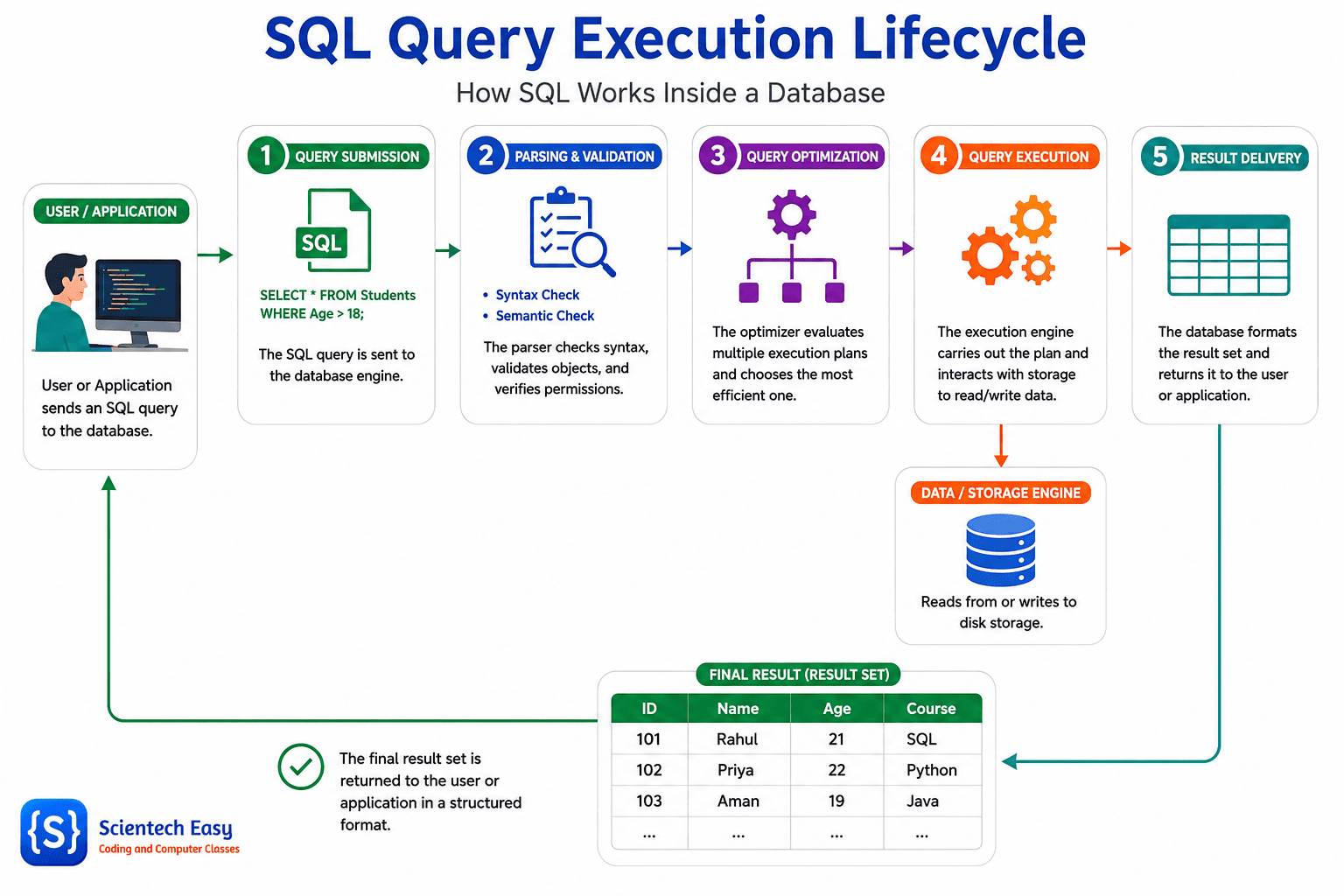
The Basic Query Processing Workflow
Step 1: Query Submission
A user, script, or web application sends an SQL query (statement) to the database engine.
Step 2: Parsing and Validation
The Database Parser evaluates the query in two ways:
- Syntax Check: Verifies that the SQL statement follows proper grammar rules.
- Semantic Check: Confirms that the requested tables and columns exist in the database catalog and that the user (or an application) has read/write permissions.
Step 3: Query Optimization
The Query Optimizer analyzes different ways to execute the query and picks the fastest, most efficient route to find your data.
Step 4: Query Execution
The Execution Engine receives the execution plan, interacts with the storage engine, and performs the required read, write, or update operations.
Step 5: Result Delivery
The database formats the final dataset (result) and sends it back to the user or application.
Step-by-Step Practical Example
Consider what happens behind the scenes when you run this simple query:
SELECT Name
FROM Students
WHERE StudentID = 101;
When you submit this query, the database engine performs the following operations:
- Verifies Syntax & Security Checks: Verifies that the SQL keywords follow proper grammar rules and confirms that you (or the application) have permission to access the data.
- Object Validation: Confirms that the Students table and the requested Name and StudentID columns exist in the database system.
- Query Optimization: Looks for the fastest path to the data—such as using an Index on StudentID (if available) to locate the exact row instantly instead of checking every student record.
- Data Retrieval: Retrieves the specific value stored in the Name column for StudentID = 101.
- Result Delivery: Formats the final answer and sends the student’s name back to your screen or application.
This entire multi-step process typically completes in a fraction of a millisecond, even when querying millions of database records.