SQL (Structured Query Language) is the standard declarative language used to define, query, manipulate, and manage data in relational database management systems (RDBMS). It allows users to store, retrieve, insert, update, and delete data efficiently.
Today, SQL is one of the most widely used languages for database management and is used by developers, data analysts, database administrators, and organizations of all sizes around the world.
The popularity of SQL comes from its powerful combination of simplicity, flexibility, portability, security, and performance. Whether you are developing a small website, building a business application, or analyzing millions of records in an enterprise database, SQL provides reliable features that simplify database operations.
Almost all major relational database management systems (RDBMS), including MySQL, PostgreSQL, Oracle Database, Microsoft SQL Server, SQLite, and MariaDB, support the SQL language.
In this tutorial, you will learn the most important features of SQL, understand why they matter, and see practical examples that demonstrate how each feature helps developers, database administrators, data analysts, and businesses.
Prerequisites: Before learning SQL features, you should understand the basic concepts of SQL. If you are new to SQL, we recommend reading our What is SQL? tutorial first and then continue with this tutorial.
Why Understanding SQL Features Is Important
SQL (Structured Query Language) is the standard language used to define, query, manipulate, and manage data in relational database management systems (RDBMS). Its powerful features help developers, data analysts, database administrators, and organizations manage data accurately, securely, and efficiently. The key features of SQL provide several important benefits:
- Efficient CRUD Operations: SQL makes it easy to create, retrieve, update, and delete data using standard statements such as INSERT, SELECT, UPDATE, and DELETE.
- Data Integrity and Consistency: SQL supports integrity constraints, such as PRIMARY KEY, FOREIGN KEY, UNIQUE, CHECK, and NOT NULL, which help maintain accurate and consistent data. SQL supports transaction control, and the database management system processes transactions safely and reliably according to ACID principles (Atomicity, Consistency, Isolation, and Durability).
- Efficient Data Retrieval: SQL allows users to retrieve specific data through filtering, sorting, grouping, joins, and indexing features provided by the database system.
- Database Security: SQL helps protect sensitive data by allowing database administrators to give or remove user permissions (GRANT/REVOKE) and control who can access the database.
- Cross-Platform Compatibility: SQL follows ANSI/ISO standards, making it easier to work with different relational database systems. Although most database systems support the SQL standard, many also include vendor-specific extensions.
- Scalability: SQL is suitable for applications of all sizes, from small websites to enterprise systems that manage millions of records and high-volume transactions.
Because of these foundational capabilities, SQL continues to be the industry-standard language for relational databases, and the leading database management systems, such as Oracle Database, Microsoft SQL Server, IBM Db2, PostgreSQL, MySQL, MariaDB, and SQLite, support it.
Core Features of SQL (Structured Query Language)
The latest SQL standard (SQL:2023) continues to evolve while preserving the core features that have made SQL successful for decades. The following sections explain the most important SQL features that every beginner should understand.
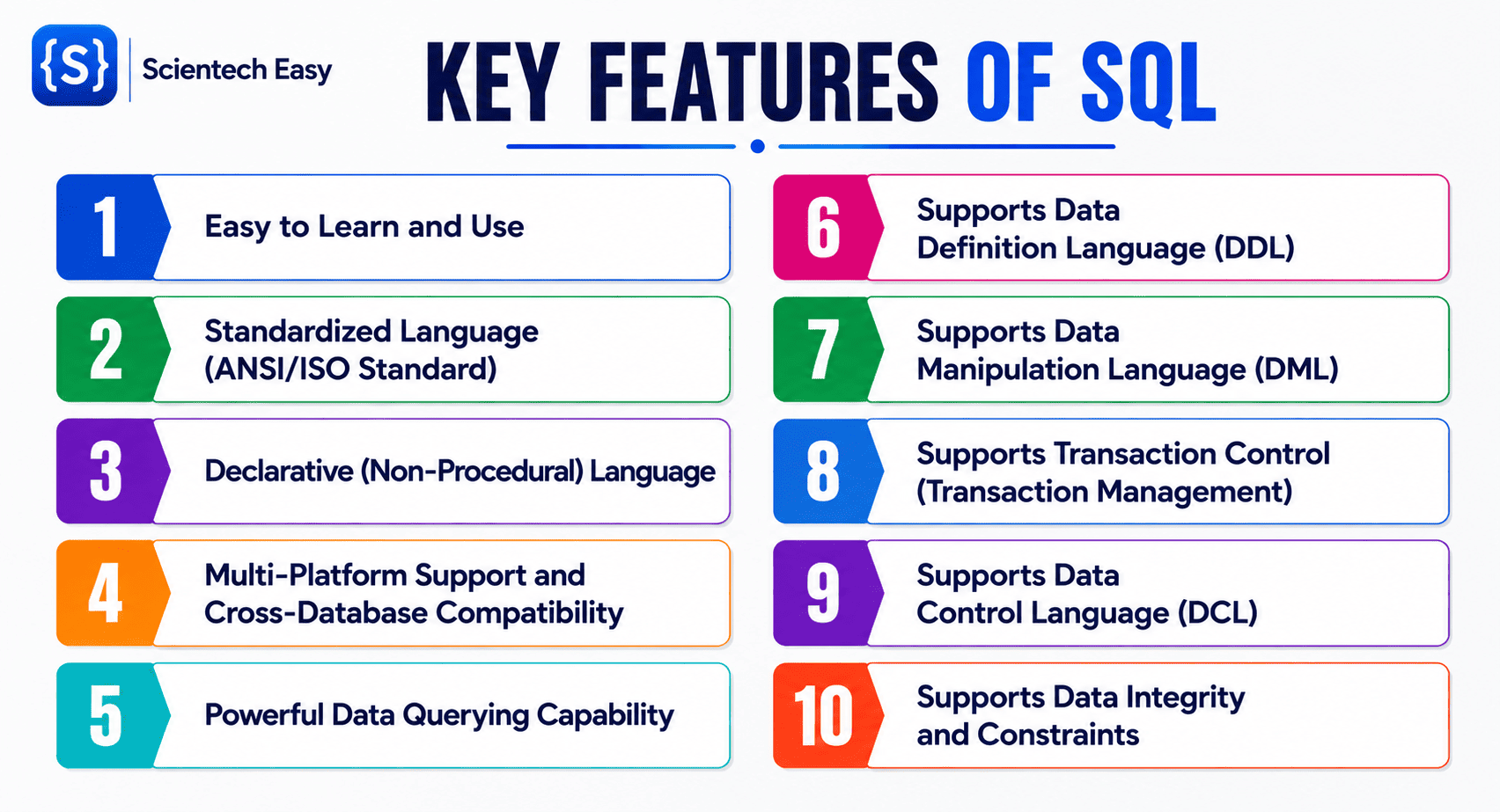
1. Easy to Learn and Use
Structured Query Language (SQL) is one of the most accessible database languages to learn because it uses simple, human-readable, and English-like commands. Unlike many programming languages, SQL is declarative—you simply specify what data you want, and the database management system determines how to retrieve it.
SQL allows you to start working with databases using just a small set of intuitive commands. For example, if you want to retrieve all records from a table named students, you simply write:
SELECT * FROM students;If you are new to databases, you can easily understand what each command does.
- SELECT instructs the database to retrieve data from the table.
- * (asterisk) means “select all columns” from the table.
- FROM specifies the table from which data should be retrieved.
- students is the name of the table.
Real-World Analogy
Suppose you are visiting a library and ask the librarian, “Show me all books written by J.K. Rowling”. The librarian understands your request and brings you the matching books. SQL works in a similar way. Instead of asking a librarian, you ask the database:
SELECT * FROM books
WHERE author = 'J.K. Rowling';
The database interprets your request and returns all matching records.
Why Is SQL Easy to Learn?
SQL has several characteristics that make it easy to learn:
- English-like syntax: Commands such as SELECT, INSERT, UPDATE, DELETE, and CREATE are self-explanatory.
- Simple command structure: Most standard SQL statements follow a consistent and predictable syntax.
- Minimal syntax rules: SQL requires fewer syntax rules compared to general-purpose programming languages.
- Immediate results: You can execute a query and instantly view the output, making learning more interactive.
- No Prerequisites: You can learn basic SQL even without knowing languages like Java, Python, or C++.
- Widely supported: Almost every relational database management system (RDBMS) uses SQL with only minor syntax differences.
Best Practice: Capitalization Conventions
Although SQL keywords are case-insensitive in most database systems, it is a good practice to write SQL keywords in uppercase and database object names (such as table and column names) in lowercase. This improves readability and follows widely accepted coding standards. For example:
-- Good Readability (Recommended)
SELECT first_name, email
FROM students
WHERE enrollment_year = 2026;

-- Harder to Read
select first_name, email from students where enrollment_year = 2026;
2. Standardized Language (ANSI/ISO Standard)
One of the most significant features of SQL is that it is an internationally standardized database language defined by the American National Standards Institute (ANSI) and the International Organization for Standardization (ISO).
This standardization ensures that you can use the same fundamental SQL commands across different relational database systems with little or no modification—making SQL one of the most portable and widely adopted database languages in the world.
What Does a Standardized Language Mean?
A standardized language is a language whose syntax, rules, and behavior are formally defined by recognized standards organizations. These standards ensure that different software vendors implement the language in a consistent manner.
In SQL, the core commands such as SELECT, INSERT, UPDATE, DELETE, CREATE, and DROP are part of the ANSI/ISO SQL standard. As a result, these commands work similarly in most relational database management systems (RDBMSs).
Real-World Analogy
We know English is an international language. People in different countries use the same basic grammar and vocabulary to communicate, even though each country may have its own accent, expressions, or slang.
Similarly, ANSI/ISO SQL is like standard English, while vendor-specific SQL extensions are like regional accents. Anyone who knows standard English can communicate globally. Likewise, anyone who understands standard SQL can work with most relational database systems.
How SQL Standardization Benefits Developers
The ANSI/ISO SQL standard offers several practical benefits:
- Learn once, use almost everywhere: After learning standard SQL, you can work with multiple database systems.
- Improved portability: You can move many SQL queries from one DBMS to another with minimal changes.
- Easier maintenance: Teams working with different databases can understand the same SQL syntax.
- Industry-wide acceptance: Most commercial and open-source RDBMSs support the SQL standard.
- Long-term stability: SQL standards evolve gradually, allowing developers to build applications that remain relevant for many years.
Examples of Popular Database Systems Supporting SQL
The following database systems implement the ANSI/ISO SQL standard while also providing their own additional features:
| Database System | Supports Standard SQL | Includes Vendor Extensions |
|---|---|---|
| MySQL | ✔ Yes | ✔ Yes |
| PostgreSQL | ✔ Yes | ✔ Yes |
| Oracle Database | ✔ Yes | ✔ Yes |
| Microsoft SQL Server | ✔ Yes | ✔ Yes |
| MariaDB | ✔ Yes | ✔ Yes |
| SQLite | ✔ Yes | ✔ Yes |
3. Declarative (Non-Procedural) Language
Another powerful feature of SQL is that it is a declarative, also known as a non-procedural, language. This means that when you write an SQL query, you only need to specify what data you want to retrieve or manipulate. You do not need to tell the database how to perform the underlying operation.
Instead of writing step-by-step instructions, you simply describe the desired result, and the Database Management System (DBMS) query optimizer determines the most efficient path to execute the request. This declarative feature makes SQL easier to learn, faster to write, and highly optimized for handling large volumes of enterprise data.
What Is a Declarative Language?
A declarative language is a query language in which you state the desired outcome rather than the step-by-step logic required to compute it. In SQL, you focus purely on what you need, while the database engine automatically decides:
- Which database indexes to use.
- Which execution plan is most efficient.
- How to access the data on disk or memory.
- How to optimize join order and filtering steps.
- How to retrieve the results as quickly as possible.
Real-World Analogy
Imagine you visit a restaurant and tell the waiter:
“Please bring me a vegetarian pizza.”
You do not need to enter the kitchen to explain how to prepare the dough, chop the vegetables, set the oven temperature, or bake the pizza. You simply state what you want. The chef decides how to prepare the pizza efficiently.
SQL works in the exact same way:
- You: Request the required data.
- DBMS: Evaluates the query, selects an optimal execution plan, and retrieves the matching records.
SQL Example
Suppose you have the following employees table:
| employee_id | employee_name | department |
|---|---|---|
| 101 | Alice | Sales |
| 102 | Bob | HR |
| 103 | David | Sales |
| 104 | Emma | IT |
To retrieve all employees who work in the Sales department, you simply write:
SELECT employee_id, employee_name
FROM employees
WHERE department = 'Sales';
Expected Output:
| employee_id | employee_name |
|---|---|
| 101 | Alice |
| 103 | David |
In this example:
- SELECT employee_id, employee_name statement specifies the columns to retrieve from the table.
- FROM employees statement identifies the source table.
- WHERE department = ‘Sales’ statement filters the records to include only employees from the Sales department.
- The database optimizer automatically determines the fastest way to execute the query.
4. Multi-Platform Support and Cross-Database Compatibility
One of the greatest practical strengths of SQL is its cross-database compatibility. Almost all modern relational database management systems support SQL as their primary interface.
As a result, you can perform common database operations—such as creating tables, inserting records, updating data, deleting records, and retrieving information—using similar SQL statements across different database platforms.
Although each database system may introduce its own advanced features, the fundamental SQL syntax remains largely the same. This consistency enables you to work with different databases without learning an entirely new query language.
Real-World Example
Suppose a company develops an online shopping application using MySQL. As the business grows and requires advanced analytics and higher scalability, the company decides to migrate to PostgreSQL.
Since both databases support standard SQL, many queries can be reused with little or no modification.
MySQL Query
SELECT employee_id, employee_name
FROM employees
WHERE department = 'Sales';
PostgreSQL Query
SELECT employee_id, employee_name
FROM employees
WHERE department = 'Sales';
In this scenario, the query remains exactly the same because both databases support the ANSI/ISO SQL standard. Regardless of the database system, the purpose of this query remains the same: retrieve the IDs and names of employees who belong to the Sales department.
Why Is Cross-Platform Support Important?
Many modern database systems support SQL because it offers several significant advantages:
- Easy migration: You can easily migrate an application from one database to another with minimal SQL changes.
- Greater career opportunities: Learning SQL enables you to work with a wide range of database technologies.
- Technology flexibility: Organizations can choose the database system that best fits their performance, scalability, and budget requirements.
- Reduced learning curve: Once you understand standard SQL, adapting to another SQL-based database becomes much easier, fast, and seamless.
- Long-term maintainability: Standard SQL helps future-proof applications by reducing dependency on a single database vendor.
5. Powerful Data Querying Capability
One of the most valuable features of SQL is its sophisticated data-querying capability. Data querying is the process of requesting and extracting specific information from a database based on one or more defined conditions.
SQL provides a rich set of commands and clauses that allow you to retrieve exactly the data you need from one or more database tables. For example, you can use SQL queries to:
- Retrieve all records from a table: SELECT *
- Find records that meet specific conditions: Condition filtering using WHERE.
- Sort data in ascending or descending order: ORDER BY.
- Search for particular values: Pattern and range matching using LIKE, IN, and BETWEEN.
- Compute totals, averages, minimums, maximums, and counts: Aggregate functions including SUM, AVG, MIN, MAX, and COUNT.
- Group similar records together for analysis: GROUP BY and HAVING.
- Merge related records across multiple tables: Relational joins including INNER JOIN, LEFT JOIN, and RIGHT JOIN.
- Generate reports for business analysis: Transforming raw database rows into structured data insights.
Basic Example: Filtering Data
Suppose the students table contains the following data:
| Student_ID | Name | Course | Marks |
|---|---|---|---|
| 101 | Alice | SQL | 92 |
| 102 | Bob | Java | 78 |
| 103 | Charlie | SQL | 85 |
| 104 | David | Python | 88 |
Suppose you want to display only students enrolled in the SQL course. The following SQL query only filters students that enrolled in SQL course.
SELECT student_id, name, marks
FROM students
WHERE course = 'SQL';
Expected Output:
| Student_ID | Name | Marks |
|---|---|---|
| 101 | Alice | 92 |
| 103 | Charlie | 85 |
In this query:
- SELECT student_id, name, marks retrieves only the required columns from the table.
- FROM students specifies the source table.
- WHERE course = ‘SQL’ filters the rows to include only students enrolled in the SQL course.
Why Is SQL Data Querying Powerful?
SQL allows users to combine multiple clauses, expressions, and logical operators in a single query to perform complex data manipulation. Some common key querying capabilities include:
- Filtering records using multiple conditions.
- Searching for specific text patterns across large datasets.
- Joining multiple relational tables without duplicating data.
- Grouping and summarizing thousands of rows into clean summary statistics.
- Performing mathematical calculations directly within the database engine.
- Identifying unique or duplicate records (DISTINCT).
- Generating business reports and dashboards.
- Analyzing historical data for decision-making.
Real-World Applications
Powerful data querying is used in almost every industry.
- Banking: Retrieve customer transactions above a certain amount.
- E-commerce: Find the top-selling products each month.
- Healthcare: Search patient records by diagnosis or treatment date.
- Education: Generate student performance reports.
- Human Resources: Identify employees eligible for promotion based on performance.
- Business Intelligence: Create dashboards and analytical reports for management.
6. Supports Data Definition Language (DDL)
Another fundamental feature of SQL is its support for Data Definition Language (DDL). DDL is a set of SQL commands used to create, modify, and manage the underlying structure (schema) of database objects such as tables, indexes, views, and schemas.
Before you can insert, update, or query data, you must first define the structure of the database. DDL commands allow database administrators (DBAs) and developers to design and manage this structure efficiently.
Real-World Example: Database Lifecycle
Suppose an educational institute is developing a Student Management System.
- Creation: The developer uses the CREATE command to build a new students table specifying columns like student_id, name, and dob.
- Modification: Later, the institute decides to record contact details, so the developer uses the ALTER command to add an email column to the existing table.
- Reset: At the end of an academic session, the administration wants to clear all old student records while keeping the table structure intact for the upcoming batch. The developer uses the TRUNCATE command to instantly clear all data.
- Removal: If the table is no longer needed, the DROP command can remove it completely.
Common DDL Commands Reference
The following table lists the most commonly used DDL commands.
| DDL Command | Purpose |
|---|---|
CREATE | Creates a new database object, such as a table, view, index, or database. |
ALTER | Modifies the structure of an existing database object. |
DROP | Permanently removes an entire database object. |
TRUNCATE | Deletes all rows from a table while keeping its structure intact. |
RENAME | Changes the name of an existing database object. |
7. Supports Data Manipulation Language (DML)
One of the most essential features of SQL is its support for Data Manipulation Language (DML). Data Manipulation Language is a set of SQL commands used to insert, retrieve, update, and delete the actual data records stored in database tables.
After creating the database structure using DDL commands, DML allows you to interact directly with the data inside the tables without altering the table structure.
Whether you are adding new records, updating existing information, deleting unwanted data, or retrieving records for business analysis, DML commands make these tasks simple and efficient.
Real-World Example: Student Management Workflow
In a student management system, you can use DML commands to:
- Add a new student’s information using the INSERT command.
- Update a student’s email address using the UPDATE command.
- Delete records of students who have left the institution using the DELETE command.
- Retrieve student details for reporting or analysis using the SELECT command.
Common DML Commands Reference
The following table lists the most commonly used DML commands.
| DML Command | Purpose |
|---|---|
SELECT | Retrieves records from one or more database tables. |
INSERT | Adds new rows of data into an existing table. |
UPDATE | Modifies existing data values in specified rows. |
DELETE | Removes specific records from a table. |
MERGE* | Inserts, updates, or deletes records in a single statement (supported by many DBMSs) |
8. Supports Transaction Control (Transaction Management)
One of the most important enterprise features of SQL is its support for transaction control. A transaction is a sequence of one or more SQL statements that are executed as a single logical unit of work. Transaction control ensures that either all operations within a transaction complete successfully, or none of them take effect.
This feature is especially important in applications where data integrity is critical, such as banking applications, e-commerce checkouts, airline reservation platforms, and healthcare management systems.
Common Transaction Control Language (TCL) Commands
The following table lists the most commonly used Transaction Control Language (TCL) commands.
| TCL Command | Purpose |
|---|---|
COMMIT | Permanently saves all changes made during the current transaction. |
ROLLBACK | Undoes changes made during the current transaction. |
SAVEPOINT | Creates an intermediate checkpoint within a multi-step transaction for partial rollback. |
Real-World Code Example: Bank Account Transfer
When you transfer money from one bank account to another, the amount must be deducted from the sender’s account and added to the receiver’s account. If either operation fails, the entire transaction should be canceled to prevent incorrect account balances.
Consider transferring ₹5,000 from Account 101 to Account 202. The transfer requires two distinct UPDATE operations that must succeed together:
-- 1. Begin the logical unit of work
START TRANSACTION;

-- 2. Deduct funds from sender
UPDATE accounts
SET balance = balance - 5000
WHERE account_id = 101;

-- 3. Credit funds to recipient
UPDATE accounts
SET balance = balance + 5000
WHERE account_id = 202;

-- 4. Permanently commit changes if both updates succeeded
COMMIT;
Expected Result
- ₹5,000 is deducted from Account 101.
- ₹5,000 is added to Account 202.
- Both changes are permanently committed to the database disk.
9. Supports Data Control Language (DCL)
Another vital feature of SQL is its support for Data Control Language (DCL). DCL consists of SQL commands that help database administrators control who can access the database and what actions they are allowed to perform.
In a real-world environment, not every user should have the same level of access. For example, a bank manager may have permission to view and update customer records, while a customer service representative may only be allowed to view them. Similarly, a student may be able to view their own grades but not modify them.
Common DCL Commands Reference
The following table lists the most commonly used DCL commands.
| DCL Command | Purpose |
|---|---|
GRANT | Gives specific permissions to users or database roles. |
REVOKE | Removes previously granted permissions from users or database roles. |
Example: Managing Access Control
-- Granting read-only access to a data analyst
GRANT SELECT ON employees TO analyst_user;
In this query:
- GRANT SELECT gives permission to retrieve data.
- ON employees specifies the name of table.
- TO analyst_user specifies the user receiving the permission.
Result:
The analyst_user can now execute SELECT queries on the employees table but cannot modify or delete the data unless additional permissions are granted.
10. Supports Data Integrity and Constraints
One of the most important features of SQL is its ability to enforce data integrity using constraints. Data integrity ensures that the information stored in a relational database is accurate, consistent, reliable, and valid throughout its entire lifecycle.
In real-world enterprise applications, such as banking, healthcare, e-commerce, and education, incorrect data can cause severe operational failures. For example:
- A bank account should never have two different customers with the same account number.
- A student enrollment record should never exist without a valid, unique Student ID.
SQL solves these problems by allowing developers to define constraints. Constraints are strict rules applied to table columns that restrict the type, range, or uniqueness of data that can be stored. They maintain data integrity by preventing invalid, duplicate, or orphaned records from entering the database.