The MySQL LIMIT clause restricts the number of rows returned by a SELECT statement. It allows you to retrieve only the required number of records you need instead of retrieving all the records from a table.
MySQL returns only the specified number of rows that match the query conditions. For example, suppose a table contains 5,000 employees, but you want to display only 10 employees. If you do not use the LIMIT clause, the following query returns all 5,000 rows from the table.
SELECT * FROM employees;
If you use the LIMIT clause, the following query returns only 10 rows from the query result.
SELECT * FROM employees
LIMIT 10;
Thus, the MySQL LIMIT clause helps you control how many rows a SELECT query returns. It is one of the most commonly used clauses in MySQL applications.
This feature is especially useful when working with large tables because it returns only the required rows instead of all the rows. As a result, the output is easier to read and manage, and the query may run faster in many cases.
Why Use the LIMIT Clause in MySQL?
The LIMIT clause offers several advantages when working with MySQL databases.
- Returns only the required number of rows instead of all the rows in a table.
- Makes query results easier to read by displaying only the records you need.
- Can improve query performance by reducing the number of rows returned.
- Helps display the first, last, or top records when used with the ORDER BY clause.
Syntax of the MySQL LIMIT Clause
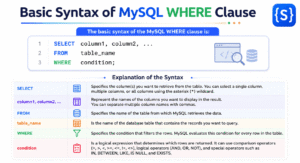
The basic syntax of the MySQL LIMIT clause is:
SELECT column1, column2, ...
FROM table_name
LIMIT number_of_rows;
In the above syntax:
- The SELECT keyword specifies the columns that you want to retrieve from the table.
- You can select one column, multiple columns, or all columns using an asterisk (*) from the table.
- The FROM clause specifies the name of the table from which MySQL retrieves the data.
- The LIMIT clause specifies the maximum number of rows that MySQL returns in the result set.
- The value of LIMIT must be a non-negative integer.
- If the table contains more rows than the specified limit, MySQL returns only the specified number of rows.
- If the table contains fewer rows than the specified limit, MySQL returns all available rows.
- If you omit the LIMIT clause, MySQL returns all rows that match the query conditions.
Example 1:
SELECT *
FROM employees
LIMIT 5;
This query returns at most 5 rows from the employees table. If the table contains:
- 100 rows, MySQL returns only 5 rows from the table.
- 5 rows, MySQL returns all 5 rows from the table.
- 3 rows, MySQL returns all 3 rows from the table.
Important Note:
- The LIMIT clause does not determine which rows are returned. It only specifies the maximum number of rows to include in the query result.
- If you want the rows in a specific order (such as the latest employees, highest salaries, or lowest prices), use the ORDER BY clause before the LIMIT clause.
Example 2:
SELECT *
FROM employees
ORDER BY salary DESC
LIMIT 5;
This query returns the five employees with the highest salaries from the employees table.
Creating a Sample Table
Suppose we have an employees table that stores employee details such as EmployeeID, Name, Department, and Salary.
| EmployeeID | Name | Department | Salary |
|---|---|---|---|
| 1 | Amit | HR | 35000 |
| 2 | Rahul | IT | 60000 |
| 3 | Neha | Sales | 45000 |
| 4 | Priya | IT | 70000 |
| 5 | Mohan | Finance | 50000 |
| 6 | Ravi | Marketing | 42000 |
The following examples use this table to demonstrate how the LIMIT clause works in MySQL.
Retrieve the First Three Rows from the Table
Example 3: Return the First Three Rows
Suppose you want to display only three rows from the employees table. The following SQL query returns only three rows from the employees table.
SELECT *
FROM employees
LIMIT 3;
Output:
| EmployeeID | Name | Department | Salary |
|---|---|---|---|
| 1 | Amit | HR | 35000 |
| 2 | Rahul | IT | 60000 |
| 3 | Neha | Sales | 45000 |
In this example:
- The SQL query returns only the first three rows from the query result.
- The LIMIT 3 clause tells MySQL to return a maximum of three rows.
- Since no OFFSET clause is specified in the above query, MySQL starts returning rows from the beginning of the query result.
- After returning three rows, MySQL stops and does not return any additional rows. The remaining rows in the result are not returned.
MySQL LIMIT Clause with ORDER BY
The MySQL LIMIT clause becomes much more useful when you use it together with the ORDER BY clause. The ORDER BY clause sorts the rows in the result set, and the LIMIT clause returns only the specified number of rows from the sorted result set.
This combination is commonly used to display the following:
- The highest or lowest salaries.
- The latest or oldest records.
- The top-selling products.
- The highest or lowest scores.
- The first few records in a specific order.
Without the ORDER BY clause, MySQL does not guarantee the order of the returned rows. Therefore, if you want specific rows based on a particular order, you should always use the ORDER BY clause before the LIMIT clause.
How MySQL Executes a Query with ORDER BY and LIMIT
When a SELECT query contains both the ORDER BY and LIMIT clauses, MySQL processes the query in the following order:
- MySQL retrieves the rows from the specified table.
- If a WHERE clause is present, MySQL filters the rows based on the specified condition.
- MySQL sorts the remaining rows according to the ORDER BY clause.
- MySQL returns only the specified number of rows using the LIMIT clause.
Example 4: Display the Top Three Highest Salaries
SELECT Name, Salary
FROM employees
ORDER BY Salary DESC
LIMIT 3;
Output:
| Name | Salary |
|---|---|
| Priya | 70000 |
| Rahul | 60000 |
| Mohan | 50000 |
In this example:
- ORDER BY Salary DESC sorts all employees in the table by salary from highest to lowest.
- After sorting, the LIMIT 3 clause returns only the first three rows from the sorted result.
Example 5: Display the Lowest Two Salaries
SELECT Name, Salary
FROM employees
ORDER BY Salary ASC
LIMIT 2;
Output:
| Name | Salary |
|---|---|
| Amit | 35000 |
| Ravi | 42000 |
In this example:
- The statement ORDER BY Salary ASC sorts the employees by salary from lowest to highest (ascending order).
- The LIMIT 2 clause returns only the first two rows from the sorted result.
MySQL LIMIT with WHERE Clause
In real-world applications, you often need to retrieve only those rows from the table that satisfy a specific condition. You can achieve this by combining the MySQL WHERE clause with the LIMIT clause.
The WHERE clause filters the rows based on a condition, and the LIMIT clause restricts the number of rows returned from the filtered result. This combination is useful when you want to display only a few records that meet certain criteria instead of returning all matching rows.
Example 6: Return Two Employees Whose Salary Is Greater Than 40,000
Suppose you want to display only two employees whose salary is greater than 40,000.
SELECT Name, Salary
FROM employees
WHERE Salary > 40000
LIMIT 2;
Output:
| Name | Salary |
|---|---|
| Rahul | 60000 |
| Neha | 45000 |
In this example:
- The WHERE Salary > 40000 clause filters the rows and selects only employees whose salary is greater than 40,000.
- After performing the filter operation, MySQL applies the LIMIT 2 clause.
- The LIMIT 2 clause tells MySQL to return at most two rows from the filtered result.
- If more than two employees satisfy the condition, only two rows are returned.
- If fewer than two employees satisfy the condition, MySQL returns all matching rows.
The employees table contains five employees with salaries greater than 40,000. The LIMIT 2 clause tells MySQL to return only two of these matching rows. Since the query does not use an ORDER BY clause, MySQL does not guarantee which two matching rows are returned.