The ALTER TABLE statement in MySQL is a data definition language command, which allows you to modify the structure of an existing table without deleting or recreating it. Using the ALTER TABLE statement, you can perform the following operations in MySQL:
- Add column – Adds one or more new columns to a table.
- Drop column – Removes an existing column from a table.
- Rename column – Changes the name of a column.
- Modify column – Changes the data type, size, default value, or attributes of a column.
- Add constraint – Adds constraints such as PRIMARY KEY, FOREIGN KEY, UNIQUE, CHECK, or NOT NULL.
- Drop constraint – Removes existing constraints from a table.
- Add index – Creates a new index on one or more columns.
- Drop index – Removes an existing index.
- Rename table – Changes the name of a table.
- Change table options – Modifies table properties such as storage engine, character set, collation, and auto-increment value.
Why Use ALTER TABLE in MySQL?
The ALTER TABLE statement in MySQL provides flexibility for modifying the structure of an existing table without deleting and recreating it. Some common reasons for using ALTER TABLE are:
- Modify an existing database table without recreating the table.
- Add new columns when requirements change.
- Remove unnecessary columns from a table.
- Increase or decrease the size of a column.
- Change the data type or attributes of a column.
- Rename columns for better clarity and readability.
- Improve query performance by adding or removing indexes.
- Add or remove constraints to maintain data integrity.
- Rename tables without affecting the existing data.
Example:
Suppose you have already created a table and later realize that you need an additional column or want to change the data type of an existing column. Instead of creating a new table and transferring the data, you can use the ALTER TABLE statement to modify the existing table structure while preserving the data.
Basic Syntax of ALTER TABLE in MySQL
The general syntax of the ALTER TABLE statement in MySQL is:
ALTER TABLE table_name
action;
In this syntax:
- ALTER TABLE specifies an existing table that will be modified.
- table_name is the name of the table to be altered.
- action specifies the modification to perform on the table, such as adding a column, dropping a column, modifying a column, renaming a column, adding an index, or adding a constraint.
Note:
The placeholder action is not an actual MySQL keyword. It represents the specific operation you want to perform. For example:
ALTER TABLE employees
ADD salary DECIMAL(10,2);
Here, ADD salary DECIMAL(10,2) is the action.
Create a Sample Table
Before learning how to use the ALTER TABLE statement, let’s create a sample table in a MySQL database. Execute the following SQL query:
CREATE TABLE Student (
    id INT PRIMARY KEY,
    name VARCHAR(50),
    age INT
);
After creating the Student table, we will insert records in the table. Run the following SQL query:
INSERT INTO Student (id, name, age)
VALUES
(101, 'John', 20),
(102, 'Peter', 22),
(103, 'David', 19);
Current Table Structure:
| id | name | age |
|---|---|---|
| 101 | John | 20 |
| 102 | Peter | 22 |
| 103 | David | 19 |
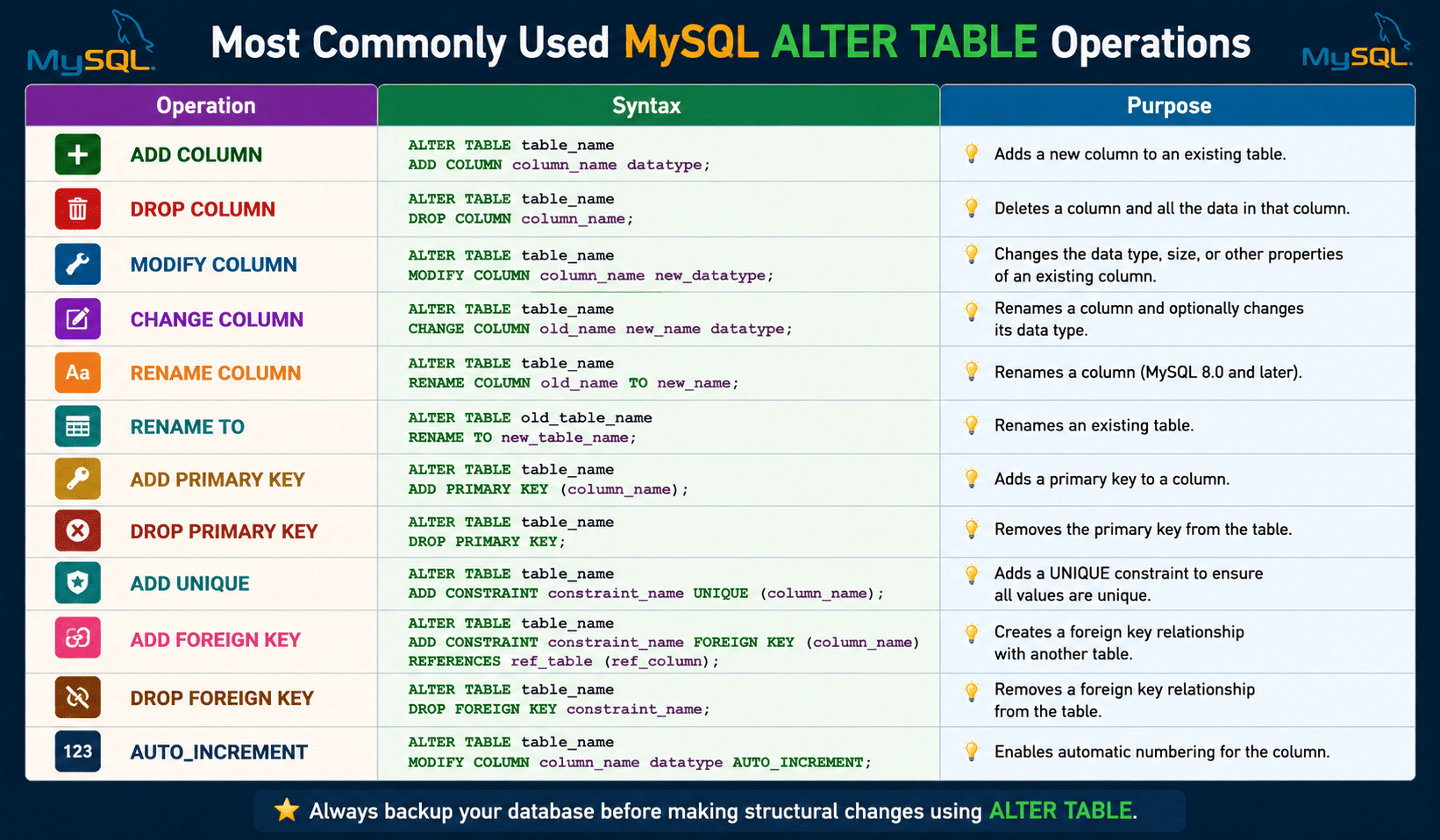
Let’s perform the most commonly used ALTER TABLE operations in MySQL.
MySQL ALTER TABLE – ADD COLUMN
The ADD COLUMN clause is used to add a new column to an existing table. The general syntax to add a new column to an existing table is:
ALTER TABLE table_name
ADD COLUMN column_name datatype;
Example 1: Adding Column in Existing Table
ALTER TABLE Student
ADD COLUMN city VARCHAR(40);
Table Structure After Alteration
| id | name | age | city |
|---|---|---|---|
| 101 | John | 20 | NULL |
| 102 | Peter | 22 | NULL |
| 103 | David | 19 | NULL |
In this example:
- The ALTER TABLE statement modifies the structure of the existing Student table.
- The ADD COLUMN clause creates a new column named city.
- The city column uses the VARCHAR(40) data type, which can store variable-length strings up to 40 characters.
- Since no default value is specified for the new column, MySQL assigns NULL to all existing rows provided the column allows NULL values.
- The existing records (id, name, and age) remain unchanged.
- No existing data is deleted or modified when the new column is added.
- After adding the column, you can update the city values for existing rows using the UPDATE statement.
To update the city values after adding the column, you can use the following UPDATE statements:
UPDATE Student
SET city = 'New York'
WHERE id = 101;

UPDATE Student
SET city = 'London'
WHERE id = 102;

UPDATE Student
SET city = 'Sydney'
WHERE id = 103;
Table Structure After Update
| id | name | age | city |
|---|---|---|---|
| 101 | John | 20 | New York |
| 102 | Peter | 22 | London |
| 103 | David | 19 | Sydney |
In the above SQL query:
- The UPDATE statement modifies existing records in a table.
- The SET clause specifies the column and the new value.
- The WHERE clause identifies the row to be updated.
- Each statement updates the city value for a specific student.
- The other column values (id, name, and age) remain unchanged.
- If the WHERE clause is omitted, all rows in the table will be updated.
MySQL ALTER TABLE – Add Multiple Columns
You can add multiple columns to an existing table using a single ALTER TABLE statement. The general syntax to add multiple columns in a table is:
ALTER TABLE table_name
ADD COLUMN column1 datatype,
ADD COLUMN column2 datatype;
Example 2: Adding Multiple Columns
ALTER TABLE Student
ADD COLUMN email VARCHAR(100),
ADD COLUMN phone VARCHAR(15);
Table Structure After Alteration
| id | name | age | city | phone | |
|---|---|---|---|---|---|
| 101 | John | 20 | New York | NULL | NULL |
| 102 | Peter | 22 | London | NULL | NULL |
| 103 | David | 19 | Sydney | NULL | NULL |
In this example:
- The first ADD COLUMN clause creates a new column named email with the VARCHAR(100) data type.
- The second ADD COLUMN clause creates a new column named phone with the VARCHAR(15) data type.
- Both columns are added in a single ALTER TABLE statement.
- Since no default values are specified, MySQL assigns NULL to the new columns for all existing rows if the columns allow NULL values.
- The existing data in the id, name, age, and city columns remains unchanged.
Modify a Column
The MODIFY COLUMN clause is used to change the definition of an existing column in a table. You can use it to change the column’s data type, increase or decrease the column size, or modify certain column attributes.
The general syntax to modify an existing column is:
ALTER TABLE table_name
MODIFY COLUMN column_name new_datatype;
Example 3:
Suppose the name column in the Student table was originally defined as name VARCHAR(50). If you want to allow longer names, you can increase its size to 100 characters:
ALTER TABLE Student
MODIFY COLUMN name VARCHAR(100);
In this example:
- The MODIFY COLUMN clause changes the definition of the name column.
- The maximum length of the name column is increased from 50 characters to 100 characters.
- Existing data stored in the name column remains unchanged because increasing the column size does not affect current values.
- New records can now store names up to 100 characters long.
Change a Column Name
To rename an existing column in a table, we use the CHANGE COLUMN clause in MySQL. You can also use it to change the column’s data type, size, or attributes at the same time.
Unlike the MODIFY COLUMN clause, the CHANGE COLUMN clause requires both the old column name and the new column name, along with the complete column definition.
The general syntax to change a column name in an existing table is:
ALTER TABLE table_name
CHANGE COLUMN old_name new_name datatype;
Example 4:
The above Student table contains a column named name, and we want to rename it to student_name.
ALTER TABLE Student
CHANGE COLUMN name student_name VARCHAR(100);
In this example, the CHANGE COLUMN clause renames the column from name to student_name. The data type of column is specified as VARCHAR(100). All existing data stored in the column remains unchanged. Only the column name in the table structure is updated.
Rename a Column (MySQL 8.0+)
Starting with MySQL 8.0, you can rename a column using the RENAME COLUMN clause. This provides a simple way to change a column name without modifying its data type or other attributes. The general syntax is:
ALTER TABLE table_name
RENAME COLUMN old_name TO new_name;
Example 5:
ALTER TABLE Student
RENAME COLUMN age TO student_age;
Table Structure After Renaming
| id | name | student_age |
|---|---|---|
| 101 | John | 20 |
| 102 | Peter | 22 |
| 103 | David | 19 |
In this example:
- The RENAME COLUMN clause changes the column name from age to student_age.
- Only the column name is changed; the column’s data type and attributes remain unchanged.
- All existing data in the column is preserved. No records are deleted or modified.
Drop a Column
If you want to permanently remove a column from an existing table, use the DROP COLUMN clause. When a column is dropped, both the column definition and all data stored in that column are deleted from the table.
The general syntax to drop a column from an existing table is:
ALTER TABLE table_name
DROP COLUMN column_name;
Example 6:
Suppose we want to remove the phone column from the existing table. Run the following SQL query:
ALTER TABLE Student
DROP COLUMN phone;
In this example, the DROP COLUMN clause removes the phone column from the table. All values stored in the phone column are permanently removed. The remaining columns and their data in the table remain unchanged.
Rename a Table in MySQL
If you want to rename or change the name of an existing table, use the RENAME TO clause. Renaming a table does not affect its data, columns, indexes, or constraints. The clause only changes the table name.
The basic syntax to rename a table using the RENAME TO clause is:
ALTER TABLE old_table_name
RENAME TO new_table_name;
Example 7:
Suppose you have a table named Student and want to rename it to Students. Run the following SQL query:
ALTER TABLE Student
RENAME TO Students;
In this example, the RENAME TO clause changes the table name from Student to Students. Only the table name changes; the table contents remain exactly the same. All rows and columns are preserved.
Add a PRIMARY KEY
A PRIMARY KEY in MySQL is a constraint that uniquely identifies and provides access to each specific record within a table. If a table does not already have a primary key, you can add one using the ALTER TABLE statement.
The general syntax to add a PRIMARY KEY in a table is:
ALTER TABLE table_name
ADD PRIMARY KEY (column_name);
Example 8:
Suppose the Students table does not have a primary key. To make the id column the primary key, run the following SQL query:
ALTER TABLE Students
ADD PRIMARY KEY (id);
Table Structure After Adding the Primary Key
| Column Name | Data Type | Constraint |
|---|---|---|
| id | INT | PRIMARY KEY |
| name | VARCHAR(100) | |
| age | INT |
Most Commonly Used MySQL ALTER TABLE Operations
| Operation | Purpose |
|---|---|
| ADD COLUMN | Adds a new column to an existing table. |
| ADD Multiple Columns | Adds two or more columns in a single statement. |
| MODIFY COLUMN | Changes the data type, size, or attributes of an existing column. |
| CHANGE COLUMN | Renames a column and optionally changes its definition. |
| RENAME COLUMN | Renames an existing column without changing its definition (MySQL 8.0+). |
| DROP COLUMN | Removes a column and all its data from a table. |
| Reorder Columns | Changes the position of a column within the table structure. |
| ADD PRIMARY KEY | Creates a primary key constraint to uniquely identify rows. |
| DROP PRIMARY KEY | Removes the primary key constraint from a table. |
| ADD FOREIGN KEY | Creates a relationship between two tables and enforces referential integrity. |
| DROP FOREIGN KEY | Removes a foreign key constraint from a table. |
| ADD UNIQUE Constraint | Ensures that all values in a column are unique. |
| DROP UNIQUE Constraint | Removes the uniqueness restriction from a column. |
| ADD CHECK Constraint | Restricts column values based on a specified condition. |
| DROP CHECK Constraint | Removes an existing CHECK constraint. |
| SET DEFAULT Value | Assigns a default value to a column. |
| DROP DEFAULT Value | Removes the default value assigned to a column. |
| ADD INDEX | Creates an index to improve query performance. |
| ADD UNIQUE INDEX | Creates an index that enforces unique values. |
| DROP INDEX | Removes an existing index from a table. |
| RENAME TABLE | Changes the name of an existing table. |
| Change Storage Engine | Changes the storage engine used by a table (e.g., InnoDB). |
| Change Character Set | Changes the character encoding of a table. |
| Change Collation | Changes the sorting and comparison rules for text data. |
| Set AUTO_INCREMENT Value | Sets the next value for an AUTO_INCREMENT column. |
| Make a Column AUTO_INCREMENT | Converts a column into an AUTO_INCREMENT column. |