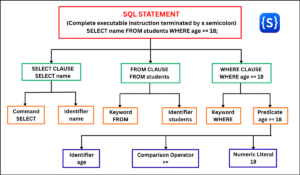
When you work with a database, you need a way to name and identify its different objects. For example, a database may contain tables, columns, views, indexes, and other objects. SQL uses identifiers as names to refer to these objects.
SQL identifiers are names used to identify and reference database objects such as tables, columns, views, schemas, indexes, and constraints. In simple terms, an SQL identifier is a name or a label used to identify a database object.
Simple Real-World Analogy
You can think of identifiers in the same way that names help us identify things in the real world. For example, a school has names for students, classrooms, teachers, and subjects.
- A classroom called Room_101
- A teacher called Mr_Sharma
- A student called Rahul
These names help people identify specific things or individuals. Similarly, a database uses identifiers to distinguish one table, column, or other database object from another.
Choosing clear and meaningful identifiers is important because they make SQL queries easier to:
- Read
- Write
- Understand
- Maintain
- Debug
- Share with other developers.
The identifier helps SQL locate the correct database object.
Basic Rules for Naming SQL Identifiers
Before naming a table, column, view, or another database object, you should understand the basic rules for naming identifiers in SQL. An identifier must follow the naming rules supported by the database management system (DBMS) you use.
Although SQL shares many common principles, the exact rules can differ between systems such as MySQL, PostgreSQL, and SQL Server.
- The starting character must begin with an alphabetical letter (a-z, A-Z) or an underscore (_). Some systems (like SQL Server) also allow @ or # for local/temporary objects, but digits are not permitted as the first character.
- Subsequent characters can contain letters, numbers (0-9), and underscores (_). Some engines permit symbols like $, but using them is generally discouraged for portability.
- White spaces, tabs, or line breaks are strictly prohibited in the identifiers.
- Use an underscore (_) to separate multiple words, such as student_name.
- SQL reserved keywords (such as SELECT, WHERE, TABLE, FROM, and ORDER) without delimiters are not allowed.
- Keep identifiers meaningful and descriptive.
- Keep names reasonably short and easy to understand.
- Use a consistent naming convention throughout the database.
Remember that identifier rules can differ between MySQL, PostgreSQL, SQL Server, Oracle, and other database systems.
Rules for Delimited (Quoted) Identifiers
Delimited identifiers are names enclosed in special quotation marks. They allow you to use names that would normally be invalid or inconvenient as identifiers.
Supported Delimiters
- PostgreSQL, Oracle, and SQLite: Double quotes (“table_name”)
- MySQL: Backticks (`table_name`)
- SQL Server (T-SQL): Square brackets ([table_name]) or double quotes
What Can They Contain?
Delimited identifiers can contain:
- Spaces, such as “Student Name”.
- Special characters, such as -, ., or /.
- Reserved keywords, such as “SELECT”.
- Names that start with a number, such as “1st_quarter”.
Important Note:
Delimited identifiers give you more freedom when naming database objects, but using simple names such as student_name is usually recommended because they are easier to read and maintain.
Examples of Valid and Invalid Identifiers in SQL
Following are the examples of valid identifiers in SQL:
- student_id
- student_name
- customer_email
- product_price
- order_date
Following are the examples of invalid identifiers in SQL:
- student name — contains a space.
- student-name — may conflict with an SQL operator.
- @student — contains a special character.
- SELECT — conflicts with an SQL keyword.
- 2026_students — may not be valid as an unquoted identifier in every DBMS.
Industry Best Practices
1. Use snake_case for identifiers. Writing names in lowercase with underscores helps avoid case-folding differences between database systems. For example:
- user_account_id
2. Choose one naming convention for table names and use it consistently throughout the database. For example, use either plural names:
- customers
- orders
or singular names:
- customer
- order
3. Avoid quoted identifiers whenever possible. Avoid spaces, reserved keywords, and unnecessary special characters in object names. Such names require quotation marks, which can make SQL, ORM mappings, and application code harder to read and maintain.
4. Use a consistent naming convention for constraints and indexes. For example:
- pk_users
- fk_orders_customer_id
- idx_created_at
The exact convention may vary between projects, so consistency is more important than the specific prefix or suffix.
Examples of SQL Identifiers
The following examples will help you understand how SQL identifiers are used in real SQL statements. Remember that identifiers are names used to identify database objects such as tables, columns, databases, schemas, views, indexes, and constraints.
Example 1: Table and Column Identifiers
CREATE TABLE students (
    student_id INT,
    student_name VARCHAR(100),
    age INT
);
In this example, CREATE TABLE is an SQL statement used to create a table. The names that follow are identifiers.
students— Table identifierstudent_id— Column identifierstudent_name— Column identifierage— Column identifier
Here, students identifies the table, while the remaining identifiers identify its columns.
Example 2: Using a Meaningful Table Identifier
CREATE TABLE customer_orders (
    order_id INT,
    customer_id INT,
    order_date DATE
);
Identifiers Used
customer_orders— Table identifierorder_id— Column identifiercustomer_id— Column identifierorder_date— Column identifier
Why These Are Good Identifiers
These names are:
- Meaningful
- Easy to understand
- Easy to maintain
- Consistent
- Readable
For example, customer_orders immediately tells us that the table stores order-related information.
Example 3: Schema, Table, and Column Identifiers
A database object can be referenced using multiple identifiers.
SELECT student_name
FROM school.students;
Identifiers Used
school— Schema identifierstudents— Table identifierstudent_name— Column identifier
The name:
school.studentsidentifies the students table within the school schema.
Example 4: Constraint Identifier
You can also give a meaningful name to a database constraint.
CREATE TABLE students (
    student_id INT,
    student_name VARCHAR(100),
    CONSTRAINT pk_students PRIMARY KEY (student_id)
);
Identifiers Used
students— Table identifierstudent_id— Column identifierstudent_name— Column identifierpk_students— Constraint identifier
pk_students is the name of the primary key constraint. Using meaningful names for constraints can make database errors and maintenance easier to understand.