Data types in SQL define the kind of data that a column, variable, or other database object can store and process. In simple terms, a data type tells the database what type of value can be stored.
SQL databases can store many kinds of information, such as names, numbers, dates, prices, email addresses, and other business data. However, different types of data require appropriate data types.
For example, a person’s name is text, so a character or string data type VARCHAR can be used. Similarly, a person’s age is normally represented as a whole number, so an integer data type INT can be used.
When creating a database table, we assign an appropriate SQL data type to each column. This helps maintain data accuracy, consistency, storage efficiency, and reliable database operations.
Why Does a Database Need Data Types?
Imagine a database column that stores student ages. The database should normally expect numeric values such as 18, 20, or 25. It would not make sense to store a text value such as “Twenty years old” in a column intended for age.
By defining a suitable data type, the database can apply appropriate rules for storing and processing the data.
Data Type vs. Actual Value
It is important to understand the difference between a data type and a value.
- Data type: Defines the type of values that can be stored.
- Value: The actual data stored in the database.
For example:
| Concept | Example |
|---|---|
| Data Type | INT |
| Value | 25 |
Practical SQL Example: Defining Column Data Types
The following example creates a table with different SQL data types:
CREATE TABLE students (
    student_id INT,
    student_name VARCHAR(100),
    age INT,
    percentage DECIMAL(5, 2),
    date_of_birth DATE
);
In this example:
- CREATE TABLE students creates a new table named students.
- student_id INT defines a column for storing integer values.
- student_name VARCHAR(100) stores variable-length character text up to a maximum of 100 characters.
- age INT defines a column for storing a student’s age as a whole number.
- percentage DECIMAL(5, 2) stores an exact fixed-point decimal value with 5 total digits of precision and 2 decimal places (up to 999.99).
- date_of_birth DATE stores a calendar date (YYYY-MM-DD) without a time component.
Real-World Analogy for SQL Data Types
Understanding SQL data types becomes easier when we compare a database with a well-organized storage system. Imagine a large warehouse that stores different types of items. The warehouse has separate labeled sections:
- Numbers section for quantities and counts.
- Text section for names and descriptions.
- Date section for important dates.
- Decimal section for prices and financial values.
- Yes/No section for true or false information.
Each section accepts only the appropriate type of item. Similarly, an SQL database uses data types to organize information correctly.
Database Storage Analogy
Imagine a student database:
| Database Column | Real-World Information | Appropriate Data Type |
|---|---|---|
student_id | Student identification number | INT |
student_name | Student’s name | VARCHAR |
age | Student’s age | INT |
percentage | Exam percentage | DECIMAL |
date_of_birth | Student’s birth date | DATE |
is_active | Active or inactive status | BOOLEAN |
Each column has a specific purpose and therefore requires an appropriate data type.
Why This Analogy Is Useful
Suppose you accidentally place a date in a storage box designed for numbers. The information becomes difficult to organize and use correctly.
The same problem can occur in a database. For example, if you store a product price as plain text instead of a numeric data type, the database may not handle calculations correctly.
If you choose a proper SQL data type, it helps the database:
- Store data in an appropriate format.
- Validate the type of data being entered.
- Perform calculations and comparisons correctly.
- Organize information consistently.
- Process data efficiently.
Syntax of SQL Data Types
In SQL, you define a data type when you create a column. The basic syntax is:
column_name DATA_TYPE;A table usually contains multiple columns, and each column can have its own data type:
CREATE TABLE table_name (
    column_name1 DATA_TYPE,
    column_name2 DATA_TYPE,
    column_name3 DATA_TYPE
);
Here:
- CREATE TABLE creates a new table.
- table_name specifies the name of the table.
- column_name specifies the name of a column.
- DATA_TYPE specifies the type of data the column can store.
Simple Example
CREATE TABLE students (
    student_id INT,
    student_name VARCHAR(100),
    age INT,
    date_of_birth DATE
);
In this example:
- student_id INT stores the ID of students as a whole number.
- student_name VARCHAR(100) stores text with a maximum length of 100 characters.
- age INT stores the student’s age as an integer value.
- date_of_birth DATE stores a date.
Types of Data Types in SQL
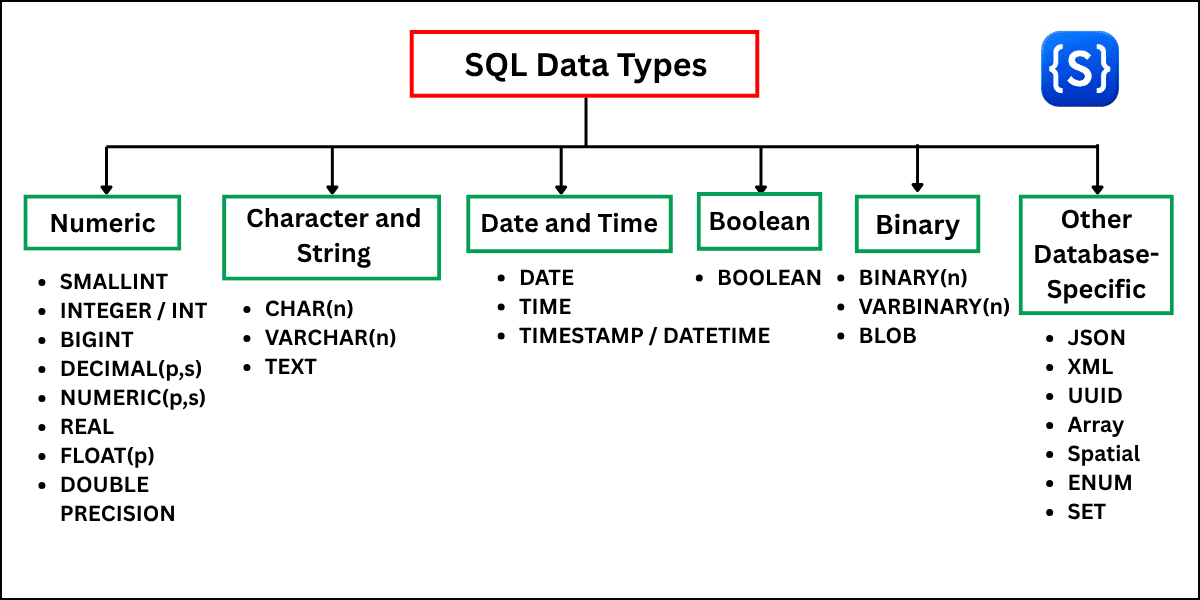
In relational database systems, SQL data types are classified into several core categories based on the type of the data they store:
- Numeric Data Types
- Character and String Data Types
- Date and Time Data Types
- Boolean Data Types
- Binary Data Types
- Other Database-Specific Data Types
Let’s explore each category in detail.
1. Numeric Data Types in SQL
Numeric data types in SQL are used to store numerical values in a database. These values can be whole numbers, decimal numbers, exact values, or approximate values. You use numeric data types for information such as age, quantity, product price, salary, etc.
Types of Numeric Data Types
Numeric data types in SQL are commonly divided into two major groups:
1. Exact Numeric SQL Data Types
Exact numeric data types represent numeric values exactly within their defined range or precision. They are useful when accuracy is essential.
| Data Type | Brief Explanation | Storage Size | Range / Precision |
|---|---|---|---|
SMALLINT | Stores relatively small integer values. | 2 bytes | −32,768 to 32,767 |
INTEGER / INT | Stores integer values. | 4 bytes | −2,147,483,648 to 2,147,483,647 |
BIGINT | Stores large integer values. | 8 bytes | −9,223,372,036,854,775,808 to 9,223,372,036,854,775,807 |
DECIMAL(p,s) | Stores exact fixed-point numeric values. p specifies total precision and s specifies digits after the decimal point. | DBMS-dependent | Defined by p and s |
NUMERIC(p,s) | Stores exact numeric values with specified precision and scale. | DBMS-dependent | Defined by p and s |
Important Note:
- Storage sizes and exact ranges can vary between DBMSs.
- The integer ranges shown above are the commonly used ranges for a signed 2-byte, 4-byte, and 8-byte integer type.
- DECIMAL/NUMERIC precision and storage are DBMS-dependent.
2. Approximate Numeric SQL Data Types
Approximate numeric data types store numbers using floating-point or approximate precision. These types are useful for certain scientific calculations, measurements, and other applications where a small approximation may be acceptable.
| Data Type | Brief Explanation | Storage Size | Range / Precision |
|---|---|---|---|
REAL | Stores approximate single-precision floating-point numbers. | DBMS-dependent | Approximately 6–7 decimal digits of precision; range is DBMS-dependent |
FLOAT(p) | Stores approximate floating-point numbers. The precision specification p determines the precision according to the DBMS. | DBMS-dependent | Precision and range are DBMS-dependent |
DOUBLE PRECISION | Stores approximate double-precision floating-point numbers. | DBMS-dependent | Approximately 15–17 decimal digits of precision; range is DBMS-dependent |
Important Note:
- Approximate numeric types can introduce rounding errors because many decimal fractions cannot be represented exactly in binary floating-point format.
- The exact storage size, precision, and range of REAL, FLOAT, and DOUBLE PRECISION vary among DBMSs.
2. Character and String Data Types in SQL
Character and string data types are used to store text and character-based information in a database. Some examples of text data include:
- Names
- Email addresses
- Phone numbers
- Addresses
- Product names
- Descriptions
- Usernames
- Comments
For example, the value “Rahul Kumar” is text, so it should normally be stored using a character or string data type rather than an integer type.
Main Character and String Data Types
| Data Type | Brief Definition | Common Use | Example |
|---|---|---|---|
CHAR(n) | Stores a fixed-length character string defined by n. | Codes, fixed-length identifiers, country codes | 'IN' |
VARCHAR(n) | Stores a variable-length character string up to the specified maximum length. | Names, emails, usernames, addresses | 'Rahul Kumar' |
TEXT | Stores variable-length text, generally intended for larger amounts of text. | Descriptions, comments, articles, messages | 'This is a product description.' |
3. Date and Time Data Types in SQL
Date and time data types are used to store information about dates, times, or both dates and times in a database.
| Data Type | Brief Definition | Common Use | Example |
|---|---|---|---|
DATE | Stores a calendar date without a time component. | Birth dates, joining dates, holidays | 2026-08-31 |
TIME | Stores a time of day without a date component. | Opening times, appointment times, daily schedules | 14:30:00 |
TIMESTAMP | Stores both a date and a time. | Orders, appointments, application events | 2026-08-31 14:30:00 |
4. Boolean Data Types in SQL
Boolean data types in SQL represent logical values such as TRUE and FALSE. They are useful when a database column needs to represent a condition or status with only two possible outcomes.
Common Uses of Boolean Values
Boolean data types are commonly used for:
- User account active or inactive status
- Email verified status
- Completed or incomplete tasks
- Product availability flags
- Subscription status
- Login permissions
Example:
CREATE TABLE students (
    student_id INT,
    student_name VARCHAR(100),
    is_active BOOLEAN
);
In this example, the is_active column can represent whether a student is active.
Insert Student Data:
INSERT INTO students
    (student_id, student_name, is_active)
VALUES
    (101, 'Rahul Kumar', TRUE),
    (102, 'Priya Sharma', FALSE);
Expected Output:
| student_id | student_name | is_active |
|---|---|---|
| 101 | Rahul Kumar | TRUE |
| 102 | Priya Sharma | FALSE |
5. Binary Data Types in SQL
Binary data types store data as a sequence of bytes rather than ordinary text or numeric values. They are commonly used for information such as:
- Images
- PDF documents
- Audio files
- Video files
- Encrypted data
- File attachments
- Other raw binary content
Common Binary Data Types
| Data Type | Brief Definition | Common Use | Example |
|---|---|---|---|
BINARY(n) | Stores fixed-length binary data. | Fixed-size binary values, binary hashes | Binary bytes |
VARBINARY(n) | Stores variable-length binary data up to a specified limit. | Small files, variable-size binary information | Binary bytes |
BLOB | Stores large binary objects. | Images, PDF documents, audio files, video files | Image or PDF data |
6. Other Database-Specific SQL Data Types
In addition to common numeric, string, date/time, Boolean, and binary types, many database systems provide specialized data types for particular kinds of information.
These data types are often database-specific, meaning they may not be supported by every SQL database.
Common Database-Specific Data Types
| Data Type | Brief Definition | Common Use | Example |
|---|---|---|---|
JSON | Stores structured JSON data in systems that support a JSON type. | API responses, application settings, flexible data | {"name": "Rahul", "age": 25} |
XML | Stores XML-formatted data in systems that support XML types. | XML documents, enterprise data exchange | <student><name>Rahul</name></student> |
UUID | Stores a universally unique identifier in systems that provide a UUID type. | Unique record identifiers, distributed systems | 550e8400-e29b-41d4-a716-446655440000 |
| Array | Stores multiple values in a single column in database systems that support arrays. | Tags, lists, multiple related values | {"SQL", "Java", "Python"} |
| Spatial / Geographic | Stores location and geometric data. | Maps, delivery systems, geographic applications | Point, Line, Polygon |
ENUM | Restricts a value to one of a predefined set of values in systems that support it. | Status, category, role | 'Active' |
SET | Stores zero or more values from a predefined collection in systems that support it. | Multiple selectable categories | Database-specific |
Important Note:
- SQL data types are not implemented identically across all database management systems (DBMSs).
- The available data types, storage requirements, value ranges, precision, and behavior can differ between systems such as MySQL, PostgreSQL, SQL Server, and Oracle.
- Therefore, the examples and specifications in this article describe commonly used SQL data types and may vary depending on the DBMS.
Basic SQL Data Types Example
Now that you understand the major categories of SQL data types, let’s look at a simple example that uses several common data types in one table.
Example: Creating a Student Table
CREATE TABLE students (
    student_id INT,
    student_name VARCHAR(100),
    age SMALLINT,
    percentage DECIMAL(5, 2),
    date_of_birth DATE,
    is_active BOOLEAN
);
Explanation of Each Column
| Column | Data Type | Purpose |
|---|---|---|
student_id | INT | Stores the student’s ID as a whole number. |
student_name | VARCHAR(100) | Stores the student’s name as variable-length text. |
age | SMALLINT | Stores the student’s age as an integer value. |
percentage | DECIMAL(5, 2) | Stores the student’s percentage as an exact decimal value. |
date_of_birth | DATE | Stores the student’s date of birth. |
is_active | BOOLEAN | Stores whether the student is active or inactive. |
Inserting Data into the Table
INSERT INTO students (
    student_id,
    student_name,
    age,
    percentage,
    date_of_birth,
    is_active
)
VALUES (
    101,
    'Saanvi Gupta',
    20,
    89.75,
    '2006-05-15',
    TRUE
);
Retrieving the Data
SELECT * FROM students;Expected Output:
| student_id | student_name | age | percentage | date_of_birth | is_active |
|---|---|---|---|---|---|
| 101 | Saanvi Gupta | 20 | 89.75 | 2006-05-15 | TRUE |