Operators in SQL are special symbols or keywords that allow you to perform operations on data stored in a database. In simple terms, SQL operators tell the database what operation to perform.
We use them in SQL queries to compare values, perform mathematical calculations, combine conditions, search for specific patterns, and filter records.
For example, consider the following SQL query:
SELECT *
FROM Employees
WHERE Salary > 50000;
In this query, the > symbol is a comparison operator. It compares the value in the Salary column with 50000. The query returns only employees whose salary is greater than 50,000.
Why Are SQL Operators Important to Learn?
SQL operators are important to learn because they allow you to work with data in a meaningful and precise way. A database table may contain thousands or millions of records, but you usually do not want to retrieve or process every record.
Operators help you specify exactly what data you need and what operation SQL should perform. For example, one of the most common uses of operators in SQL is filtering data with conditions.
An e-commerce database may contain millions of products. You can use operators to find products that meet specific requirements:
SELECT *
FROM Products
WHERE Price < 1000;
The less than operator (<) filters the table and returns only products whose price is less than 1000. Without operators, filtering and analyzing database records would be much more difficult.
We can perform the following operations in the database by using operators in SQL:
- Filter specific records.
- Compare data values.
- Perform calculations.
- Combine multiple conditions.
- Search for patterns in text.
- Work with ranges of values.
- Check for missing values.
- Combine or compare query results.
Understanding operators is therefore an important step toward writing accurate, powerful, and practical queries.
Understanding Operators and Operands
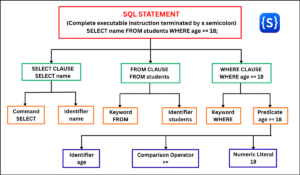
An operator performs an action, while the values or expressions on which it performs that action are called operands. Let us do this condition:
Salary > 50000
This condition contains three important parts:
| Part | Example | Meaning |
|---|---|---|
| Left operand | Salary | The column value being checked |
| Operator | > | The comparison operation being performed |
| Right operand | 50000 | The constant reference value used for comparison |
The greater than operator (>) checks whether the value of Salary is greater than 50000.
Types of SQL Operators
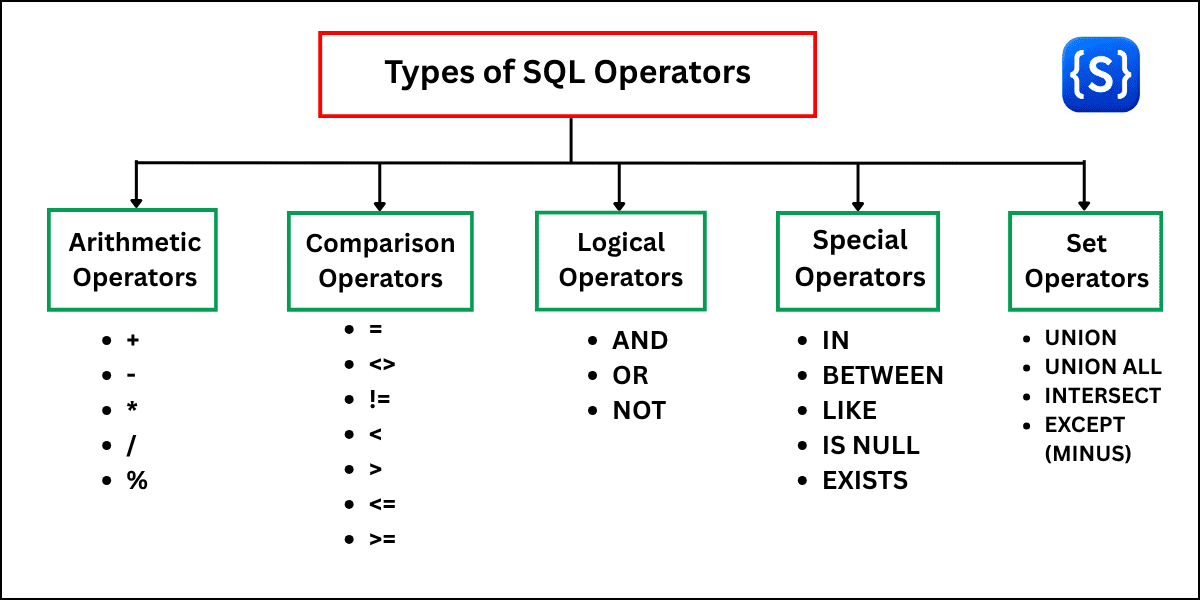
SQL provides different types of operators for performing various operations on data. They are:
- Arithmetic operators
- Comparison operators
- Logical operators
- Special operators
- Set operators
1. Arithmetic Operators
Arithmetic operators perform mathematical calculations on numeric values. In some SQL systems, arithmetic operators can also be used with interval or date/time values.
Operators: +, -, *, /, %
2. Comparison Operators
Comparison operators compare two expressions and return a Boolean result such as TRUE, FALSE, or UNKNOWN when three-valued logic applies.
Operators: =, <>, !=, <, >, <=, >=
Note: <> is the standard SQL operator for “not equal to”, while != is supported by many SQL database systems.
3. Logical Operators
Logical operators combine, negate, or modify conditions used in SQL expressions.
Operators: AND, OR, NOT
4. Special Operators
Special operators are commonly used for specific types of filtering and condition checking.
Operators: IN, BETWEEN, LIKE, IS NULL, EXISTS
5. Set Operators
Set operators combine the result sets of two or more compatible SELECT statements according to set-operation rules.
Operators: UNION, UNION ALL, INTERSECT, EXCEPT / MINUS
Important Note:
Operator availability and syntax can vary across Relational Database Management Systems (RDBMS) such as MySQL, PostgreSQL, SQL Server, and Oracle. System-specific differences are highlighted where applicable.